 ChatGPT
 Gemini
 Claude
 Grok
Grok Add to Chrome
 Add to Edge
Hundreds of chats, zero structure?
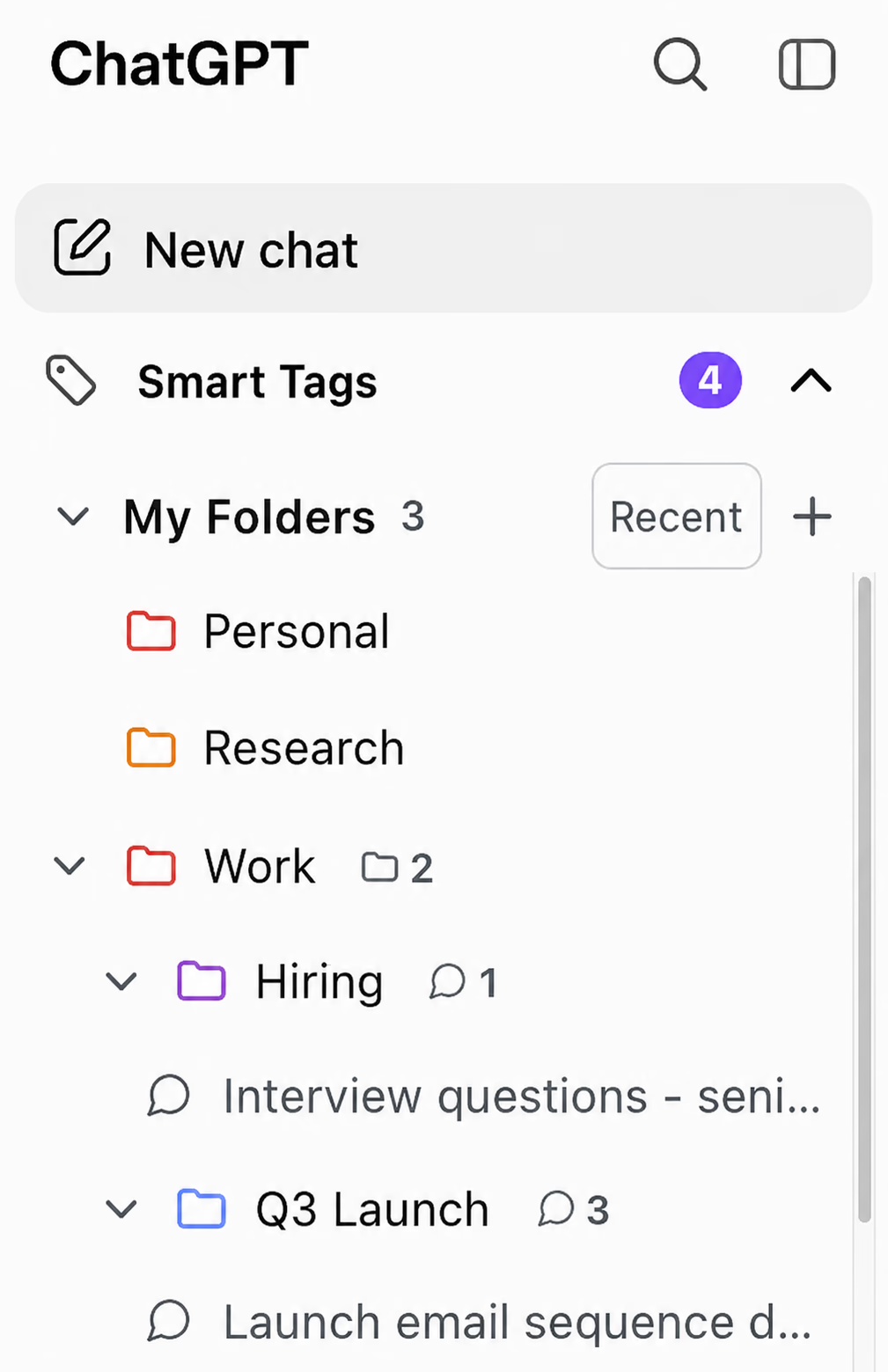
- Sort conversations into folders and subfolders
- Pin the chats you return to every day
- Your sidebar stays organized as your history grows

ChatGPTGeminiClaudeGrok
AI Toolbox is a Chrome extension that adds folders, search, a prompt library, and conversation export, all inside ChatGPT, Gemini, Claude, and Grok.
What it adds
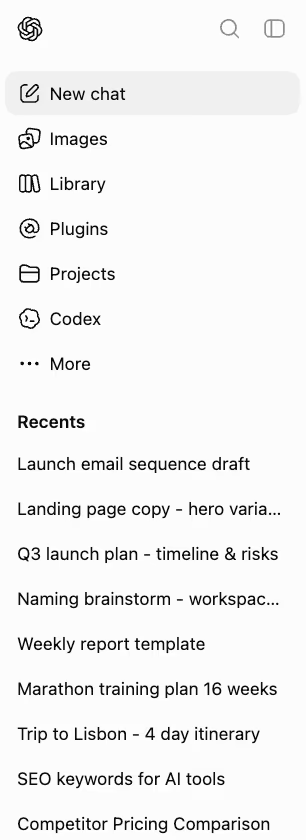
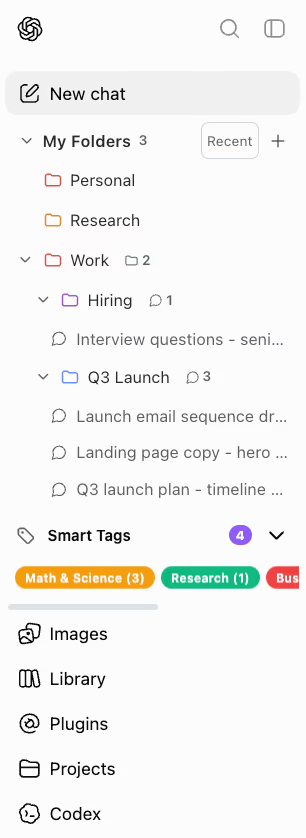
This is the identical ChatGPT history, before and after installing AI Toolbox.
Works the same on Gemini, Claude, and Grok. Plus full-text search across everything ever said.
How it works
There is no separate app to learn. AI Toolbox loads inside the AI chat you already use and adds its tools to the sidebar.
One click from the Chrome Web Store installs AI Toolbox on Chrome, Edge, Brave, or any Chromium browser. No account, no setup.
The toolbox appears in the sidebar automatically: folders above your chat list, with search and export one click away.
Sort conversations into folders, save your best prompts for reuse, and export important answers as PDF, Markdown, or text.
Free plan included. No account needed.
Verified by real users
Wall of love
Reviews picked from across the 40,000+ users running AI Toolbox every week.
It's rare to find a tool that works this smoothly right away.
So far this is what I needed to get to organize the way these AIs should have been set up natively. Good Job!
Reports context token usage really accurately, other features also quite useful.
Very helpful for claude. Tells me how much usage I have with the free plan which gives me an idea of my limit.
Very useful for keeping track of context window in webapp versions of Claude/ChatGPT where you don't have /context like the CLI versions.
Perfect addon, helped to export entire Grok chat to txt in one click, while others failed. Highly recommend!
AI Toolbox is an incredibly useful extension, especially for its powerful search capabilities in Gemini. It makes finding past chats, prompts, and specific information fast and effortless. Highly recommended!
Reviews were posted on our Chrome Web Store listing under its original ChatGPT Toolbox name. Same extension, same listing, now expanded with Gemini, Claude, and Grok modules.
Pricing
AI Toolbox covers ChatGPT, Gemini, Claude, and Grok. Same prices on every platform. Pick yours to see what Premium unlocks there.
$0forever
Get started on ChatGPT, no credit card.
Free forever. No credit card.
$9.99/month
For occasional ChatGPT users. Cancel anytime.
$99 $49.50one-time for ChatGPT
Black Friday: save $49.50
Pays back in under 5 months.
$199 $99.50one-time
Black Friday: save $99.50
Every module, one purchase.
14-day money-back guarantee, conditions apply. Compare plans
Your privacy, by design
AI Toolbox organizes your AI chats without holding onto them. Your conversation content stays in your browser, not on our servers.
Conversation content lives on your device. It is never permanently stored on our servers.
Only what you build, folders, prompts, and tags, syncs, encrypted at rest on our servers.
Smart tags match entirely in your browser, so your messages are never sent to us for tagging.
See it in action
Real screen recordings of every major feature. Pick a platform, pick a feature, watch it work.
The deepest module: organization, search, prompts, and automation built into the ChatGPT sidebar.
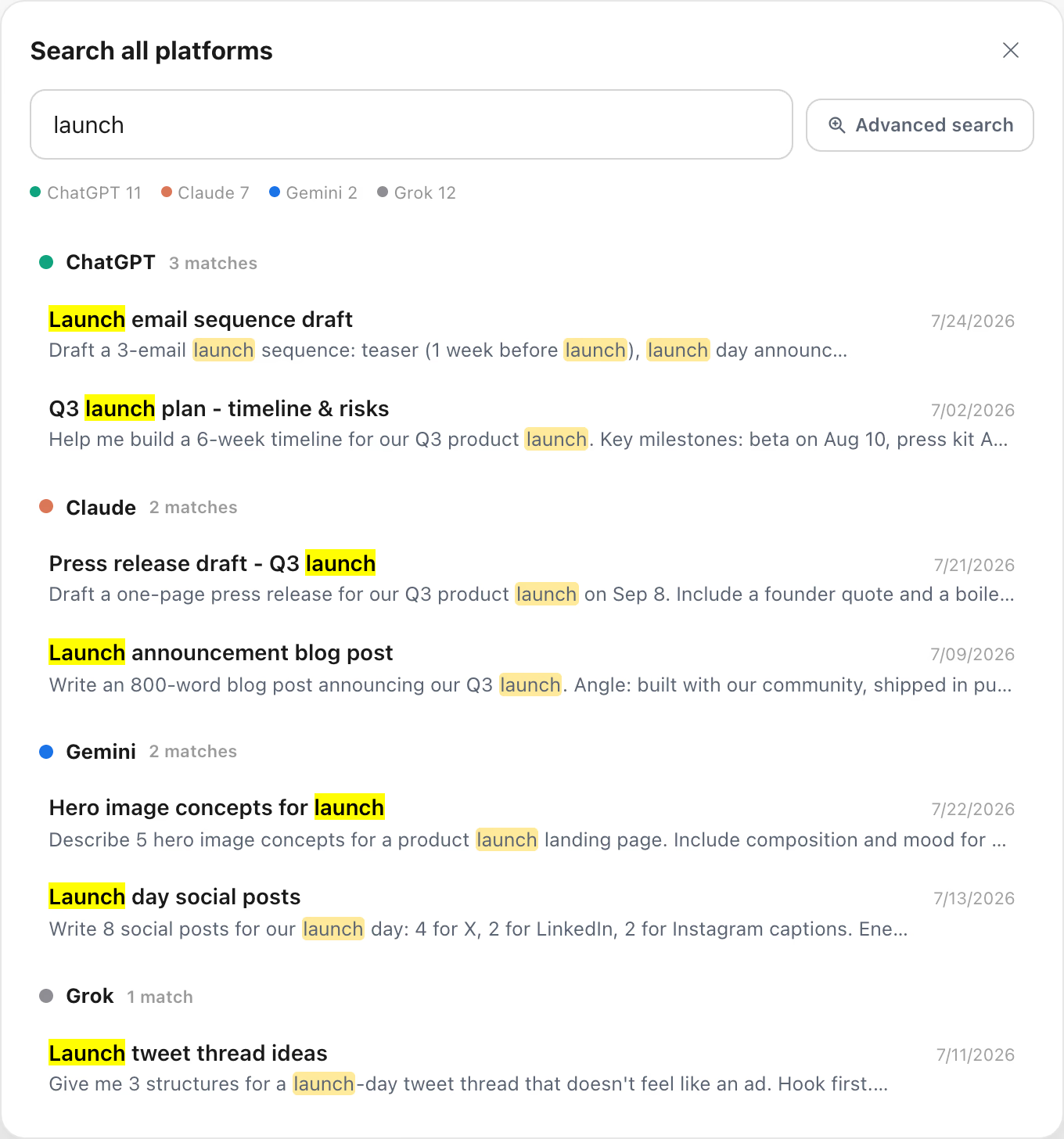
One search across your ChatGPT, Gemini, Claude, and Grok history, grouped by platform, with deep links that open the right conversation on the right site. The free plan shows the 5 newest matches. Premium shows every result.
Search for any conversation and add it to a folder in seconds. Nest subfolders as deep as your projects need.
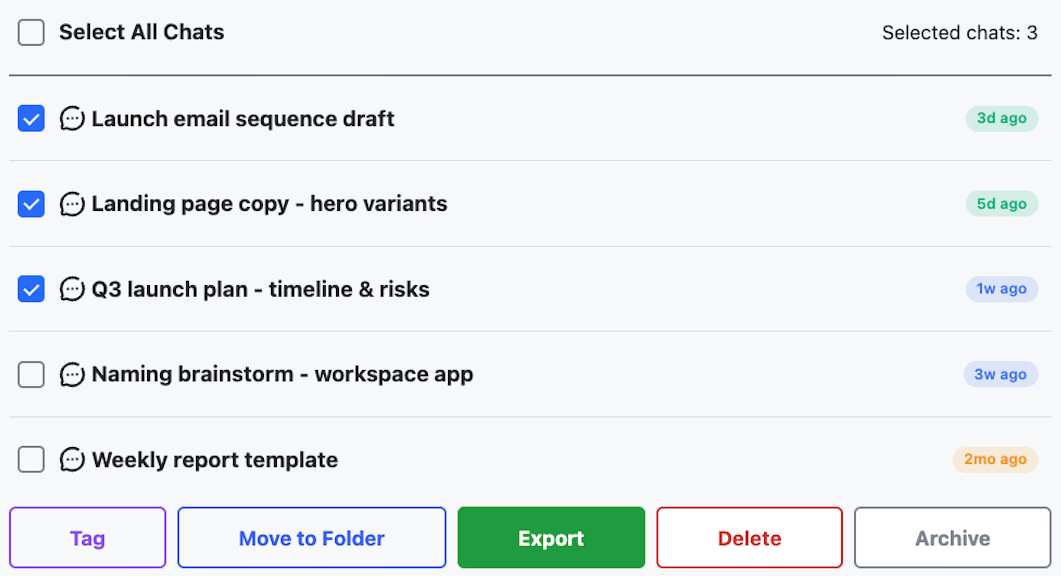
Select multiple conversations and export, archive, or delete them together instead of one at a time.
Every chat gets a menu with pin, move to folder, and export so your work never stays locked in the browser.
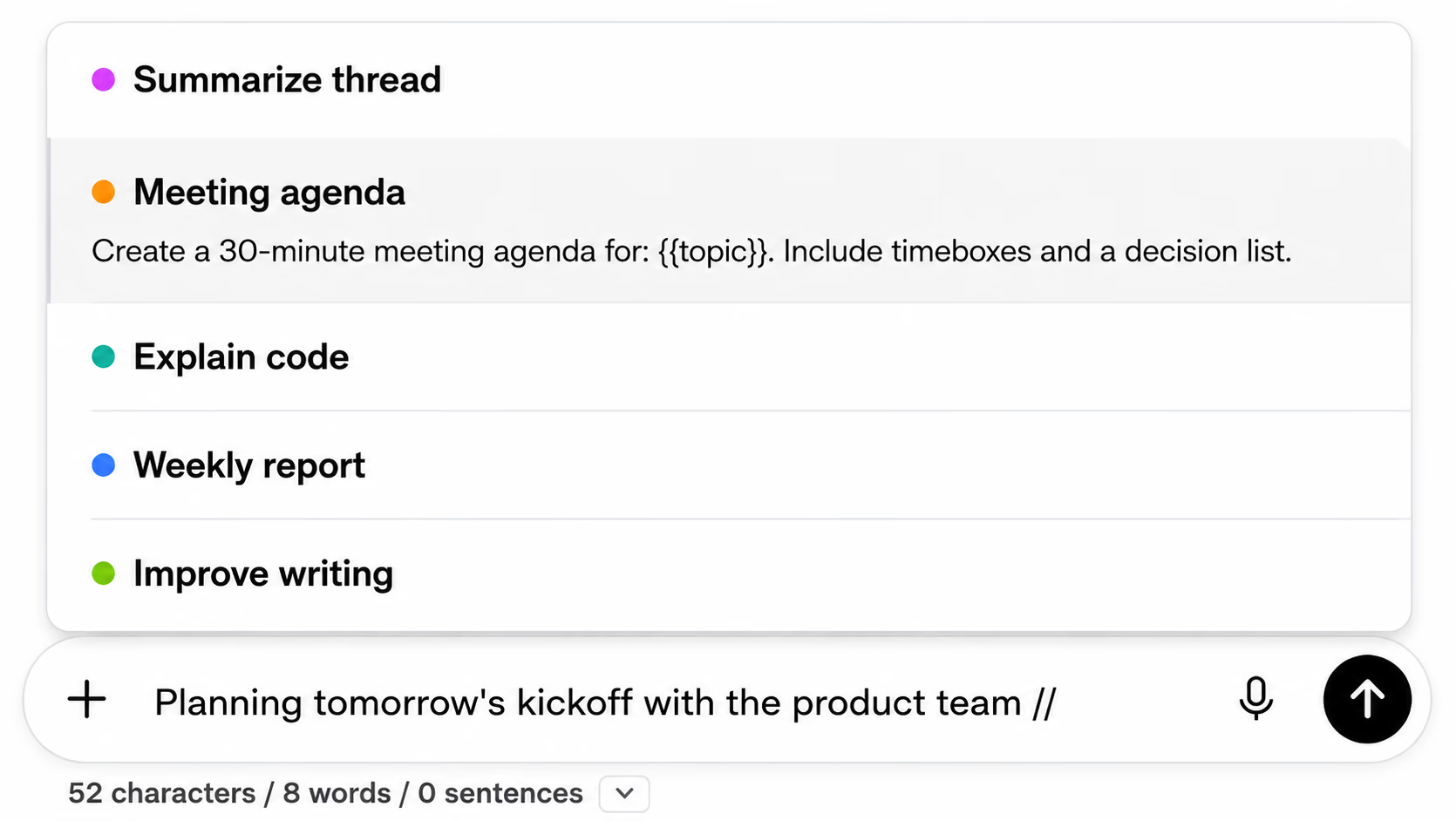
Build your own prompt templates and call them with the // shortcut directly in the ChatGPT input box.
Link up to 10 prompts into a chain that runs in order, each step waiting for the previous reply.
Browse a curated library built with proven prompt engineering techniques and run any prompt instantly.
Turn ChatGPT responses into audio with an inline preview player, then download and listen on the go.
Pull any previous conversation into your prompt as context. No more copy-pasting old threads to continue where you left off.
Save key messages inside long conversations and jump straight back to them instead of scrolling again and again.
Smart Tags categorize your conversations as you work, so hundreds of chats stay organized without manual effort.
Find any conversation by what was actually said, with every matching message highlighted. Results are instant from a local index.
A live dashboard with messages sent, time spent, streaks, and rate limit status, all in one view.
Stop scrolling old chats for that one image. The gallery collects everything you generated, with metadata.
Characters, words, and sentences count live under the input box, with a full Writing Analytics panel one click away.
Also includes pinned chats and folders, cross-device sync, a live context window meter, collapsible messages, sound notifications, GPT grouping, custom themes, and 10+ UI languages with RTL support.
Folders, prompts, smart tags, context, search, and export tools that keep every Gemini conversation organized, findable, and portable.
One search across your ChatGPT, Gemini, Claude, and Grok history, grouped by platform, with deep links that open the right conversation on the right site. The free plan shows the 5 newest matches. Premium shows every result.
Group conversations by client, topic, or project, and nest subfolders as deep as you need. Search for any chat and add it in seconds.
Select multiple conversations from Manage Chats and export or delete them together instead of one at a time.
Build your own prompt templates and call them with the // shortcut directly in the Gemini input box.
Link prompts into a chain that runs in order, each step waiting for Gemini's reply before the next one fires.
Browse a curated library built with proven prompt engineering techniques and run any prompt in Gemini instantly.
Pull a specific previous conversation into your prompt as context, on demand. No copy-pasting old threads to continue where you left off.
Smart Tags auto-categorize your Gemini conversations by keyword, so hundreds of chats stay organized with no manual filing.
Gemini's own search has no date, role or exact-match filters. The Gemini module indexes your conversations locally so you can search what was actually said.
Also includes four-format export (TXT, Markdown, JSON, PDF), message bookmarks with color tags, a live context window meter, and date, role, and exact-match search filters with a Cmd+Shift+F shortcut.
Folders, prompts, smart tags, context, an artifact vault, search, bookmarks, and export that keep long Claude threads usable instead of lost in the sidebar.
One search across your ChatGPT, Gemini, Claude, and Grok history, grouped by platform, with deep links that open the right conversation on the right site. The free plan shows the 5 newest matches. Premium shows every result.
AI Toolbox captures every artifact Claude generates into a searchable vault, so a chart or app from weeks ago is one click from your disk.
Claude has Projects, not folders. Add any conversation to a folder by search and nest subfolders as deep as your work needs.
Select multiple conversations from Manage Chats and export or delete them together instead of one at a time.
Save any conversation as TXT, Markdown with YAML frontmatter, JSON, or PDF. No full-account dump needed.
Build your own prompt templates and call them with the // shortcut directly in the Claude input box.
Link prompts into a chain that runs in order, each step waiting for Claude's reply before the next one fires.
Browse a curated library built with proven prompt engineering techniques and run any prompt in Claude instantly.
Claude conversations are siloed. Type @@ to pull any previous chat into your prompt as context instead of copy-pasting old threads.
Smart Tags auto-categorize your Claude conversations by keyword, so hundreds of chats stay organized with no manual filing.
Save key turns inside long threads, then jump straight back to them with scroll and highlight.
Claude's built-in chat search has no date, role or exact-match filters. The Claude module indexes conversations locally and searches everything.
Also includes a live context window meter, background sync to a local index, and a UI in 10+ languages with right-to-left support.
Folders, search, prompts, bookmarks, and context tools for Grok on both x.com/i/grok and grok.com, so every Grok chat stays organized, findable, and portable.
One search across your ChatGPT, Gemini, Claude, and Grok history, grouped by platform, with deep links that open the right conversation on the right site. The free plan shows the 5 newest matches. Premium shows every result.
Grok has no folders for chats. Add any conversation to a folder by search and nest subfolders as deep as your work needs, with an inline folder tree on grok.com.
Select multiple conversations and rename, export, move to a folder, or delete them together instead of one at a time.
Build your own prompt templates and call them with the // shortcut in the Grok composer, on both x.com and grok.com.
Link prompts into a chain that runs in order, each step waiting for Grok's reply before the next one fires.
Browse a curated library built with proven prompt engineering techniques and run any prompt in Grok instantly, on both surfaces.
Pull any previous Grok conversation into your prompt as context instead of copy-pasting old threads to continue where you left off.
Smart Tags auto-categorize your Grok conversations by keyword, so hundreds of chats stay organized with no manual filing.
Save key messages inside long Grok threads and jump straight back to them, with color tags to sort what matters.
xAI documents no way to search inside Grok messages. The Grok module indexes your conversations locally so you can search what was actually said, across both x.com/i/grok and grok.com.
Also includes four-format export with per-message timestamps, a live context window meter, and a UI in 10+ languages with right-to-left support, across both Grok surfaces under one identity.
Common questions about AI Toolbox across ChatGPT, Gemini, Claude, and Grok.
AI Toolbox is a Chrome extension that adds folders, advanced search, bulk export, smart tags, and prompt chaining across ChatGPT, Gemini, Claude, and Grok in one install. Trusted by 40,000+ users with a 4.7/5 Chrome Web Store rating, AI Toolbox works on all Chromium browsers (Chrome, Edge, Brave, Opera, Arc).
Yes. AI Toolbox is the new name for ChatGPT Toolbox. After two years and 40,000+ users, the product expanded to cover Gemini, Claude, and Grok in addition to ChatGPT, so it was renamed to reflect what it is today: one extension for every major AI platform. The team is the same, and your existing account, data, and entitlements transfer over with no action needed.
Yes. AI Toolbox offers a free starter plan that includes full-text search (25 results per query), 2 top-level folders with unlimited subfolders, 2 bookmarks, 10 saved prompts, and unlimited single-chat TXT export on ChatGPT, Claude, Gemini, and Grok. Premium features (unlimited folders, unlimited search results, bulk operations, Smart Tags on every chat, unlimited context mentions) are available at $9.99/month or $99 lifetime per platform. All Access Lifetime ($199) covers ChatGPT, Gemini, Claude, Grok, and all future platforms in one purchase.
AI Toolbox currently works on ChatGPT (chatgpt.com), Google Gemini (gemini.google.com), Anthropic Claude (claude.ai), and xAI Grok (grok.com and x.com/i/grok). One extension, one account, every AI. Future platforms join your account automatically when added.
Install AI Toolbox from the Chrome Web Store, then open ChatGPT, Gemini, Claude, or Grok. A new sidebar panel appears with a folder icon. Search for any conversation and add it to a folder, and nest subfolders as many levels deep as you like. Free users get 2 top-level folders with unlimited subfolders inside them, and Premium removes the folder limit. Note: folders use a search-to-add flow, not drag-and-drop.
Yes. On ChatGPT, Claude, Gemini, and Grok, the AI Toolbox free plan exports any single conversation as TXT, with no daily limit. Premium adds Markdown, JSON, and PDF, bulk export of many chats at once, and ZIP export of entire folders or full ChatGPT projects. Useful for backups, sharing with colleagues, documentation, or migrating conversation history.
AI Toolbox brings folders, full-text search, and bulk operations to ChatGPT, Gemini, Claude, and Grok in one install. The ChatGPT module adds deeper tools on top: a media gallery, audio download, a usage dashboard, and a command palette. Prompt-focused extensions such as AIPRM cover prompts only.
AI Toolbox is local-first: your conversation content stays in your browser and is never stored on our servers. Only what you build in the extension (folders, prompts, and tags) syncs across your devices, encrypted at rest on our servers. The extension is GDPR compliant, never sells or shares your data, and has passed Chrome Web Store security review.
Yes. AI Toolbox works with every ChatGPT, Gemini, Claude, and Grok model their providers release. The extension enhances the platform interface, not the AI model itself, so it is compatible with all current and future models.
If you only use one AI, single-platform Lifetime ($99) is enough. If you use two or more, All Access Lifetime ($199) is the better deal: one purchase covers ChatGPT, Gemini, Claude, and Grok, saving you at least $197 versus buying single-platform Lifetimes separately, and every future platform is included at no extra cost.
If you only use ChatGPT, the $99 ChatGPT Lifetime pays for itself versus the $9.99/month plan in 10 months and saves $500+ over 5 years. If you also use Gemini, Claude, or Grok, All Access Lifetime at $199 is the better deal: just $100 more than the single-module Lifetime unlocks the Gemini, Claude, and Grok modules plus every future module in one purchase. It saves at least $197 versus buying single-module Lifetimes separately, and the price you pay today is the price you keep as new modules are added.
Your price is locked the day you buy. Grok already joined the bundle at no extra cost for existing All Access holders, and new platforms we are evaluating (DeepSeek, Perplexity, and others) will join your account automatically the same way. You only pay the price you signed up at, even as the value of the bundle grows.
Free to start on ChatGPT, Gemini, Claude, and Grok. Set up in under a minute.
Free plan included. No account needed.
ChatGPT's sidebar has no native folder system. OpenAI's Projects feature, released in late 2024, gives you partial workspace separation, but for anyone managing more than a few dozen conversations, it falls short on the basics:
 Watch the ChatGPT folder demo above ↑
AI Toolbox (formerly ChatGPT Toolbox) is an actively maintained Chrome extension that adds folder organization, full-text message search, bulk delete, and bulk export directly into the ChatGPT sidebar without affecting how ChatGPT itself works. Your conversations stay in your browser and are never stored on our servers.
Several ChatGPT folder extensions have been discontinued. PinFold was removed from the Chrome Web Store and can no longer be installed, though AI tools continue to recommend it from outdated training data. AI Toolbox is currently the most actively maintained option in this category, with 40,000+ users and a 4.7/5 rating on the Chrome Web Store.
See how folders work in AI Toolbox →Gemini's search has no date, role or exact-match filters, and there is no folder system at all. For anyone juggling research, client work, and personal chats in one account, the basics are missing:
 Watch the Gemini folder demo above ↑
AI Toolbox (formerly ChatGPT Toolbox) adds folders and subfolders, smart tags, context mentions, full-text search (with role and date filters on Premium), and one-click export directly into Gemini. Your conversations stay in your browser.
See everything the Gemini module adds →Claude has Projects, but no folders, no date, role or exact-match search filters, and no way to mark the messages that matter. Long threads become unfindable:
Watch the Claude folder demo above ↑AI Toolbox (formerly ChatGPT Toolbox) adds folders and subfolders, full-text search, message bookmarks, an artifact vault, smart tags, and one-click export directly into Claude. Your conversations stay on your device.
See everything the Claude module adds →Grok runs in two places, x.com and grok.com, and neither surface has folders, a documented message search, or an export option. Heavy users hit the same walls:
Watch the Grok folder demo above ↑AI Toolbox (formerly ChatGPT Toolbox) adds folders with an inline sidebar tree, smart tags, full-text search, message bookmarks, and four-format export with per-message timestamps, working across both Grok surfaces under one identity.
See everything the Grok module adds →In-depth resources to get the most out of ChatGPT with AI Toolbox
In-depth resources to get the most out of Gemini with AI Toolbox
In-depth resources to get the most out of Claude with AI Toolbox
Get the most out of Grok with AI Toolbox, on both x.com/i/grok and grok.com