ChatGPTGeminiClaudeGrok40,000+users on the Chrome Web Store4.7/ 5

ChatGPT for Developers: Keep Every Fix Findable

Developers use ChatGPT for debugging, code generation, architecture questions and reviews, and the working answer ends up in a sidebar list with hundreds of untitled chats. AI Toolbox (formerly ChatGPT Toolbox), a Chromium extension by Infi Developments, adds folders per project or language, full-text search across every message, a // prompt library and one-click export to Markdown, JSON, TXT or PDF, all inside chatgpt.com.

Free with 2 root folders, 5 search results per query and 3 exports a day. Premium removes the caps and adds the Advanced search filters and bulk export.

Free plan, no account | Premium $9.99/mo | Lifetime $99 | All Access $199 once for all four modules

Manage Folders panel in ChatGPT listing Python Scripts, Code Review and API Debug folders with chat, subfolder and GPT counts

Manage Folders on chatgpt.com, free plan

  • One folder per project or language, each showing its chats, subfolders and GPTs
  • Pin a folder to keep the active debugging thread at the top of the sidebar
  • Search folders by name; the free plan includes two root folders with unlimited subfolders

The gap

What ChatGPT gives developers, and what it loses

ChatGPT has Projects, a title-only sidebar search and an all-or-nothing account export. None of them find the regex you fixed in March by searching for the error message.

A coding session is worth keeping when it ends in a working fix. In ChatGPT that fix sits inside a reply in a chat called "Help me with this error", one of hundreds. Projects group chats but cannot search inside them; the sidebar search matches titles only; the data export arrives as a ZIP of your whole account, hours later.

AI Toolbox keeps the ChatGPT interface and adds the missing layer in the browser: a folder tree in the sidebar, an index of every message you can query by function name or stack trace, saved prompts you insert by typing //, and per-conversation export in developer-friendly formats. Nothing is uploaded; the index lives in your browser.

Why it matters

Here is what you cannot do with ChatGPT alone:

  • Search by error message. Native search matches chat titles, not the traceback inside a reply.
  • Nest folders by project and language. Projects are flat and cannot hold sub-projects or pinned threads.
  • Export one conversation as Markdown or JSON. The native export is your entire account as HTML in a ZIP, delivered by email.
  • Reuse a debugging prompt. There is no prompt library; you retype the same setup instructions every session.

The longer you use ChatGPT for code, the more of your solved problems sit in old replies. Folders, search and export are what make that history reusable.

Step by step

A developer workflow in five steps

From install to an exported fix. Steps one to four are on the free plan; Markdown and bulk export in step five are where Premium starts.

About three minutes

  1. Install AI Toolbox from the Chrome Web StoreWorks in Chrome, Edge, Brave, Opera and Arc. Open chatgpt.com and the folder tree, search and prompt controls appear in the sidebar.
  2. Create folders per project or languageManage Folders, then Add Folder: React App, API Debug, Code Review. Subfolders nest as deep as you need.
  3. File a debugging session as you goOpen the folder, search for the conversation by name and add it. Pin the one you are actively working in so it stays at the top.
  4. Search before you ask againCmd/Ctrl+Shift+F, then type the error message or function name. Every matching message shows its highlighted sentence with a link into the chat.
  5. Export the working fixChoose Markdown for a repo wiki or Obsidian (the file carries YAML frontmatter with title, date, model and URL), JSON for automation, or TXT and PDF for documentation.
Add to Chrome, free

Advanced search: exact match, role and date filters

Advanced search panel with exact match, role and date filters open above the results

The Advanced panel above the results: exact match on, Questions or Answers to pick a side of the conversation, and a date range. These filters are Premium; a plain query on the free plan searches every message with no filter and lists the first five results.

The four features developers use

Folders, search, prompts and export, as they ship

Every capture below is the extension running inside chatgpt.com. The plan each feature needs is stated in the text.

Folders

A folder tree per project, language or client

Nested subfolders in the ChatGPT sidebar, added by searching a conversation's name rather than dragging. Pin the folder for the sprint you are in. Free covers two root folders with unlimited subfolders; Premium removes the cap and adds bulk move.

AI Toolbox folder tree with nested subfolders inside the ChatGPT sidebar

Search

Find the fix by the error message, not the chat title

The index covers every message in your history, so a stack trace, a function name or a config key finds the reply that solved it. Cmd/Ctrl+Shift+F opens it anywhere on chatgpt.com. Free returns five results per query; Premium adds unlimited results with exact match, role and date filters.

Search History panel showing a query matched in 11 messages across 3 conversations, with per-message highlights and bulk actions

Prompts

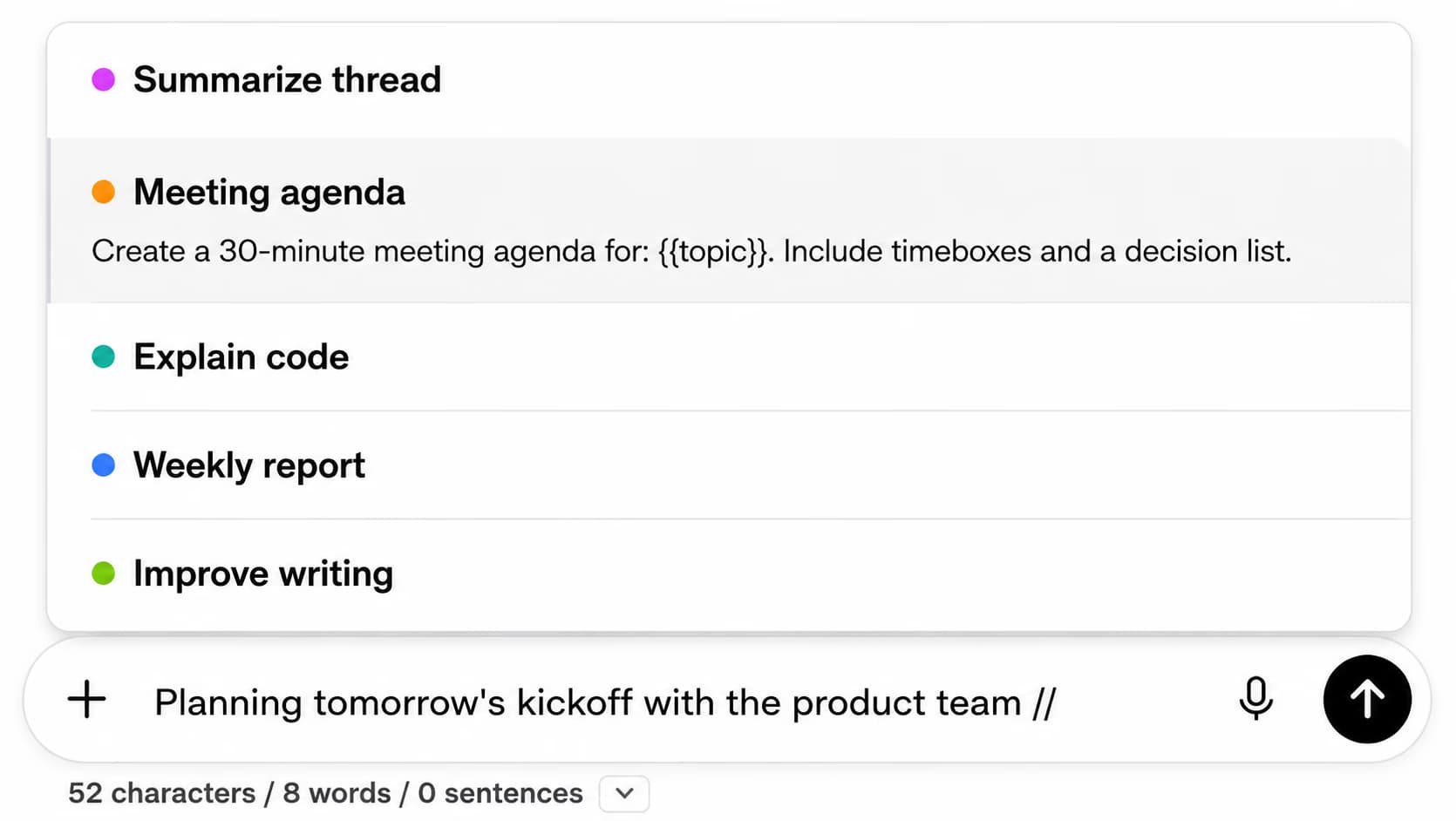
Type // to load a saved debugging prompt

Keep your "explain this stack trace", "review this diff" and "write tests for" templates in the prompt library and insert one by typing // in the compose box. The free plan stores two prompts; Premium makes the library unlimited and adds prompt chaining.

Inserting a saved prompt by typing // in the ChatGPT compose box

Export

Markdown for the wiki, JSON for automation

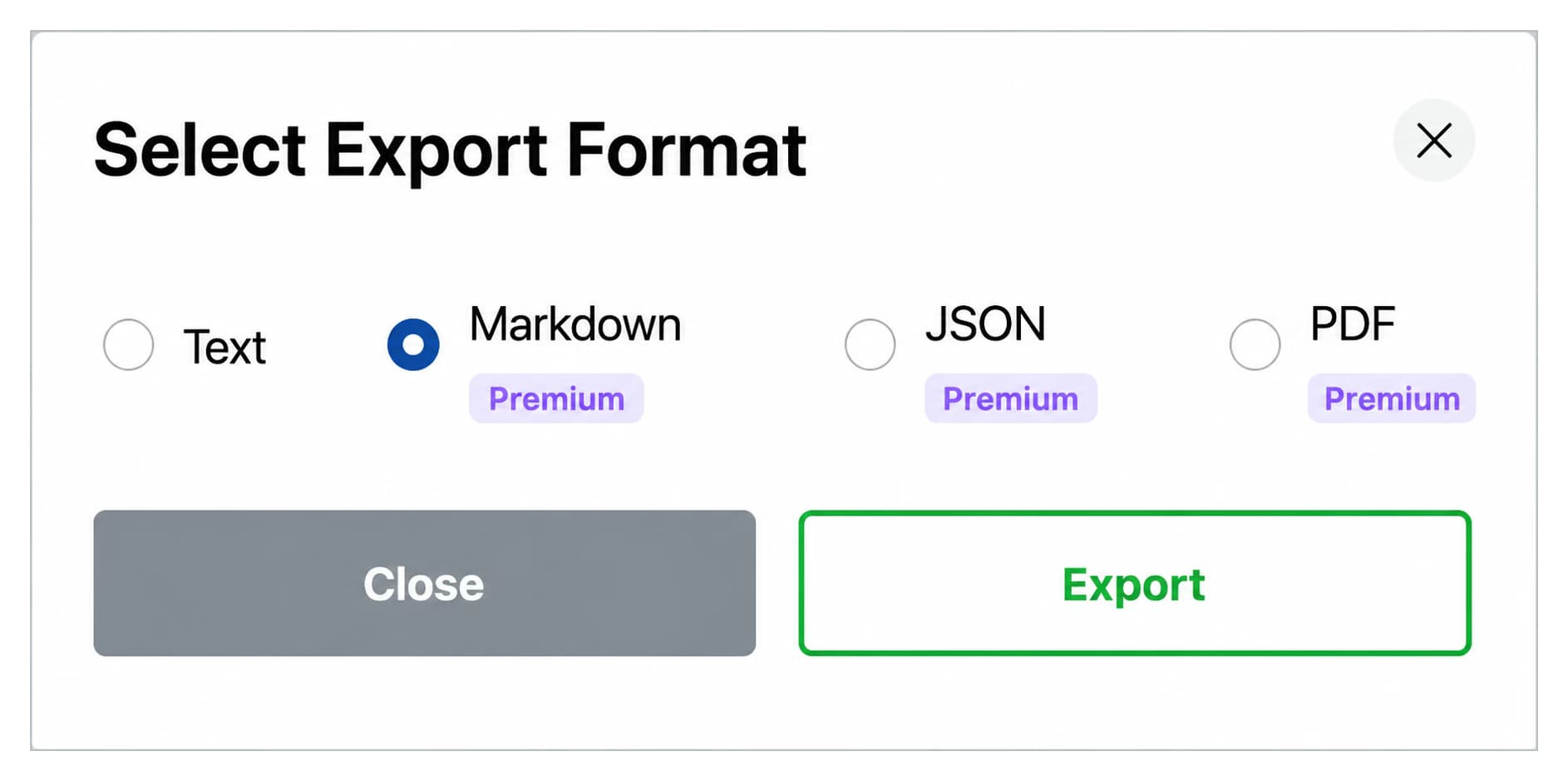
Any conversation exports as Markdown, JSON, TXT or PDF from a dialog on the chat itself. Markdown ships with YAML frontmatter (title, date, model, URL, source) so it parses in Obsidian, Logseq and static-site generators. Free exports as TXT, three a day; Premium unlocks Markdown, JSON and PDF, removes the cap and adds bulk export of a whole folder.

Select Export Format dialog with Text, Markdown, JSON and PDF options

Scenarios

Where it pays off

Three developer workflows and what to file, pin and export in each.

  • Debugging

    • One folder per service, subfolder per incident
    • Pin the thread for the bug you are on
    • Search the traceback before opening a new chat
    • Export the fix to the incident notes
  • Code generation

    • Folders by language and framework
    • Save the prompt that produced clean output
    • Search past snippets by function name
    • Export Markdown into the repo wiki
  • Code review and docs

    • Folder per repository
    • Save review checklists as // prompts
    • Bookmark the reply with the agreed pattern
    • Export JSON when a script needs the messages
  • Works with GitHub Copilot

    Copilot handles the editor; AI Toolbox keeps the ChatGPT side searchable. See ChatGPT vs GitHub Copilot for coding.

    Add to Chrome, free

From the Chrome Web Store

What reviewers say about folders and search

Public reviews from the listing, shown as captured. The full wall is on the reviews page.

  • Chrome Web Store review by R.M. Nedd: I no longer get frustrated trying to find a specific GPT in my long list. The ability to organize GPTs in folders and search a list of GPTs to find one should have been part of ChatGPT, but wasn't. This extension now eliminates that issue for me completely. The developer is very responsive and very fast to update with needed features to make it even more useful. I highly, highly, highly recommend this for anyone using ChatGPT for more than casual purposes.
    R.M. Nedd
  • Chrome Web Store review by Asaf Ben-Yehuda: makes chatgpt search and usage much better. helps you find what you want to find. glad i joined when this add on was first introduced!
    Asaf Ben-Yehuda

Read all 46 captured reviews or the live Chrome Web Store listing.

Pricing

Plans and pricing for the ChatGPT module

Free covers folders, search, prompts and export with usage caps. Premium removes the caps on ChatGPT and adds Advanced search and bulk export. All Access does the same across ChatGPT, Gemini, Claude and Grok, paid once. Not an AI subscription: you keep using your own ChatGPT account.

Free

$0forever

  • 2 root folders with unlimited subfolders, 2 pinned chats
  • Full-text search, 5 results per query
  • 2 saved prompts with the // shortcut
  • 3 TXT exports a day
Add to Chrome

Premium

$9.99/month

  • Unlimited folders, pins, prompts and exports in Markdown, JSON, PDF or TXT
  • Advanced search: exact match, role and date filters, unlimited results
  • Bulk export and bulk move to folder
  • Prompt chaining and cross-platform search
Get Premium

All Access LifetimeBest value

$199one-time

  • ChatGPT, Gemini, Claude and Grok included
  • Search all platforms across all four
  • Every future AI platform we add
  • Save $197 vs single Lifetimes
Get All Access

Teams$15/seat/month

All Premium features across the four modules ยท Admin dashboard ยท Team analytics ยท $12/seat/mo billed annually ยท 14-day free trial

See Teams
  • GDPR compliant
  • Secure checkout by Polar
  • 14-day money-back on a first purchase
  • Conversation content stays in your browser

Refunds follow the refund policy; renewals are not refundable. Premium unlocks on the ChatGPT account whose email you enter at checkout, so use the address you sign in with.

FAQ

Questions people ask before installing

How do developers organize ChatGPT conversations by project or language?

Create a root folder per language or repository and subfolders per project or incident, then add conversations by searching their name inside the folder. Pinned folders and chats stay at the top of the sidebar. The free plan includes two root folders with unlimited subfolders; Premium removes the cap and adds bulk move.
Can I search ChatGPT for an error message or function name?

Yes. AI Toolbox indexes every message in your history in the browser, so a query like the traceback text or a function name returns each reply that contains it, with the matching sentence highlighted. Press Cmd/Ctrl+Shift+F on chatgpt.com. Free shows five results per query; Premium shows all of them and adds exact match, role and date filters.

Which export format should I use for code?

Markdown for a repo wiki, Obsidian or a docs site: the .md file carries YAML frontmatter with title, date, model, URL and source and keeps fenced code blocks intact. JSON when a script needs the raw messages and metadata. TXT and PDF for plain documentation. The free plan exports as TXT, three a day; Markdown, JSON and PDF need Premium, which is unlimited and can export a whole folder at once.

Does AI Toolbox send my code anywhere?

No. The folder tree, search index and saved prompts are stored in your browser, and every search runs locally. The only account detail that reaches our servers is the email used to verify a Premium plan. The extension passed Chrome Web Store review and is GDPR compliant.

Does it slow ChatGPT down?

The index is built in the background from your own history with a cooldown between syncs, and a search returns in a few hundredths of a second. The extension only runs on chatgpt.com (and the other AI sites you enable) and adds nothing to your editor or terminal.

Which browsers work?

Any Chromium browser installed from the Chrome Web Store: Chrome, Edge, Brave, Opera and Arc. There is no Firefox version.

40,000+ users ยท 4.7/5 on the Chrome Web Store

Stop re-solving bugs you already fixed

Install AI Toolbox, make one folder for the project you are on, and search your ChatGPT history for the last error you hit before you decide on anything else.