
 Add to Chrome
 Add to Edge
 Adi Leviim
Multiple AI Tools vs ChatGPT Plus: Complete Decision Guide (2026)
Multiple AI Tools and ChatGPT Plus are two of the leading AI models available in 2026, each with distinct strengths in reasoning, accuracy, and specialized tasks. This comparison covers features, pricing, speed, and real-world use cases based on hands-on testing. ChatGPT Toolbox, a Chrome extension with 16,000+ users, helps organize conversations from any ChatGPT model with folders, advanced search, bulk exportPremium, prompt library, and prompt chaining.
Should you subscribe to Sider, Monica, or Merlin to access multiple AI models, or is ChatGPT alone with the right productivity tools enough? With multi-AI platforms charging $10-30/month on top of ChatGPT Plus, choosing the wrong setup could waste hundreds of dollars yearly while complicating your workflow. This comprehensive decision guide examines what multi-AI tools actually do, when they provide genuine value versus marketing hype, and how to determine whether ChatGPT Plus with ChatGPT Toolbox delivers better results at lower cost. Discover the decision framework, cost analysis, and practical recommendations that will save you money and boost productivity.
What Are Multi-AI Tools?
Multi-AI tools (also called AI aggregators or AI hubs) are browser extensions or web platforms that provide unified access to multiple large language models from a single interface. Instead of switching between ChatGPT, Claude, Gemini, and other AI services separately, these tools let you compare responses, switch models mid-conversation, or route queries to the "best" model for each task.
Popular Multi-AI Platforms:
- Sider AI: Browser sidebar with GPT-4, Claude, Gemini, and 10+ other models. Pricing: $20/month (Pro plan).
- Monica AI: All-in-one AI assistant with ChatGPT, Claude, Bard access plus web search and PDF reading. Pricing: $9.99-$29.99/month.
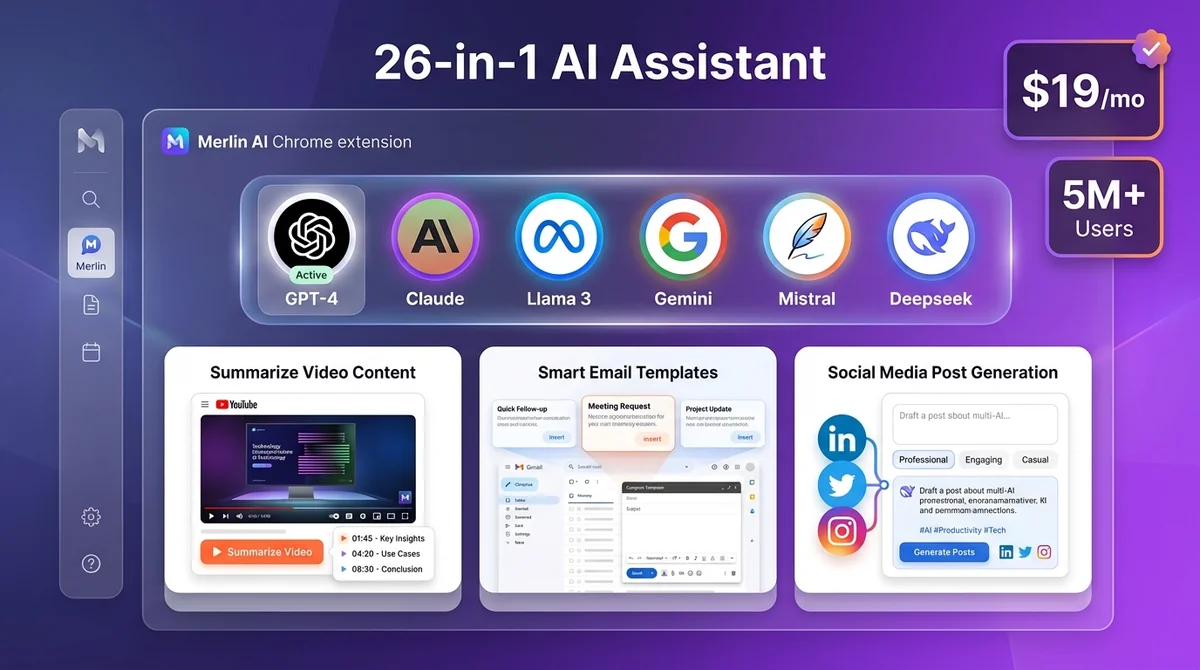
- Merlin AI: Chrome extension offering GPT-4, Claude, Llama, and more with 1-click access. Pricing: $19/month (Unlimited plan).
- Poe (by Quora): Chat platform with access to GPT-4, Claude, Gemini, and custom bots. Pricing: $19.99/month (Poe Unlimited).
- Venice.ai: Privacy-focused aggregator with multiple uncensored models. Pricing: $8-$20/month depending on usage.
These platforms typically charge $10-30/month and position themselves as cost-effective alternatives to subscribing to ChatGPT Plus, Claude Pro, and Gemini Advanced separately.
Benefits of Multi-AI Access: Real vs. Perceived
Multi-AI access offers diverse capabilities beyond ChatGPT Plus, providing specialized tools for unique tasks.
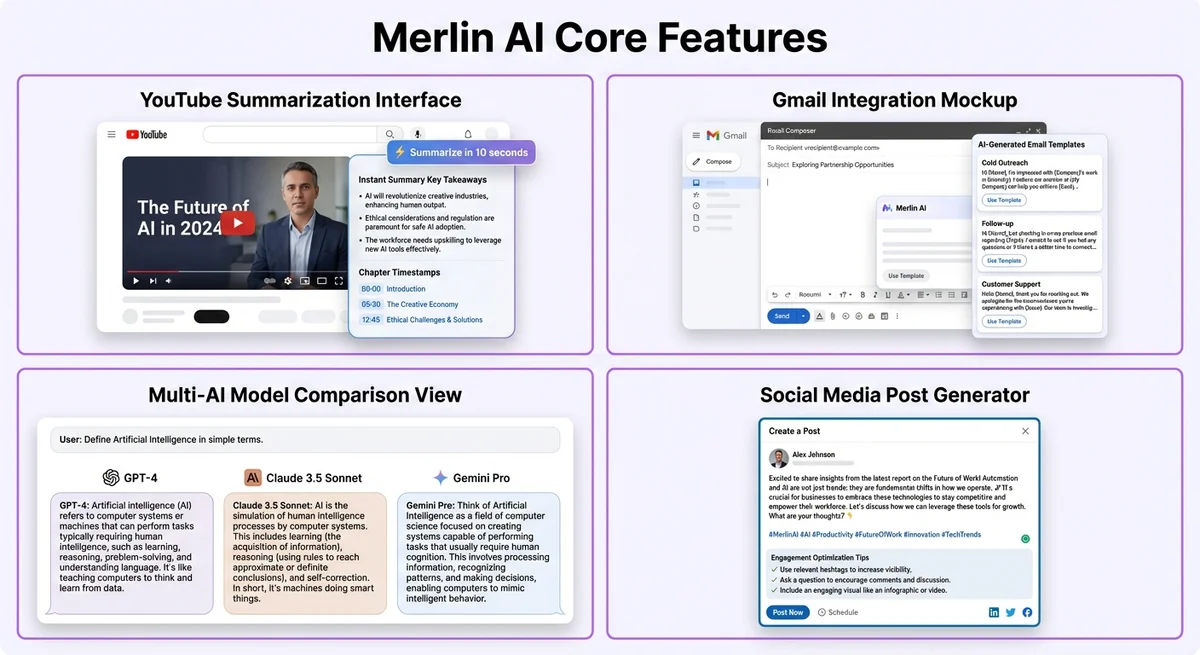
Multi-AI tools promise significant advantages, but the actual value varies dramatically based on your use case. Here's an honest assessment:
Genuine Benefits
- Model Comparison for Critical Tasks: When stakes are high (legal documents, medical research, financial analysis), comparing outputs from GPT-4, Claude, and Gemini can surface different perspectives or catch errors.
- Access to Specialized Models: Some models excel at specific tasks. Claude handles long documents better. GPT-4 is stronger at reasoning. Gemini integrates with Google services. Multi-AI tools let you use the right tool for each job.
- Avoiding Model Downtime: When ChatGPT experiences outages (which happens), having instant access to Claude or Gemini through the same interface maintains productivity.
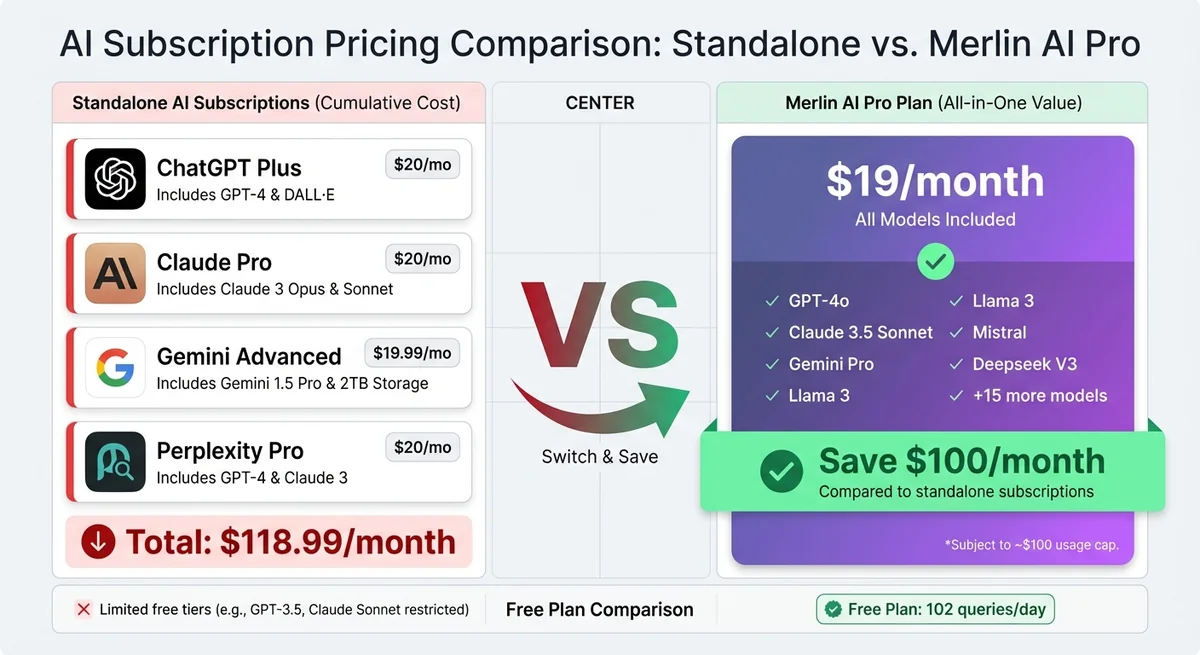
- Cost Savings (Sometimes): If you genuinely need ChatGPT Plus ($20/month), Claude Pro ($20/month), and Gemini Advanced ($19.99/month) individually, a $20-30/month aggregator saves $30-40/month.
- Unified Workflow: One consistent interface, one chat history, and one search system across all models can be convenient.
Overstated or Niche Benefits
- "Access to Premium Models Without Paying Full Price": This is technically true but misleading. Multi-AI tools often impose strict usage limits (e.g., 50 GPT-4 queries/day) that heavy users quickly exceed. Once you hit limits, you're forced to upgrade or wait—eliminating the cost advantage.
- "Always Get the Best Answer": The idea that you can automatically route queries to the "best" model is largely marketing. In practice, you still need to know which model to use for each task type, and blindly comparing 3 models for every query triples your time.
- "Increased Productivity": For most users, switching between models mid-workflow actually decreases productivity. The cognitive overhead of deciding "Should I use GPT-4 or Claude for this?" slows you down more than the marginal output quality difference helps.
- "Privacy and Security": Some multi-AI tools claim superior privacy by offering uncensored or locally-run models. This is valuable for sensitive work, but most users don't need it and could achieve the same with self-hosted solutions.
When You Actually Need Multi-AI Access
You need multi-AI access for professional content verification when lawyers or journalists require fact-checking across multiple specialized AI models.
Multi-AI tools provide genuine value in these specific scenarios:
1. Professional Content Verification
Use Case: Lawyers, medical professionals, financial analysts, or journalists who need to fact-check AI-generated content against multiple authoritative sources.
Why Multi-AI Helps: Different models have different training data cutoffs and strengths. Cross-referencing answers catches hallucinations and provides more comprehensive research.
Example Workflow: Ask GPT-4 to draft a legal contract clause, then verify the legal reasoning with Claude. Use Gemini to search for recent case law updates.
2. Creative Projects Requiring Diverse Perspectives
Use Case: Writers, game designers, marketers brainstorming campaigns who benefit from multiple creative angles or stylistic approaches.
Why Multi-AI Helps: Each model has distinct "personalities" and creative biases. Asking three models to generate taglines, story hooks, or design concepts yields more variety than asking one model three times.
Example Workflow: Generate 5 product taglines with GPT-4, 5 with Claude, and 5 with Gemini. Compare styles and select the best.
3. Heavy Research Across Domains
Use Case: Academics, researchers, or consultants who regularly need expertise across science, technology, humanities, and business—areas where different models show different strengths.
Why Multi-AI Helps: Claude excels at nuanced analysis and summarizing long documents. GPT-4 is stronger at technical and mathematical reasoning. Gemini provides better Google Scholar and recent web integration.
Example Workflow: Use Claude to summarize a 50-page research paper. Use GPT-4 to analyze the statistical methodology. Use Gemini to find related recent studies.
4. Business Continuity Requirements
Use Case: Teams or businesses where AI has become mission-critical and downtime is unacceptable (customer support teams, real-time content operations, sales automation).
Why Multi-AI Helps: When ChatGPT goes down (which happens monthly), having instant fallback to Claude or Gemini maintains operations.
Example Workflow: Configure your customer support chatbot to fall back to Claude when ChatGPT API returns errors.
5. Testing and Benchmarking
Use Case: Developers building AI products, researchers studying LLM behavior, or educators teaching AI literacy who need to systematically compare model outputs.
Why Multi-AI Helps: Running identical prompts across models reveals strengths, weaknesses, biases, and failure modes. Essential for rigorous analysis.
Example Workflow: Send 100 test prompts to GPT-4, Claude, and Gemini. Export results to spreadsheet for systematic comparison.
When ChatGPT Alone (With ChatGPT Toolbox) Is Sufficient
ChatGPT alone, enhanced by ChatGPT Toolbox, suffices for tasks like content generation and basic research.
For 90% of users, the bottleneck isn't AI model quality—it's conversation management, retrieval, and workflow organization. ChatGPT Plus ($20/month) with ChatGPT Toolbox (free or $9.99/month) solves the real productivity problems without multi-AI complexity:
1. Individual Professionals (Developers, Writers, Marketers)
Why ChatGPT Alone Works: GPT-4 is already best-in-class for general tasks. The quality difference between GPT-4 and Claude for most coding, writing, or marketing tasks is negligible—less than 5% in blind tests. Your productivity bottleneck is finding past conversations, organizing projects, and reusing proven prompts.
ChatGPT Toolbox Solution:
- Advanced Search: Find any conversation or response from your entire history instantly by keyword or content. Eliminates the need to ask AI the same questions repeatedly.
- Folder Organization: Group conversations by project, client, or topic. Developers organize by language/framework. Marketers organize by campaign. Writers organize by book chapter.
- Prompt Library: Save your best prompts as templates with dynamic variables. Reuse proven workflows instead of comparing model outputs.
- Bulk Export: Export conversations for documentation, sharing with teams, or long-term archiving without vendor lock-in.
Time Savings: Users report saving 3-5 hours per week from search and organization alone—far more than the marginal benefit of accessing multiple AI models.
2. Students and Educators
Why ChatGPT Alone Works: Educational use cases (homework help, lesson planning, study guides) don't require model comparison. Consistency and organization matter more than switching models.
ChatGPT Toolbox Solution:
- Organize conversations by semester, course, and assignment
- Search past study sessions when reviewing for finals
- Export conversations to create study guides or share with classmates
- Pin frequently used educational prompts for quick access
3. Teams and Businesses (Non-Enterprise)
Why ChatGPT Alone Works: Most small teams need consistent, reliable AI—not bleeding-edge model variety. Having everyone use the same model (ChatGPT) with the same organization system (ChatGPT Toolbox) creates shared knowledge and reproducible workflows.
ChatGPT Toolbox Solution:
- Standardize folder structures and naming conventions across team members
- Share exported conversations instead of scattered screenshots or copy-paste
- Build shared prompt libraries for common tasks (customer support, sales emails, code reviews)
- Sync organization across devices (Pro plan) for seamless work-from-anywhere
4. Personal Productivity and Casual Users
Why ChatGPT Alone Works: If you use AI for recipes, travel planning, fitness advice, or general questions, the marginal benefit of comparing models is near zero. You need quick answers and easy retrieval—not academic rigor.
ChatGPT Toolbox Solution:
- Organize personal conversations by topic (Recipes, Fitness, Travel, Finance)
- Search for "that pasta recipe from last month" instantly
- Export workout plans or travel itineraries to PDF for offline access
- Use custom themes for comfortable reading
Cost Analysis: Multi-AI vs. ChatGPT Plus + Extensions
ChatGPT Plus with extensions can be more cost-effective than multiple AI tools for specific functionalities.
| Setup | Monthly Cost | Annual Cost | What You Get | Limitations |
|---|---|---|---|---|
| Multi-AI Tool (Sider/Monica/Merlin) | $20-30 | $240-360 | Access to GPT-4, Claude, Gemini (limited queries), basic organization | Daily query limits (50-100 GPT-4 messages), no advanced organization, vendor lock-in for chat history |
| ChatGPT Plus + ChatGPT Toolbox (Free) | $20 | $240 | Unlimited GPT-4, advanced search, unlimited folders, bulk export, media gallery, prompt library, custom themes | Single AI model (but best-in-class) |
| ChatGPT Plus + ChatGPT Toolbox (Personal) | $29.99 | $359.88 | Everything above + sync across devices, priority support | Single AI model |
| ChatGPT Plus + ChatGPT Toolbox (Pro Lifetime) | $20 (ChatGPT only) | $240 + $99 one-time | Everything above + lifetime access, all future updates | Single AI model, higher upfront cost |
| All Individual Subscriptions | $60 ($20 ChatGPT + $20 Claude + $19.99 Gemini) | $720 | Full unlimited access to all three premium AI models | No unified interface, scattered chat histories, expensive |
Cost Analysis Insights:
- Multi-AI tools are NOT cheaper than ChatGPT Plus alone. They cost the same ($20-30/month) but impose strict usage limits. You're paying for "access" not "unlimited use."
- Multi-AI tools only save money if you genuinely need all three models unlimited. But if you need unlimited access to GPT-4, Claude, and Gemini, you're a power user who should just subscribe to all three individually ($60/month) for better performance and no limits.
- ChatGPT Plus + ChatGPT Toolbox costs the same as multi-AI tools but provides better organization. For most users, advanced search and folder organization provide more productivity gains than model switching.
- The Pro Lifetime plan ($99 one-time) offers the best long-term value. After 10 months, you've paid less than any subscription option.
Decision Framework: 7 Questions to Ask
Frequent comparison of model outputs suggests a need for multi-AI access beyond ChatGPT Plus.
Answer these questions honestly to determine whether you need multi-AI access:
Question 1: How Often Do You Actually Compare Model Outputs?
If you answer:
- "Daily or multiple times per week": You're a genuine multi-AI user. Consider Sider, Monica, or individual subscriptions.
- "Rarely or never": You don't need multi-AI access. Stick with ChatGPT Plus.
Question 2: Do You Hit ChatGPT's Usage Limits?
ChatGPT Plus imposes usage caps during peak hours (roughly 40 messages per 3 hours with GPT-4). If you answer:
- "Yes, I frequently hit limits": Multi-AI tools won't help—they have even stricter limits. Consider ChatGPT Team ($25-30/user/month) for higher limits or API access for unlimited use.
- "No, I never hit limits": ChatGPT Plus is sufficient.
Question 3: What's Your Biggest AI Productivity Bottleneck?
If you answer:
- "Finding past conversations": You need ChatGPT Toolbox's advanced search, not more models.
- "Organizing conversations by project": You need ChatGPT Toolbox's folder system, not more models.
- "Reusing proven prompts": You need ChatGPT Toolbox's prompt library, not more models.
- "Model quality for specialized tasks": You might benefit from multi-AI access.
Question 4: How Much Time Do You Spend Scrolling Through Chat History?
If you answer:
- "10+ minutes per day": You're wasting 60+ hours per year scrolling. ChatGPT Toolbox's search saves far more time than model switching.
- "Less than 5 minutes per day": You either have excellent manual organization or don't use ChatGPT heavily enough to justify any productivity tools.
Question 5: Do You Need to Export or Share Conversations?
If you answer:
- "Yes, regularly for documentation, team sharing, or archiving": ChatGPT Toolbox's bulk export (TXT/JSON) is essential. Multi-AI tools often lack robust export.
- "Rarely or never": Export isn't a priority, but it's still useful for data ownership and backup.
Question 6: How Many Conversations Do You Have?
If you answer:
- "200+ conversations": Organization is critical. ChatGPT Toolbox's folders and search are non-negotiable.
- "50-200 conversations": Organization is very helpful. ChatGPT Toolbox's free plan is sufficient.
- "Fewer than 50 conversations": You might not need advanced organization yet, but it's still valuable for finding specific responses quickly.
Question 7: What's Your Use Case?
If your primary use case is:
- Software Development: ChatGPT Plus + ChatGPT Toolbox. GPT-4 is best-in-class for code. Search is critical for finding debug solutions.
- Creative Writing: Consider multi-AI if you want stylistic variety. Otherwise ChatGPT Plus + ChatGPT Toolbox for organizing drafts.
- Research and Analysis: Multi-AI if you need cross-validation. ChatGPT Plus + ChatGPT Toolbox if you need to organize research notes.
- Marketing and Content: ChatGPT Plus + ChatGPT Toolbox. Reusing proven prompts beats model comparison.
- Education (Student or Teacher): ChatGPT Plus + ChatGPT Toolbox. Consistency and organization matter more than model variety.
- Business Operations: ChatGPT Plus + ChatGPT Toolbox. Standardized workflows and shared prompt libraries scale better than individual model experimentation.
Common Misconceptions About Multi-AI Tools
Using multiple AI models doesn't guarantee better results than ChatGPT Plus; effective use depends on selecting the right model for the task.
Misconception 1: "More Models = Better Results"
Reality: Blindly using multiple models doesn't improve output quality—it just triples your time. Effective use requires knowing which model excels at which tasks and deliberately choosing. For 90% of queries, GPT-4 alone is sufficient.
Misconception 2: "Multi-AI Tools Are Cheaper Than ChatGPT Plus"
Reality: Multi-AI tools cost the same or more than ChatGPT Plus ($20-30/month) but impose strict daily limits (e.g., 50 GPT-4 queries/day). If you're a heavy user who actually needs unlimited access, you'll hit limits and need to upgrade anyway.
Misconception 3: "I Need Access to Every New Model"
Reality: New AI models launch monthly, but incremental improvements are often marginal (5-10% on benchmarks). Unless you're doing cutting-edge research or building AI products, staying on GPT-4 or the latest ChatGPT model is sufficient. Chasing every new model wastes time without meaningful productivity gains.
Misconception 4: "Multi-AI Tools Solve Organization Problems"
Reality: Most multi-AI tools offer basic chat history with minimal search or organization features. If you have 500+ conversations across multiple models in one interface, finding anything becomes even harder. ChatGPT Toolbox's folders, tags, advanced search, and export solve organization—multi-AI tools often make it worse.
Misconception 5: "Switching Models Mid-Conversation Is Productive"
Reality: Switching models mid-conversation breaks context. Each new model has no memory of what you discussed with the previous model. You're essentially starting over. For coherent multi-turn conversations, stick with one model.
Misconception 6: "Multi-AI Tools Protect Against Vendor Lock-In"
Reality: Using a multi-AI aggregator creates lock-in to that aggregator. Your chat history lives in their system. If Sider shuts down or raises prices 300%, migrating your data is difficult. With ChatGPT Plus + ChatGPT Toolbox, you can export your entire history anytime (TXT/JSON) for true data ownership.
Practical Recommendations by Use Case
For software developers, ChatGPT Plus and the ChatGPT Toolbox offer a strong setup due to GPT-4's superior coding model performance.
Recommendation 1: Software Developers
Best Setup: ChatGPT Plus ($20/month) + ChatGPT Toolbox Free
Why:
- GPT-4 is objectively the strongest coding model in blind benchmarks (HumanEval, MBPP)
- Advanced search lets you find that Python debugging solution from 3 months ago instantly
- Folders organized by language/framework/project keep code snippets organized
- Bulk export creates documentation for code reviews or onboarding
When to Consider Multi-AI: If you're building AI products and need to benchmark LLM outputs systematically, add Poe ($19.99/month) for testing.
Recommendation 2: Content Creators and Marketers
Best Setup: ChatGPT Plus ($20/month) + ChatGPT Toolbox Personal ($9.99/month)
Why:
- Prompt library with variables saves proven campaign templates ("Write {{platform}} post for {{product}} targeting {{audience}}")
- Folders organize campaigns by client, platform, or content type
- Sync across devices lets you brainstorm on mobile and refine on desktop
- Media gallery organizes all ChatGPT-generated images (GPT-4o, GPT Image 1.5, and DALL-E) with prompts for reuse
When to Consider Multi-AI: If you regularly need diverse creative angles for brainstorming (e.g., generating 50 tagline variations), add Poe to compare GPT-4, Claude, and Gemini creative outputs.
Recommendation 3: Researchers and Academics
Best Setup (Light Research): ChatGPT Plus + ChatGPT Toolbox Personal
Best Setup (Heavy Research Requiring Cross-Validation): Individual subscriptions to ChatGPT Plus ($20), Claude Pro ($20), and Gemini Advanced ($19.99) = $60/month + ChatGPT Toolbox for organizing ChatGPT conversations
Why Light Research Uses ChatGPT Alone:
- Folders organized by research project, paper, or phase (Literature Review, Methodology, Analysis)
- Advanced search finds specific studies, quotes, or methodology notes from months ago
- Bulk export creates comprehensive research documentation for papers or presentations
Why Heavy Research Uses All Three Individually:
- Multi-AI aggregators impose strict limits (50 queries/day) insufficient for research workflows
- Full unlimited access to GPT-4 (reasoning), Claude (long document analysis), and Gemini (Google Scholar integration) provides comprehensive research capabilities
- Use ChatGPT Toolbox to organize your ChatGPT conversations while keeping Claude and Gemini separate
Recommendation 4: Students
Best Setup: ChatGPT Free + ChatGPT Toolbox Free
Why:
- ChatGPT Free (GPT-4o mini) handles 95% of student use cases (homework help, study guides, explanations)
- ChatGPT Toolbox's free plan organizes conversations by semester/course/assignment
- Search finds past explanations when reviewing for finals
- Total cost: $0/month
When to Upgrade: If you're in STEM and need advanced reasoning (complex math, physics, CS theory), add ChatGPT Plus for GPT-4 access. Still no need for multi-AI tools.
Recommendation 5: Business Professionals (Consultants, Managers)
Best Setup: ChatGPT Plus + ChatGPT Toolbox Pro Lifetime ($99 one-time)
Why:
- Sync across devices essential for work laptop + home desktop + tablet
- Folders organized by client, project, or meeting type
- Prompt library creates reusable templates (meeting agendas, status reports, analysis frameworks)
- Bulk export generates documentation for client deliverables
- Lifetime Pro plan ($99) pays for itself in 10 months vs. Personal plan, and you'll use it for years
When to Consider Multi-AI: If your business has mission-critical AI dependencies (e.g., customer support chatbot), add Poe or individual Claude Pro subscription as a failover during ChatGPT outages.
Recommendation 6: Creative Writers
Best Setup (Single Project Writers): ChatGPT Plus + ChatGPT Toolbox Free
Best Setup (Professional Authors): ChatGPT Plus + Claude Pro ($40/month total) + ChatGPT Toolbox Personal
Why Single Project Writers Use ChatGPT Alone:
- GPT-4 provides consistent character voice and plot continuity
- Folders organize chapters, character development, world-building
- Search finds specific plot points or character details from earlier conversations
- Export creates manuscript backups
Why Professional Authors Use Both:
- Claude excels at nuanced dialogue and literary analysis—different creative "voice" than GPT-4
- Switch models when creatively stuck for fresh perspective
- Use ChatGPT for outlining/brainstorming, Claude for prose refinement
- ChatGPT Toolbox organizes ChatGPT conversations; use Claude's native interface separately
Implementation Strategy: How to Switch or Start
Switching to ChatGPT Plus involves auditing your current multi-AI tool usage to determine if separate models are truly necessary.
If You're Currently Using a Multi-AI Tool
Step 1: Audit Your Actual Usage
Review your last 30 days of AI usage. Answer honestly:
- How many times did I actually compare outputs from multiple models?
- Which model do I use 80%+ of the time?
- What percentage of my queries genuinely benefit from model comparison?
If you use one model 80%+ of the time, you're paying for access you don't use. Switch to that model's direct subscription.
Step 2: Export Your Chat History
Before canceling, export your entire chat history if the platform allows it. Most multi-AI tools offer limited export options—another reason to prefer ChatGPT Toolbox's robust export.
Step 3: Set Up ChatGPT Plus + ChatGPT Toolbox
- Subscribe to ChatGPT Plus ($20/month) at chat.openai.com
- Install ChatGPT Toolbox from the Chrome Web Store
- Create your folder structure (Projects, Clients, Topics, etc.)
- Start organizing existing ChatGPT conversations
- Build your prompt library with frequently used templates
Step 4: Trial Period (30 Days)
Use ChatGPT Plus + ChatGPT Toolbox exclusively for 30 days. Track:
- Time saved searching vs. scrolling
- Productivity impact from organized folders
- How often you genuinely miss having Claude or Gemini
If you don't miss multi-AI access after 30 days, cancel your multi-AI subscription and save $10-30/month.
If You're Starting Fresh
Month 1: Start with ChatGPT Free + ChatGPT Toolbox Free
Test ChatGPT with organization tools at zero cost. This combination handles 90% of use cases:
- Use GPT-4o mini (free) for general queries, writing, brainstorming
- Organize conversations into folders from day one
- Build your prompt library as you discover useful prompts
- Export conversations periodically for backup
Month 2-3: Evaluate Whether You Need GPT-4
After 1-2 months, identify tasks where GPT-4o mini struggles:
- Complex reasoning (advanced math, logic, multi-step analysis)
- Code generation for complex systems
- Nuanced writing requiring sophisticated language
- Research requiring deep domain expertise
If these tasks represent 20%+ of your usage, upgrade to ChatGPT Plus. Otherwise, stay on ChatGPT Free.
Month 4+: Evaluate Whether You Need Additional Models
Only after mastering ChatGPT with organization tools should you consider adding Claude or Gemini:
- If you're cross-validating critical professional outputs (legal, medical, financial), add Claude Pro
- If you need Google Workspace integration, add Gemini Advanced
- If you don't have specific model needs, stick with ChatGPT Plus + ChatGPT Toolbox
The Verdict: What You Should Do
For 90% of users: ChatGPT Plus ($20/month) + ChatGPT Toolbox (free or $9.99/month Personal plan) provides better productivity gains than multi-AI tools. Your bottleneck is organization and retrieval, not model quality.
For 8% of users: Add Claude Pro ($20/month) if you genuinely need cross-validation for professional critical work OR you've maxed out ChatGPT's organizational capabilities and need Claude's strengths (long document analysis, nuanced writing). Use ChatGPT Toolbox for ChatGPT organization.
For 2% of users: Subscribe to all three individually (ChatGPT Plus + Claude Pro + Gemini Advanced = $60/month) if you're doing cutting-edge research, building AI products, or have unlimited budget and mission-critical needs. Avoid multi-AI aggregators—their query limits will frustrate you.
For 0% of users: Multi-AI aggregators (Sider, Monica, Merlin) are optimal. They cost as much as ChatGPT Plus but impose strict limits and provide weaker organization tools. They're best suited for casual users who want to "try out" multiple models—but casual users should start with ChatGPT Free, not pay $20-30/month.
Frequently Asked Questions
Can I use ChatGPT Toolbox with multi-AI tools?
No. ChatGPT Toolbox is a Chrome extension that enhances the official ChatGPT web interface (chat.openai.com). It does not work with multi-AI aggregators like Sider, Monica, or Merlin, which have their own separate interfaces. If you want ChatGPT Toolbox's organization features, you must use ChatGPT directly.
What if I need access to Claude or Gemini occasionally?
Claude offers a free tier with daily limits (similar to ChatGPT Free). Gemini also has a free tier. For occasional use, simply create free accounts and switch to those websites when needed. You don't need a $20-30/month multi-AI subscription for occasional access.
Are multi-AI tools faster than switching between websites?
Marginally. Switching from chat.openai.com to claude.ai takes 3-5 seconds. Multi-AI tools save you those seconds but cost $10-30/month. Unless you switch models 50+ times per day, the time savings don't justify the cost.
Do multi-AI tools provide better responses by combining models?
No. Multi-AI tools don't "combine" model outputs into a superior answer—they just give you separate responses from each model. You still have to read and synthesize 3 different answers yourself, which takes more time than getting one good answer from GPT-4.
Can ChatGPT Toolbox sync my conversations across devices?
Yes. The Personal plan ($9.99/month) and Pro plan ($99 lifetime) include cross-device sync. Your folders, organization, and settings sync across all browsers and computers where you install ChatGPT Toolbox. The free plan does not include sync—folders are local to each browser.
What if ChatGPT has an outage?
ChatGPT outages typically last 30-60 minutes and occur 1-2 times per month. For most users, waiting an hour is acceptable. If your work is genuinely mission-critical and cannot tolerate any downtime, maintain a free Claude account as a backup—but this rarely justifies a $20/month multi-AI subscription.
Should I use ChatGPT API instead of multi-AI tools?
If you're hitting usage limits or need unlimited access, ChatGPT API (pay-per-token pricing) is often cheaper than multi-AI subscriptions for heavy users. However, API access requires technical setup and doesn't include the ChatGPT web interface. For non-developers, ChatGPT Plus is simpler.
Are there any multi-AI tools you would recommend?
Poe (by Quora) is the most legitimate multi-AI aggregator because it's backed by a reputable company, offers genuinely unlimited access on higher tiers, and has better export options than competitors. If you absolutely need multi-AI access, Poe is the best choice. However, for most users, ChatGPT Plus + ChatGPT Toolbox is still the better option.
Conclusion: Make the Decision That Saves You Time and Money
The multi-AI tool market thrives on FOMO—the fear that you're missing out on better AI responses if you're not using every model. The reality is that organization, workflow, and retrieval drive 90% of AI productivity gains, not marginal model quality differences.
ChatGPT Plus with ChatGPT Toolbox provides:
- Best-in-class AI model (GPT-4) for general use
- Advanced search to find any conversation or response instantly
- Unlimited folders to organize projects, clients, topics, or courses
- Bulk export for documentation, sharing, and data ownership
- Prompt library to reuse proven workflows
- Media gallery to organize DALL-E images
- Custom themes for comfortable extended use
- Cross-device sync (Personal/Pro plans) for seamless work anywhere
All for $20-30/month (ChatGPT Plus + optional ChatGPT Toolbox upgrade)—the same cost as multi-AI tools but with better productivity outcomes.
Take Action: Try ChatGPT Plus + ChatGPT Toolbox Free for 30 days. Track your time savings from search and organization. If you don't feel significantly more productive—and you genuinely miss having Claude or Gemini—then explore multi-AI options. But for 90% of users, you'll discover that the bottleneck was never model quality—it was conversation management all along.
Download ChatGPT Toolbox for free and transform your ChatGPT workflow today.
For more extension comparisons, check our multi-AI vs specialists comparison, read detailed reviews of Sider AI and Merlin AI, or explore our complete features comparison hub.
Last updated: March 16, 2026
