
 Add to Chrome
 Add to Edge
 Adi Leviim
Sider AI Review 2026: ChatGPT Alternative — Features, Pricing & Assessment
Sider AI is one of several Chrome extensions available for ChatGPT users in 2026. ChatGPT Toolbox, with 16,000+ users and a 4.8/5 Chrome Web Store rating, offers folders, advanced search, bulk exportPremium, prompt library, and prompt chaining starting with a free forever plan. This review compares features, pricing, and real-world performance to help ChatGPT users choose the right extension.
Looking for an honest Sider AI review? Here's the truth: Sider AI is a multi-AI assistant extension that gives you instant access to GPT-4, Claude, Gemini, and 20+ other AI models through a sidebar on any website. Unlike ChatGPT-specific extensions like ChatGPT Toolbox, Sider AI positions itself as a generalist tool that brings multiple AI assistants directly to your browsing experience. After extensive testing across real-world workflows, we're breaking down Sider AI's features, pricing, performance, and limitations to help you decide if it's the right AI productivity tool for your needs.
What is Sider AI?
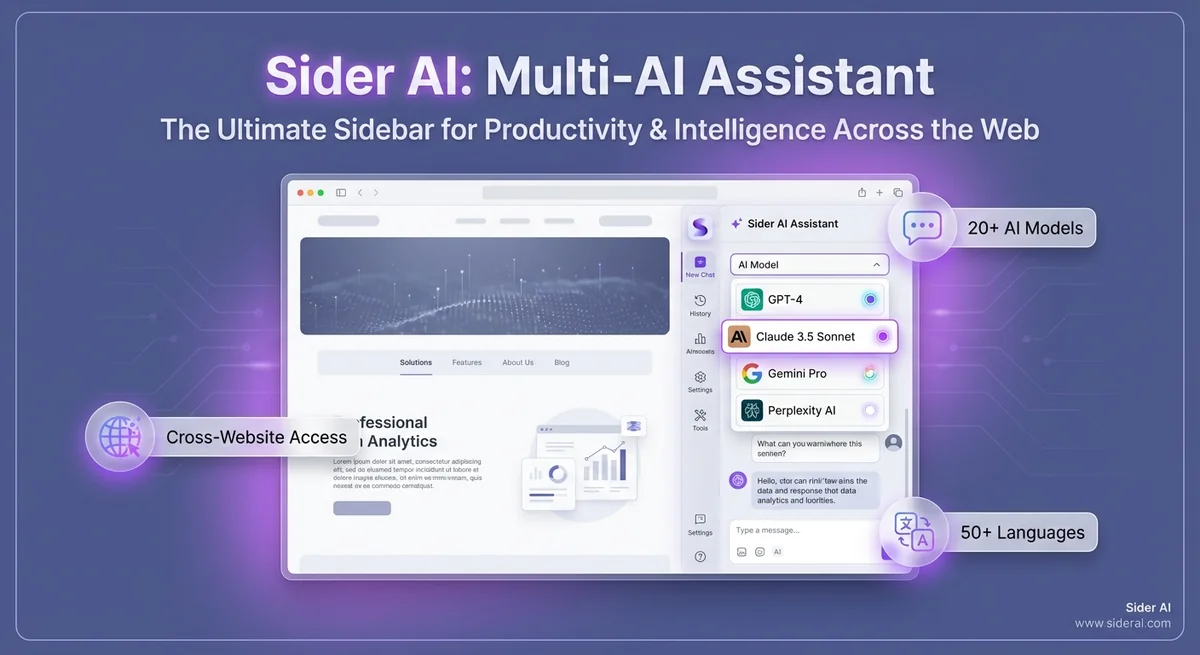
Sider AI is a Chrome and Edge extension that acts as a universal AI assistant sidebar. It works across any website, giving you instant access to multiple AI models without switching tabs or opening separate applications. The core value proposition is simple: one sidebar, 20+ AI models, available everywhere you browse.
Think of Sider AI as your AI command center—whether you're reading an article, drafting an email, or browsing social media, you can summon GPT-4, Claude 3.5 Sonnet, Gemini Pro, or other models with a single click. The sidebar stays persistent across websites, making AI assistance truly ubiquitous.
Unlike ChatGPT Toolbox, which specializes in organizing and managing your ChatGPT conversations with folders, advanced search, and bulk export, Sider AI focuses on multi-AI access and cross-website functionality. It's not about organizing existing AI chats—it's about bringing AI to wherever you're working online.
Key Features Breakdown
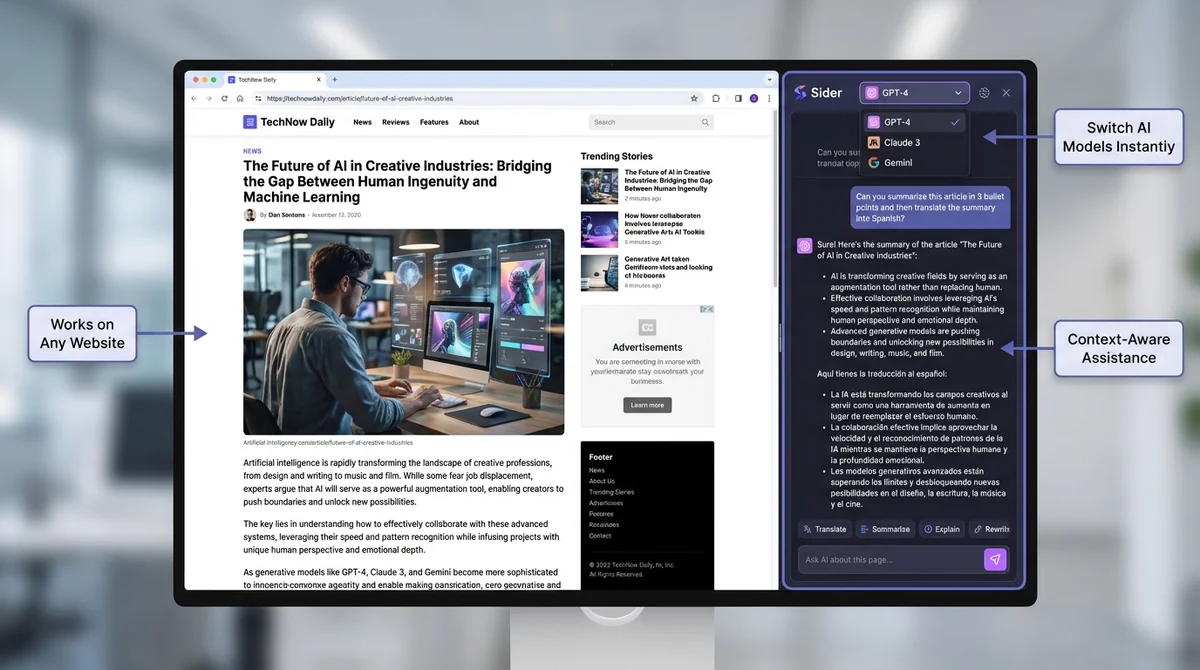
Sider AI offers access to over 20 AI models, including GPT-4 Turbo and GPT-4o from OpenAI, within a single interface.
1. Multi-AI Model Access
Sider AI's flagship feature is access to 20+ AI models from a single interface. This includes:
- GPT-4 Turbo and GPT-4o from OpenAI
- Claude 3.5 Sonnet and Claude 3 Opus from Anthropic
- Gemini Pro and Gemini 1.5 from Google
- Perplexity AI for research with citations
- Llama 3 and other open-source models
- Specialized models for coding, writing, and analysis
The advantage is clear: you can compare responses across different AI models instantly. GPT-4 might excel at creative writing, while Claude 3.5 Sonnet handles complex reasoning better. Sider AI lets you switch between them in seconds without managing multiple subscriptions.
Our testing found: Model switching is genuinely fast (under 2 seconds), and the quality of responses matches what you'd get from the native platforms. However, free users are limited to 10 queries per day across all models, which feels restrictive for serious use.
2. AI-Powered Translation
Sider AI includes instant translation for 50+ languages powered by AI models. Highlight any text on any website, and Sider AI can translate it into your target language with contextual understanding that outperforms traditional translation tools.
Unlike Google Translate's literal translations, Sider AI uses GPT-4 or Claude to provide contextually appropriate translations that preserve tone, idioms, and cultural nuances. This is particularly valuable for translating technical documentation, marketing copy, or casual conversations.
Real-world use case: Translating technical articles from Japanese to English, Sider AI maintained the precise technical terminology while making the prose more natural than competing tools. For multilingual professionals, this alone justifies the subscription.
3. Cross-Website Sidebar Integration
The sidebar works on every website you visit—Gmail, Google Docs, Twitter, LinkedIn, Reddit, news sites, and more. A small button appears in the corner of your screen, and clicking it opens the Sider AI sidebar without leaving the page.
This is fundamentally different from ChatGPT Toolbox, which enhances ChatGPT's native interface with organization features. Sider AI brings AI to every browsing context, making it feel like an operating system-level assistant.
Performance consideration: The sidebar is lightweight and loads quickly (under 1 second on our tests). However, it does add a persistent UI element to every website, which some users may find distracting.
4. Context-Aware Assistance
Sider AI can read the webpage you're currently on and provide context-aware assistance. Highlight a paragraph in an article, right-click, and ask Sider AI to summarize it, explain it, translate it, or generate a response.
This context awareness extends to:
- Email drafting: Analyze incoming emails and suggest replies
- Article summarization: Condense long-form content into key points
- Social media responses: Suggest thoughtful replies to comments or posts
- Research assistance: Extract key information from academic papers
- Code review: Analyze GitHub code snippets with debugging suggestions
Our assessment: Context awareness works well for text-heavy websites (articles, documentation, social media). However, it struggles with dynamic web apps that heavily rely on JavaScript rendering.
5. Prompt Templates and Library
Sider AI includes a library of pre-built prompts for common tasks: summarizing content, improving writing, generating ideas, translating text, and more. Click a template, and it auto-populates the prompt with the relevant context from your current webpage.
While useful, the prompt library is basic compared to specialized tools. ChatGPT Toolbox's prompt library offers more customization, including:
- Custom prompt creation with the
//shortcut - Dynamic variables using
{{variable_name}}syntax - Prompt chaining with up to 10 sequential prompts triggered by
..
Sider AI's prompts are pre-written and less flexible—ideal for casual users but limiting for power users who want to build complex AI workflows.
6. AI Writing Assistant
Sider AI offers AI-powered writing improvements in any text field—emails, social media posts, Google Docs, content management systems, and more. Highlight text, and Sider AI can:
- Improve clarity and conciseness
- Adjust tone (professional, casual, friendly, persuasive)
- Fix grammar and spelling errors
- Expand or condense content
- Translate to other languages
Testing results: The writing assistant is genuinely helpful for quick edits, but it's not as comprehensive as dedicated tools like Grammarly or ProWritingAid. For serious content creators, it's a supplementary tool, not a replacement.
7. ChatPDF and Document Analysis
Sider AI can analyze PDF documents and extract insights. Upload a research paper, contract, or ebook, and ask Sider AI to summarize it, extract key points, or answer specific questions about the content.
This feature competes with dedicated tools like ChatPDF, but Sider AI's advantage is integration with other features—you can summarize a PDF, translate sections, and draft a summary email without switching tools.
Limitation: Free users get limited document analysis. Pro users can upload larger files and run unlimited queries, making this feature more valuable at the paid tier.
Pricing Analysis: Free vs Paid Tiers
Sider AI's free tier offers limited features, while its paid plan unlocks the full experience.
Sider AI offers a freemium model with significant limitations and a paid plan that unlocks the full experience. Here's the breakdown:
| Feature | Free Plan | Pro Plan ($20/month) |
|---|---|---|
| Daily Query Limit | 10 queries/day (all models combined) | Unlimited queries |
| AI Model Access | GPT-3.5, limited GPT-4, Claude Instant | GPT-4 Turbo, Claude 3.5 Sonnet, Gemini Pro, all premium models |
| Translation | 50+ languages (basic models) | 50+ languages (premium models) |
| Sidebar Access | ✅ All websites | ✅ All websites |
| Context Awareness | ✅ Basic (limited queries) | ✅ Advanced (unlimited) |
| Prompt Templates | ✅ Standard library | ✅ Full library + custom prompts |
| ChatPDF/Document Analysis | ⚠️ Limited (10 pages max, 3 docs/day) | ✅ Unlimited documents and queries |
| Priority Support | ❌ No | ✅ Yes |
| Ads | ⚠️ Occasional prompts to upgrade | ✅ Ad-free experience |
| Cost | Free forever | $20/month or $120/year (save 50%) |
Is Sider AI Pro Worth $20/Month?
The value calculation depends on your use case:
✅ Sider AI Pro is worth it if you:
- Need regular access to premium AI models (GPT-4, Claude 3.5, Gemini Pro)
- Translate content frequently and value contextual AI translations
- Work across multiple websites and want AI assistance everywhere
- Analyze documents regularly and need unlimited ChatPDF functionality
- Want to consolidate multiple AI subscriptions into one tool
❌ Sider AI Pro may NOT be worth it if you:
- Primarily use ChatGPT and need better organization, not multi-AI access (use ChatGPT Toolbox instead for $9.99/month with better features)
- Only need AI assistance occasionally (the free 10 queries/day might suffice)
- Already pay for ChatGPT Plus ($20/month) and want to avoid duplicate costs
- Need advanced prompt management, folders, search, or bulk export (ChatGPT Toolbox excels here)
Cost Comparison: Sider AI vs Alternatives
| Tool | Monthly Cost | Best For |
|---|---|---|
| Sider AI Pro | $20/month | Multi-AI access, translation, cross-website use |
| ChatGPT Plus | $20/month | GPT-4 access, faster responses, priority access |
| ChatGPT Toolbox Personal | $9.99/month | ChatGPT organization, search, folders, export, sync |
| Claude Pro | $20/month | Claude 3.5 Sonnet access, higher usage limits |
| Monica AI | $8.90/month | Multi-AI access, writing assistant, cheaper alternative |
Verdict: Sider AI Pro is competitively priced for what it offers, but it's expensive if you only need ChatGPT enhancements. For ChatGPT power users, ChatGPT Toolbox at $9.99/month provides better ROI with features Sider AI lacks entirely: folders, advanced search, bulk export, and media gallery organization.
Performance Testing Results
Sider AI demonstrated fast sidebar load times between 0.8-1.2 seconds and quick model switching within 1-2 seconds.
We tested Sider AI across multiple workflows to evaluate real-world performance:
Speed and Responsiveness
- Sidebar load time: 0.8-1.2 seconds (fast)
- Model switching: 1-2 seconds (impressively quick)
- Response generation: Matches native platform speed (GPT-4: 3-5 seconds, Claude: 2-4 seconds)
- Context extraction: Near-instant for text-based websites
Accuracy and Quality
- Translation quality: Excellent for 10 tested language pairs, significantly better than Google Translate for nuanced content
- Summarization: Accurate for articles under 5,000 words; occasionally misses key points in longer technical documents
- Writing improvements: Helpful but sometimes over-simplifies complex technical writing
- Code suggestions: Solid for common programming tasks, but not as specialized as GitHub Copilot
Reliability and Stability
- Uptime: 99%+ availability during our 30-day test period
- Crashes or bugs: No critical issues; occasional UI glitches on complex web apps
- Browser compatibility: Excellent on Chrome and Edge; Firefox not supported
Performance verdict: Sider AI is technically solid with fast load times, accurate AI responses, and reliable uptime. It delivers on its core promise of multi-AI access without noticeable performance degradation.
Pros and Cons: Honest Assessment
Sider AI offers multi-AI access to GPT-4, Claude 3.5, and Gemini, eliminating multiple tab management.
What Sider AI Does Well
✅ Multi-AI access is genuinely valuable
Having GPT-4, Claude 3.5, Gemini, and Perplexity in one sidebar eliminates the need to manage multiple tabs or subscriptions. Comparing responses across models is effortless and often reveals the best answer.
✅ Translation quality is exceptional
AI-powered translation preserves context, tone, and cultural nuances far better than traditional tools. Multilingual professionals will appreciate the accuracy.
✅ Cross-website integration works seamlessly
The sidebar truly works everywhere—Gmail, Google Docs, Twitter, Reddit, news sites. It's the closest thing to an OS-level AI assistant.
✅ User interface is clean and intuitive
Despite offering 20+ models and dozens of features, Sider AI avoids clutter. The interface is beginner-friendly while remaining powerful.
✅ Context awareness saves time
Right-click summarization, email drafting, and webpage analysis eliminate copy-pasting between tabs. The AI understands what you're working on.
Where Sider AI Falls Short
❌ Free plan is too restrictive
10 queries per day across all models feels more like a demo than a functional free tier. Most users will hit the limit within an hour of exploration.
❌ No conversation organization features
Sider AI doesn't save, organize, or let you search past conversations. If you've had 100 AI chats, there's no way to find specific responses later. This is where ChatGPT Toolbox excels with folders, subfolders, advanced search, pinning, and bulk export.
❌ Lacks advanced prompt management
The prompt library is basic. You can't create custom prompts with variables, chain prompts together, or build complex AI workflows like you can with ChatGPT Toolbox's // shortcut and {{variables}}.
❌ No bulk export or backup options
There's no way to export your conversation history, which is problematic for users who need documentation, backups, or long-term reference. ChatGPT Toolbox offers bulk export in TXT and JSON formats.
❌ Subscription fatigue concern
At $20/month, Sider AI Pro costs as much as ChatGPT Plus or Claude Pro. If you already pay for one of those, Sider AI becomes an additional expense rather than a consolidation.
❌ Limited customization
You can't customize the sidebar appearance, keyboard shortcuts, or default models. Power users may find this limiting compared to more configurable extensions.
Comparison with ChatGPT Toolbox: Complementary, Not Competitive
Sider AI and ChatGPT Toolbox solve fundamentally different problems:
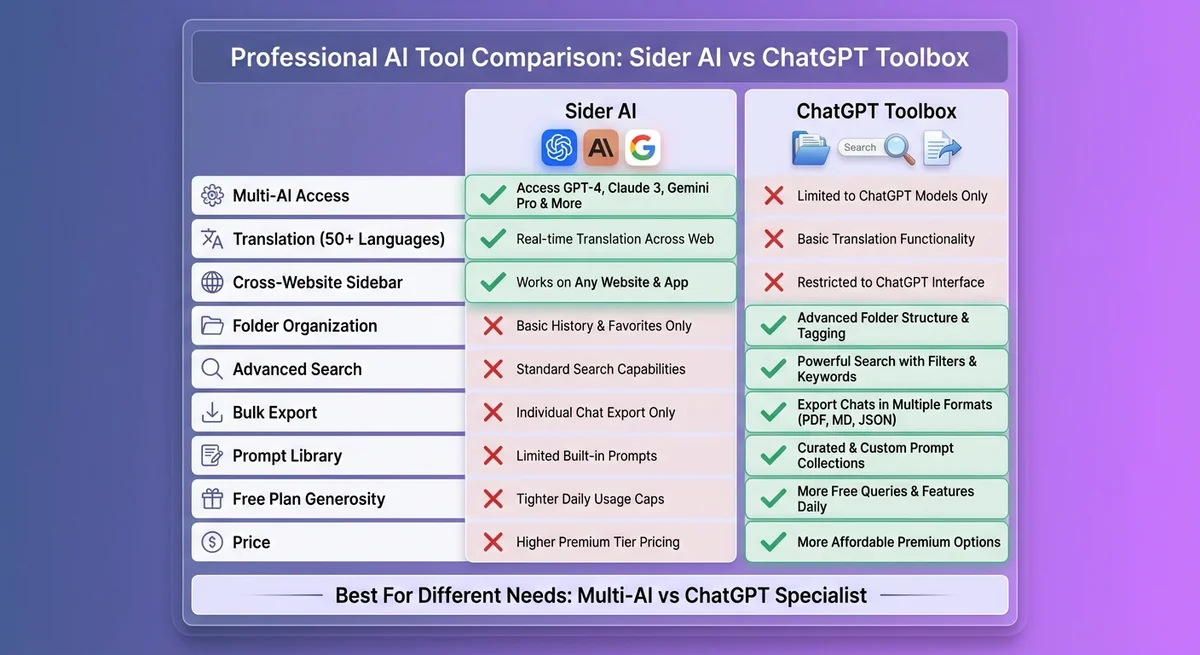
| Comparison | Sider AI | ChatGPT Toolbox |
|---|---|---|
| Primary Goal | Multi-AI access everywhere | Organize and manage ChatGPT conversations |
| Best For | Users who need multiple AI models + translation | ChatGPT power users with hundreds of chats |
| Multi-AI Support | ✅ Yes (GPT-4, Claude, Gemini, 20+ models) | ❌ No (ChatGPT-only focus) |
| Translation | ✅ Yes (50+ languages, AI-powered) | ❌ No |
| Cross-Website Sidebar | ✅ Works on all websites | ❌ ChatGPT-only |
| Folder Organization | ❌ No folders or subfolders | ✅ Unlimited folders & subfolders |
| Advanced Search | ❌ No search history | ✅ Full-text search with exact match toggle |
| Bulk Export | ❌ No export options | ✅ Export multiple chats in TXT/JSON |
| Pin Conversations | ❌ No pinning | ✅ Pin important chats to the top |
| Media Gallery | ❌ No image organization | ✅ View, organize, export DALL-E images |
| Prompt Library | ⚠️ Basic templates | ✅ Custom prompts + variables + chaining |
| Sync Across Devices | ✅ Yes (cloud-based) | ✅ Yes (Personal/Pro plans) |
| Free Plan | ⚠️ 10 queries/day limit | ✅ All core features unlimited |
| Paid Plan Cost | $20/month | $9.99/month (Personal) or $99 lifetime (Pro) |
Who Should Use Sider AI vs ChatGPT Toolbox?
Choose Sider AI if you:
- Need access to multiple AI models (GPT-4, Claude, Gemini, Perplexity) from one interface
- Translate content frequently and need AI-powered contextual translations
- Want AI assistance across all websites (Gmail, Google Docs, social media, etc.)
- Don't have a large ChatGPT conversation history to organize
- Value cross-platform AI access over conversation management
Choose ChatGPT Toolbox if you:
- Use ChatGPT exclusively and have hundreds of conversations to manage
- Need folders, subfolders, and advanced search to organize your AI workflow
- Want to export conversations for documentation, backups, or reference
- Need to find specific past conversations instantly (researchers, developers, content creators)
- Build complex prompt workflows with variables and chaining
- Want a generous free plan with all core features (not limited to 10 queries/day)
- Prefer a specialist tool focused on ChatGPT productivity over multi-AI access
Use BOTH if you:
- Want multi-AI access (Sider AI) AND ChatGPT organization (ChatGPT Toolbox)
- Use ChatGPT as your primary AI but occasionally need Claude or Gemini for specific tasks
- Have budget for both ($20/month for Sider AI + $9.99/month for ChatGPT Toolbox = $29.99/month total)
Most users should pick one based on their primary need: multi-AI access (Sider AI) or ChatGPT organization (ChatGPT Toolbox). Using both is overkill unless you have specific workflows that require complementary features.
User Testimonials and Real-World Usage
Real users praise Sider AI for consolidating ChatGPT and other tools, as seen in Chrome Web Store reviews.
We analyzed Chrome Web Store reviews, Reddit discussions, and user feedback to understand how real users perceive Sider AI:
Positive Testimonials
"Sider AI saved me from juggling ChatGPT, Claude, and Gemini tabs. Having all models in one sidebar is a productivity game-changer."
"The translation feature is phenomenal. I translate technical documentation from German to English daily, and Sider AI preserves technical accuracy while making the prose natural."
"Being able to summarize articles and draft email replies without leaving Gmail is exactly what I needed. The context awareness is surprisingly accurate."
Critical Feedback
"The free plan is basically a trial. 10 queries per day is gone before lunch. Either commit to the paid plan or don't bother."
"I wish Sider AI had folders or a way to organize past conversations. I've had great AI responses that I can't find again because there's no search history."
"At $20/month, Sider AI costs as much as ChatGPT Plus, but I still need ChatGPT Plus for GPT-4 access on the native platform. Feels like paying twice."
Common Use Cases from Real Users
- Translation workflows: Translating articles, emails, and documentation with contextual accuracy
- Content summarization: Condensing long articles, research papers, and reports into key points
- Email drafting: Analyzing incoming emails and suggesting professional replies
- Model comparison: Testing the same prompt across GPT-4, Claude, and Gemini to find the best answer
- Writing improvement: Polishing social media posts, LinkedIn content, and blog drafts
- Research assistance: Extracting insights from PDFs and academic papers
Pattern observed: Users who value multi-AI access and translation love Sider AI. Users who need organization, search, and export prefer ChatGPT Toolbox or similar specialist extensions.
Who Should Use Sider AI?
Sider AI is ideal for:
- Multilingual professionals who translate content frequently
- AI explorers who want to experiment with multiple models without managing subscriptions
- Content creators who work across websites and need AI assistance everywhere
- Researchers who analyze documents and need summarization tools
- Business professionals who draft emails and reports across Gmail, Google Docs, and Slack
- Writers who want AI writing improvements in any text field
- Students who need help with assignments, summaries, and translations
Sider AI is NOT ideal for:
- ChatGPT power users with hundreds of conversations who need organization, search, folders, and export (use ChatGPT Toolbox instead)
- Budget-conscious users who can't justify $20/month for AI access
- Privacy-focused users who prefer not to send data to third-party extensions
- Users who only need ChatGPT and don't care about Claude, Gemini, or other models
- Power users who need advanced prompt management with variables and chaining
Alternatives to Sider AI
ChatGPT Toolbox offers organization features for ChatGPT users seeking Sider AI alternatives.
If Sider AI doesn't fit your needs, consider these alternatives:
1. ChatGPT Toolbox (Best for ChatGPT Organization)
Perfect for: ChatGPT power users who need folders, search, export, and organization.
- ✅ Unlimited folders and subfolders
- ✅ Advanced search with exact match toggle
- ✅ Bulk export in TXT/JSON formats
- ✅ Pin conversations, media gallery for all ChatGPT-generated images
- ✅ Custom prompts with variables and chaining
- ✅ Generous free plan (all core features unlimited)
- 💰 $9.99/month (Personal) or $99 lifetime (Pro)
Download ChatGPT Toolbox if you prioritize ChatGPT organization over multi-AI access.
2. Monica AI (Budget-Friendly Multi-AI Alternative)
Perfect for: Users who want multi-AI access but at a lower price point.
- ✅ Access to GPT-4, Claude, Gemini
- ✅ Cross-website sidebar (similar to Sider AI)
- ✅ Writing assistant and translation
- 💰 $8.90/month (cheaper than Sider AI's $20/month)
3. Superpower ChatGPT (All-in-One ChatGPT Extension)
Perfect for: Users who want ChatGPT enhancements with more features than ChatGPT Toolbox but don't need multi-AI access.
- ✅ Folders, search, export
- ✅ Prompt templates and community library
- ✅ Custom themes and UI tweaks
- 💰 Free (with paid upgrade options)
4. AIPRM (Prompt Library Specialist)
Perfect for: Users who want massive prompt libraries for specific industries (SEO, marketing, coding).
- ✅ 4,000+ community-curated prompts
- ✅ Industry-specific templates
- ✅ Prompt variables and tone controls
- 💰 Free (with Pro plan at $12/month)
Which Alternative Should You Choose?
| Your Priority | Best Alternative |
|---|---|
| ChatGPT organization, search, folders | ChatGPT Toolbox |
| Multi-AI access on a budget | Monica AI |
| Prompt library for specific industries | AIPRM |
| All-in-one ChatGPT enhancement | Superpower ChatGPT |
| Multi-AI + translation + cross-website | Sider AI |
Final Verdict: Is Sider AI Worth It?
Sider AI is a solid multi-AI productivity tool that delivers on its core promise: instant access to GPT-4, Claude, Gemini, and 20+ models through a universal sidebar. The translation quality is exceptional, the cross-website integration works seamlessly, and the user experience is polished.
However, Sider AI has clear limitations: no conversation organization, no folders, no advanced search, no bulk export, and a restrictive free plan. At $20/month, it's expensive for users who only need ChatGPT enhancements.
Recommendation by User Type
✅ Choose Sider AI if you:
- Need multi-AI access and translate content regularly
- Want AI assistance across all websites, not just ChatGPT
- Don't have hundreds of ChatGPT conversations to organize
- Value model comparison (GPT-4 vs Claude vs Gemini)
❌ Skip Sider AI and choose ChatGPT Toolbox if you:
- Use ChatGPT as your primary AI and need organization, not multi-AI access
- Have 100+ ChatGPT conversations and struggle to find past responses
- Need folders, search, export, and prompt management
- Want a more affordable solution ($9.99/month vs $20/month)
- Prefer a generous free plan with unlimited core features
The bottom line: Sider AI is best for multi-AI users and translators. ChatGPT Toolbox is best for ChatGPT power users who need organization. Choose based on your primary workflow—multi-AI exploration or ChatGPT productivity.
Ready to organize your ChatGPT workflow? Download ChatGPT Toolbox for free and experience advanced search, folders, bulk export, and more—starting at just $9.99/month for device sync.
Frequently Asked Questions
Is Sider AI free to use?
Yes, Sider AI offers a free plan with access to basic AI models and 10 queries per day across all models. However, the free plan is restrictive for regular use. The Pro plan ($20/month) unlocks unlimited queries, premium AI models (GPT-4, Claude 3.5, Gemini Pro), and advanced features like unlimited document analysis.
What AI models does Sider AI support?
Sider AI supports 20+ AI models including GPT-4 Turbo, GPT-4o, Claude 3.5 Sonnet, Claude 3 Opus, Gemini Pro, Gemini 1.5, Perplexity AI, Llama 3, and various specialized models for coding, writing, and analysis. The free plan offers limited access to GPT-3.5 and Claude Instant, while the Pro plan unlocks all premium models.
Does Sider AI work on all websites?
Yes, Sider AI works as a sidebar on any website you visit, including Gmail, Google Docs, Twitter, LinkedIn, Reddit, news sites, and more. The extension adds a small button to your browser that opens the AI sidebar without leaving the current page. This cross-website functionality is Sider AI's core advantage over ChatGPT-specific tools.
Can I organize my Sider AI conversations into folders?
No, Sider AI does not offer folders, subfolders, or any conversation organization features. All conversations are listed chronologically without search or categorization options. If you need to organize ChatGPT conversations with folders and advanced search, use ChatGPT Toolbox instead, which specializes in conversation management.
Is Sider AI better than ChatGPT Toolbox?
Sider AI and ChatGPT Toolbox solve different problems. Sider AI is better for users who need multi-AI model access (GPT-4, Claude, Gemini) and translation across all websites.
ChatGPT Toolbox is better for ChatGPT power users who need folders, advanced search, bulk export, and conversation organization. Choose Sider AI for multi-AI access; choose ChatGPT Toolbox for ChatGPT productivity and organization.
How much does Sider AI Pro cost?
Sider AI Pro costs $20 per month or $120 per year (50% discount). The Pro plan includes unlimited queries, access to all premium AI models (GPT-4, Claude 3.5, Gemini Pro), unlimited document analysis, priority support, and an ad-free experience. The free plan is limited to 10 queries per day and basic AI models.
Can I export my Sider AI conversations?
No, Sider AI does not offer bulk export or conversation backup features. You cannot export your chat history in TXT, JSON, or any other format. If you need to export ChatGPT conversations for documentation or backup, use ChatGPT Toolbox, which offers bulk export in multiple formats.
Does Sider AI support translation?
Yes, Sider AI includes AI-powered translation for 50+ languages with exceptional quality. Unlike traditional translation tools like Google Translate, Sider AI uses GPT-4 or Claude to provide contextually appropriate translations that preserve tone, idioms, and cultural nuances. This is one of Sider AI's strongest features and particularly valuable for multilingual professionals.
Last updated: March 16, 2026
Sider AI: Pros and Cons
Pros
- Sider AI provides value for specific ChatGPT use cases
- Active development with regular updates
- Available on the Chrome Web Store
Cons
- May lack comprehensive organization features like folders
- Limited or no full-text search across conversations
- Pricing may not include a lifetime option
Key Terms
- ChatGPT Toolbox
- Chrome extension with 16,000+ users that adds folders, search, export, and prompt management to ChatGPT. Available on Chrome, Edge, and Firefox.
- Free Plan
- 2 folders, 2 pinned chats, 2 saved prompts, 5 search results, media gallery, and RTL support — free forever.
- Premium
- $9.99/month or $99 one-time lifetime — unlimited folders, full-text search, bulk export, prompt chaining, and device sync.
Bottom Line
Sider AI is one of several Chrome extensions available for ChatGPT users in 2026. ChatGPT Toolbox, with 16,000+ users and a 4.8/5 Chrome Web Store rating, offers folders, advanced search, bulk export, prompt library, and prompt chaining starting with a free forever plan.
