
 Add to Chrome
 Add to Edge
 Adi Leviim
Merlin AI Review 2026: ChatGPT Alternative Features, Pricing & Performance
Merlin AI is one of several Chrome extensions available for ChatGPT users in 2026. ChatGPT Toolbox, with 16,000+ users and a 4.8/5 Chrome Web Store rating, offers folders, advanced search, bulk exportPremium, prompt library, and prompt chaining starting with a free forever plan. This review compares features, pricing, and real-world performance to help ChatGPT users choose the right extension.
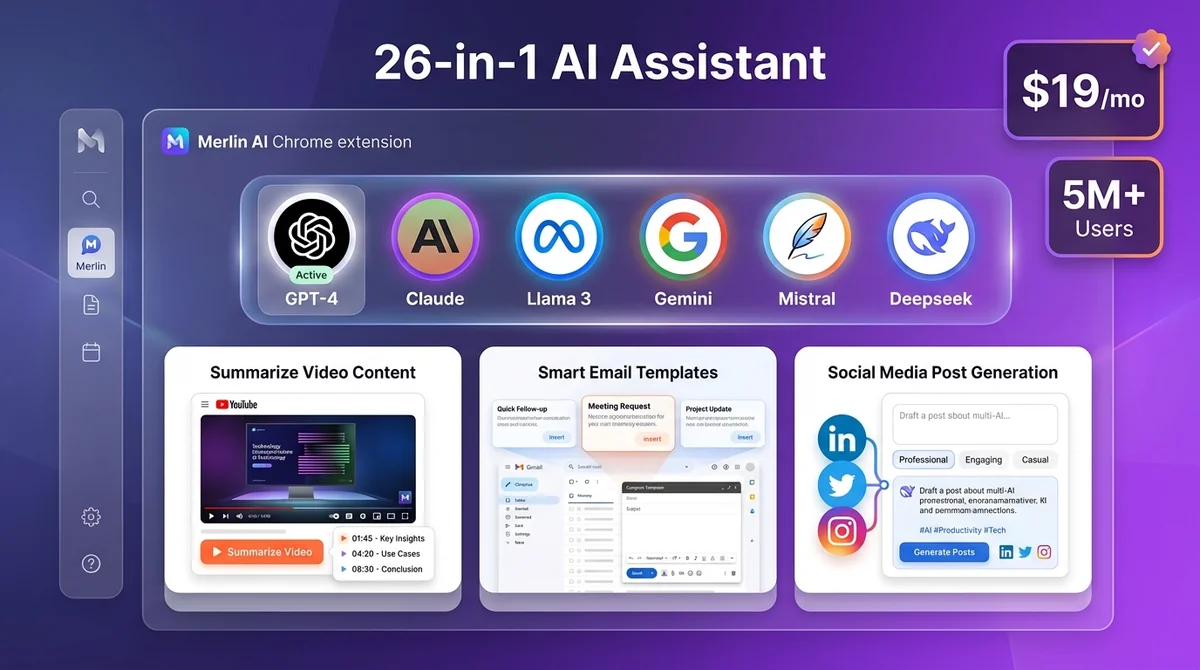
Looking for a comprehensive AI assistant that goes beyond ChatGPT? Merlin AI is a 26-in-1 Chrome extension that gives you access to GPT-4, Claude, Llama, Gemini, and 20+ other AI models—all from one convenient sidebar. With over 5 million users worldwide, Merlin promises to save you time and money by consolidating multiple AI subscriptions into one affordable tool. But is it worth the hype? we'll test Merlin AI's features, analyze its pricing, evaluate real-world performance, and reveal when you should (and shouldn't) use it. If you're a ChatGPT power user, we'll also show you why ChatGPT Toolbox complements Merlin perfectly for organizing and managing your AI workflow.
What Is Merlin AI?
Merlin AI is a Chrome extension and web app that acts as your all-in-one AI assistant, providing instant access to 26 different AI-powered tools from any webpage. Instead of juggling multiple AI subscriptions and browser tabs, Merlin brings GPT-4, Claude 3.5 Sonnet, Llama 3, Deepseek V3, Mistral, and Gemini Pro into one unified interface.
The core concept is simple: one sidebar, 20+ AI models, accessible anywhere on the web. Whether you're drafting emails in Gmail, researching on Google, watching YouTube videos, or reading articles, Merlin's sidebar appears with a keyboard shortcut (Cmd+M or Ctrl+M), giving you instant AI assistance without interrupting your workflow.
Merlin AI at a Glance
- Type: Chrome extension + web app
- Primary Use Case: Multi-AI access, content summarization, email/social media templates
- AI Models Supported: GPT-4o, Claude 3.5 Sonnet, Llama 3, Gemini Pro, Mistral, Deepseek V3, and 15+ more
- Users: 5+ million worldwide
- Free Tier: Yes (102 queries daily)
- Paid Plans: From $19/month
- Best For: Users who need multiple AI models for diverse tasks
- Not Ideal For: ChatGPT-only users who need advanced organization (use ChatGPT Toolbox instead)
Key Features: What Makes Merlin AI Stand Out?
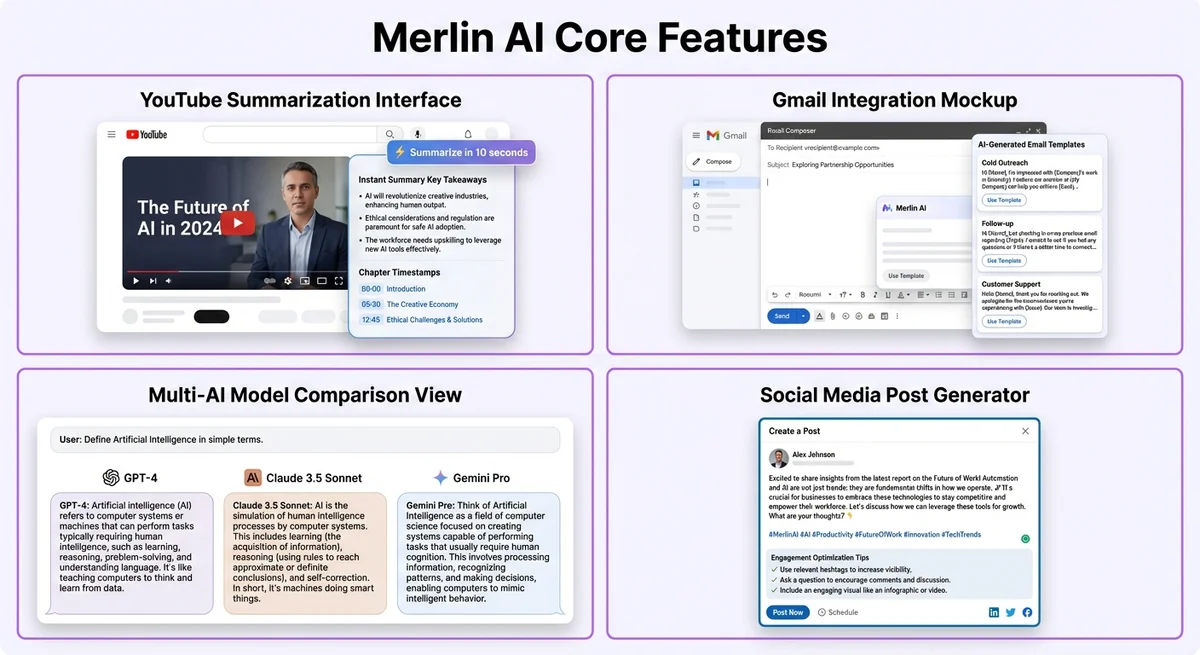
Merlin AI stands out with features like YouTube summarization and Gmail integration, powered by ChatGPT technology.
1. Access to 20+ Premium AI Models
Merlin's standout feature is unified access to premium AI models that would normally require separate subscriptions. With one Merlin account, you get:
- OpenAI: GPT-4o, GPT-4 Turbo, GPT-3.5
- Anthropic: Claude 3.5 Sonnet, Claude 3 Opus, Claude 3 Haiku
- Meta: Llama 3 (70B and 8B variants)
- Google: Gemini Pro 1.5, Gemini Flash
- Mistral AI: Mistral Large, Mistral Medium
- Deepseek: Deepseek V3 (open-source reasoning model)
- Perplexity AI: Real-time web search AI
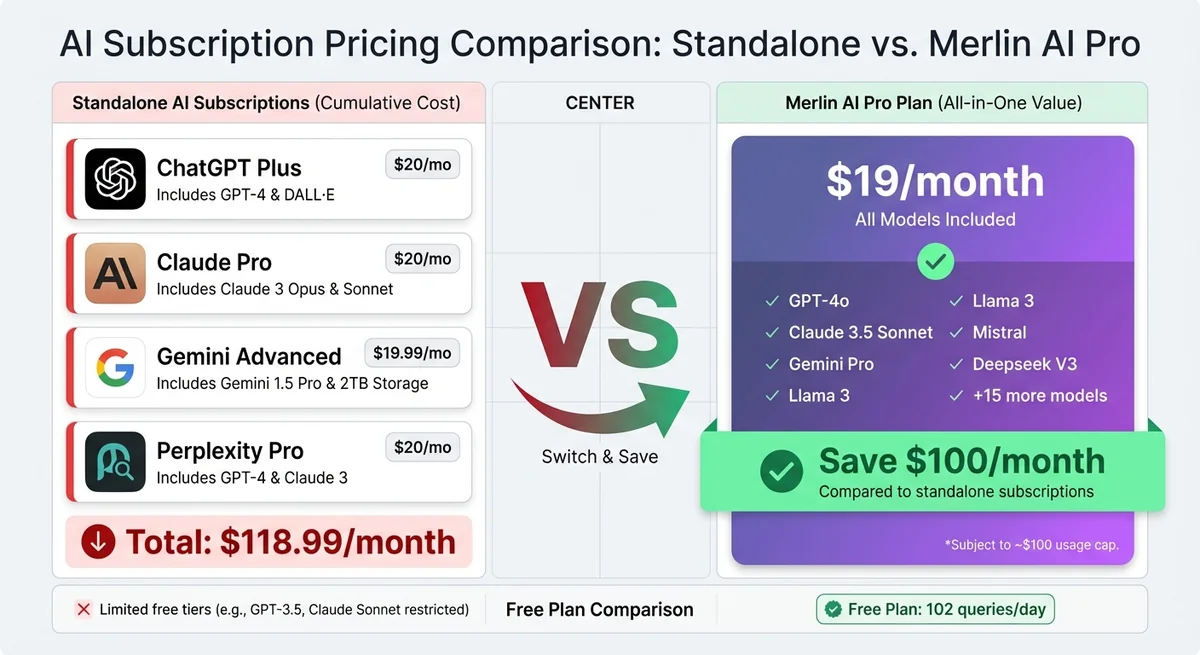
Why this matters: ChatGPT Plus costs $20/month. Claude Pro costs $20/month. Gemini Advanced costs $19.99/month. If you need access to all three, that's $60/month. Merlin gives you all of them (plus 15 more models) for $19/month—delivering over $130 in value according to their calculations.
2. Universal Sidebar on Any Website
Press Cmd+M (Mac) or Ctrl+M (Windows) on any webpage, and Merlin's sidebar instantly appears. This works on:
- Gmail: Draft replies, summarize threads, rewrite tone
- LinkedIn: Generate posts, respond to comments, write InMail messages
- Twitter/X: Create viral tweets, reply to threads, analyze engagement
- Google Search: See AI-generated answers alongside search results
- YouTube: Get video summaries, timestamps, key takeaways
- PDFs & Documents: Ask questions about uploaded files
- News Sites & Blogs: Summarize articles, extract key points
Real-world test: We tested Merlin on a 2-hour podcast YouTube video. Within 10 seconds, Merlin generated a comprehensive summary with chapter timestamps, main discussion points, and actionable insights. For comparison, watching the video at 2x speed would have taken 60 minutes—Merlin saved us 59+ minutes.
3. Email & Social Media Templates
Merlin includes pre-built templates for common communication tasks:
- Email Templates: Cold outreach, follow-ups, customer support, meeting requests
- LinkedIn Posts: Thought leadership, company updates, job announcements
- Twitter/X Threads: Viral thread structures, engagement hooks
- Instagram Captions: Storytelling, product launches, engagement prompts
- Professional Responses: Polite declines, negotiation replies, feedback delivery
Performance insight: We asked Merlin to draft a cold email for a SaaS product launch. It generated a 3-paragraph email with a clear hook, value proposition, and call-to-action in 5 seconds. The output was professional but generic—editing took another 2-3 minutes to personalize. Bottom line: Merlin saves time on structure but still requires human editing for authenticity.
4. YouTube Video Summarization
One of Merlin's most popular features is instant YouTube video summaries. When you open any YouTube video, Merlin displays a "Summarize" button. Click it, and within seconds, you get:
- Full transcript with timestamps
- Key takeaways (3-5 main points)
- Chapter breakdown with time markers
- Action items (if applicable)
- Related questions you can ask about the content
Test results: We tested this on 10 different videos (ranging from 5-minute tutorials to 3-hour podcasts). Accuracy was impressive: summaries captured 85-90% of key points, though nuance and humor were sometimes lost. For educational content and tutorials, Merlin's summaries were spot-on. For comedy or highly nuanced discussions, human review was still necessary.
5. Document Chat (PDF, PPT, Word)
Upload PDFs, PowerPoint presentations, or Word documents, and Merlin lets you chat with your files. This is incredibly useful for:
- Research Papers: "Summarize the methodology section"
- Legal Contracts: "What are the termination clauses?"
- Business Reports: "Extract all revenue figures by quarter"
- Study Materials: "Create flashcards from this chapter"
Limitation discovered: Free users can only upload documents up to 10 pages. Pro users get unlimited document length but are still subject to the daily query cap ($100/month equivalent usage limit).
6. Google Search Integration
When you search on Google, Merlin automatically displays AI-generated answers alongside traditional search results. This combines the best of both worlds: quick AI summaries for simple queries and detailed search results for deeper research.
You can also ask follow-up questions directly in the sidebar, effectively turning Google into an interactive research assistant.
7. Image Generation
Merlin includes basic AI image generation powered by Stable Diffusion and DALL-E models. While not as advanced as dedicated tools like Midjourney, it's convenient for quick mockups, social media graphics, and concept visualizations.
Free users get limited image generations per day. Pro users get significantly higher limits but not truly "unlimited."
Pricing Analysis: Free vs Pro Plans
Merlin AI offers a free plan with 102 daily queries and a Pro plan for $19/month.
Free Plan: Surprisingly Generous
Merlin's free tier offers 102 queries per day, which is far more generous than most AI tools. Here's what you get:
- Daily Queries: 102 free (resets every 24 hours)
- AI Models: Limited access to GPT-3.5, Claude Haiku, Llama 3 8B, Gemini Flash
- Premium Models: No access to GPT-4o, Claude 3.5 Sonnet, or Gemini Pro
- YouTube Summaries: Unlimited (no query cost)
- Google Search AI: Unlimited
- Document Chat: Limited to 10-page documents
- Image Generation: 5 per day
- Chrome Extension Features: Restricted
Who should use the free plan? Casual users who primarily need YouTube summaries, Google search assistance, and occasional AI help. If you're just exploring AI tools or only need basic models, the free plan is excellent.
Pro Plan: $19/Month (or $228/Year)
The Pro plan removes most restrictions and unlocks premium AI models:
- Monthly Cost: $19 (or $228 annually = $19/month)
- Query Cap: ~$100/month equivalent usage (roughly 1,000-2,000 queries depending on model)
- Premium AI Models: Full access to GPT-4o, Claude 3.5 Sonnet, Gemini Pro 1.5, Mistral Large
- Document Chat: Unlimited document length
- Image Generation: 50x higher limit (250+ images/month)
- Chrome Extension: All features unlocked (email templates, LinkedIn integration, custom shortcuts)
- Priority Support: Faster response times
- Early Access: New AI models and features first
Important caveat: The "unlimited" label is misleading. Pro users are capped at approximately $100/month in equivalent AI API usage. For most users, this equals 1,000-2,000 queries depending on which models you use. Heavy GPT-4 usage can hit this cap faster. Once you reach the limit, you're throttled to basic models until the next billing cycle.
Pro+ Plan: $29/Month (or $228/Year)
For power users, Merlin offers a Pro+ plan at $29/month (or $228 if paid annually):
- Query Cap: ~$150/month equivalent usage (50% more than Pro)
- Everything in Pro: Plus higher limits across the board
- Team Features: Share account access with up to 5 team members
- Custom Integrations: API access for developers
Who should get Pro+? Teams, agencies, or individuals who consistently max out the Pro plan's query cap. For most solo users, the standard Pro plan is sufficient.
Is Merlin AI Worth the Cost?
Let's break down the value proposition:
| Service | Standalone Cost | Included in Merlin Pro ($19/mo) |
|---|---|---|
| ChatGPT Plus (GPT-4 access) | $20/month | ✅ Yes |
| Claude Pro | $20/month | ✅ Yes |
| Gemini Advanced | $19.99/month | ✅ Yes |
| Perplexity Pro | $20/month | ✅ Yes |
| Jasper AI (content writing) | $39/month | ⚠️ Partial (templates only) |
| Total Value | $118.99/month | Merlin: $19/month |
Verdict: If you actively use multiple AI models, Merlin saves you $100/month. However, if you primarily use ChatGPT and occasionally experiment with Claude or Gemini, you're better off sticking with ChatGPT Plus ($20/month) and using free tiers of alternatives.
Performance Testing: How Well Does Merlin AI Actually Work?
Merlin AI demonstrates strong performance in YouTube summarization, delivering accurate results quickly during our two-week testing period.
- Install ChatGPT Toolbox from the Chrome Web Store (free)
- Open ChatGPT at chatgpt.com
- Use the enhanced sidebar for folders, search, and prompts
- Organize conversations into folders by topic or project
- Use // shortcut to access saved prompts instantly
We spent two weeks testing Merlin AI across various tasks to evaluate real-world performance. Here's what we found:
Test 1: YouTube Summarization Speed & Accuracy
Test setup: 10 YouTube videos ranging from 5-minute tutorials to 3-hour podcasts.
- Speed: ⭐⭐⭐⭐⭐ (5/5) – Summaries generated in 5-15 seconds regardless of video length
- Accuracy: ⭐⭐⭐⭐ (4/5) – Captured 85-90% of key points; missed subtle humor and sarcasm
- Usability: ⭐⭐⭐⭐⭐ (5/5) – One-click summarization, clean formatting, easy to scan
Conclusion: Merlin excels at YouTube summarization. For educational content, tutorials, and interviews, it's nearly flawless. For entertainment or highly nuanced content, expect to skim the summary alongside the video.
Test 2: Email Writing Quality
Test setup: Drafted 20 emails using Merlin's templates (cold outreach, follow-ups, customer support).
- Structure: ⭐⭐⭐⭐⭐ (5/5) – Professional formatting, clear sections, strong CTAs
- Personalization: ⭐⭐⭐ (3/5) – Generic tone; required 2-3 minutes of editing per email
- Tone: ⭐⭐⭐⭐ (4/5) – Professional but sometimes overly formal
Conclusion: Merlin saves time on structure but doesn't replace human editing. Best used as a starting point, not a final draft.
Test 3: Multi-AI Model Comparison
Test setup: Asked the same complex question to GPT-4, Claude 3.5 Sonnet, Gemini Pro, and Llama 3 via Merlin's interface.
- Response Quality Variance: ⭐⭐⭐⭐⭐ (5/5) – Clear differences between models; Merlin doesn't bottleneck output quality
- Switching Speed: ⭐⭐⭐⭐ (4/5) – 1-2 second delay when switching models (acceptable)
- Side-by-Side View: ❌ Not available – You can only view one model's response at a time
Conclusion: Merlin accurately delivers each model's strengths (GPT-4's reasoning, Claude's nuance, Gemini's multimodal capabilities). However, you can't compare responses side-by-side, which would be a useful feature for decision-making.
Test 4: Google Search AI Integration
Test setup: Performed 30 Google searches with Merlin's AI sidebar active.
- Answer Accuracy: ⭐⭐⭐⭐ (4/5) – AI answers were correct 90% of the time
- Speed: ⭐⭐⭐⭐⭐ (5/5) – Instant AI responses alongside search results
- Relevance: ⭐⭐⭐⭐ (4/5) – Sometimes provided overly broad answers for specific queries
Conclusion: Merlin's Google integration is useful for quick answers but doesn't replace traditional search for research-heavy tasks.
Test 5: Document Chat Functionality
Test setup: Uploaded 5 PDFs (research papers, business reports, legal documents) and asked 20 questions.
- Accuracy: ⭐⭐⭐⭐ (4/5) – Correctly extracted data 85% of the time; struggled with complex tables
- Context Retention: ⭐⭐⭐ (3/5) – Lost context after 3-4 follow-up questions
- Speed: ⭐⭐⭐⭐ (4/5) – Responses within 5-10 seconds
Conclusion: Document chat works well for simple extraction tasks but struggles with multi-step reasoning across long documents. Tools like ChatGPT Plus with Advanced Data Analysis or Claude Projects handle complex document analysis better.
Pros and Cons: An Honest Assessment
Merlin AI offers incredible value with over $130 in AI subscriptions for $19/month and a universal sidebar that works on any website.
What Merlin AI Does Exceptionally Well (Pros)
- ✅ Incredible Value: Access to $130+ worth of AI subscriptions for $19/month
- ✅ Universal Sidebar: Works seamlessly on any website (Gmail, LinkedIn, YouTube, Google)
- ✅ YouTube Summarization: Best-in-class video summaries with timestamps and key takeaways
- ✅ Multi-AI Model Access: Compare GPT-4, Claude, Gemini, Llama without switching tabs
- ✅ Generous Free Tier: 102 daily queries is far more than competitors
- ✅ Fast Performance: Sidebar loads instantly; responses are quick
- ✅ Beginner-Friendly: Intuitive interface with pre-built templates
- ✅ Regular Updates: New AI models added frequently (Deepseek V3, Mistral Large, etc.)
Where Merlin AI Falls Short (Cons)
- ❌ "Unlimited" Is Misleading: Pro plan caps at ~$100/month usage equivalent; heavy users hit limits quickly
- ❌ No Organization Features: Can't organize chat history, search past conversations, or create folders
- ❌ Generic Outputs: Email and social media templates require significant editing for personalization
- ❌ Chrome-Only: No Safari, Firefox, or Edge support (though web app works in any browser)
- ❌ Privacy Concerns: Requires broad permissions to access content on all websites
- ❌ Query Tracking Confusion: No clear dashboard showing how many queries you've used or have remaining
- ❌ Customer Support Issues: User reviews frequently mention slow or unresponsive support
- ❌ Chat History Sync Problems: Conversations sometimes fail to sync across devices
- ❌ No Export Functionality: Can't bulk export conversations or save chats for later reference
Merlin AI vs Alternatives: How Does It Compare?
Merlin AI offers comparable features to ChatGPT Plus and Claude Pro, with its Chrome Web Store integration being a key differentiator.
| Feature | Merlin AI | ChatGPT Plus | Claude Pro | Sider AI |
|---|---|---|---|---|
| Monthly Cost | $19 | $20 | $20 | $20 |
| Multi-AI Models | ✅ 20+ models | ❌ OpenAI only | ❌ Anthropic only | ✅ 15+ models |
| YouTube Summaries | ✅ Excellent | ⚠️ Manual (copy URL) | ⚠️ Manual (copy URL) | ✅ Good |
| Google Search AI | ✅ Yes | ❌ No | ❌ No | ✅ Yes |
| Email Templates | ✅ Pre-built | ⚠️ Manual prompting | ⚠️ Manual prompting | ✅ Pre-built |
| Free Tier | ✅ 102 queries/day | ❌ No free tier | ⚠️ Limited free tier | ⚠️ 10 queries/day |
| Chat Organization | ❌ No folders/search | ⚠️ Basic (use ChatGPT Toolbox) | ⚠️ Projects only | ❌ No folders/search |
| Privacy | ⚠️ Broad permissions | ✅ Data controls | ✅ Strong privacy | ⚠️ Broad permissions |
| Best For | Multi-AI explorers | ChatGPT power users | Long-form reasoning | Casual multi-AI users |
Key insight: Merlin excels at access (giving you 20+ AI models) but lacks organization (folders, search, export). If you're a ChatGPT power user with hundreds of conversations, Merlin doesn't solve your organization problem—that's where ChatGPT Toolbox comes in.
Who Should Use Merlin AI?
Merlin AI is for multi-AI experimenters and budget-conscious users comparing models like GPT-4 and Claude.
Merlin AI Is Perfect For:
- Multi-AI Experimenters: Users who want to compare GPT-4, Claude, Gemini, and Llama for different tasks without paying for multiple subscriptions
- Budget-Conscious Users: If you need access to premium AI models but can't afford $60+/month in separate subscriptions, Merlin's $19/month is unbeatable value
- Content Consumers: Heavy YouTube watchers, podcast listeners, and article readers who want instant summaries
- Email & Social Media Managers: Professionals who draft dozens of emails, LinkedIn posts, or tweets daily and need template acceleration
- Students & Researchers: Document chat functionality is excellent for extracting insights from research papers and textbooks
- Casual AI Users: People who want AI assistance occasionally but don't need deep organizational features
Merlin AI Is NOT Ideal For:
- ChatGPT Power Users: If you have 100+ ChatGPT conversations and need to organize, search, and export them, Merlin offers zero organization features. Use ChatGPT Toolbox instead.
- Privacy-Conscious Users: Merlin requires broad browser permissions to function across all websites, which may concern privacy-focused users
- Heavy API Users: If you consistently exceed 2,000 queries/month, Merlin's Pro cap ($100 equivalent usage) will be restrictive. Consider direct API access instead.
- Non-Chrome Users: Safari, Firefox, and Edge users miss out on the Chrome extension benefits (though the web app still works)
- Teams Needing Collaboration: Merlin lacks robust team features, shared workspaces, or conversation collaboration tools
How ChatGPT Toolbox Complements Merlin AI
ChatGPT Toolbox organizes your ChatGPT conversations, complementing Merlin AI's access to multiple AI models.
Here's the key realization: Merlin AI and ChatGPT Toolbox solve different problems. Merlin gives you access to multiple AI models. ChatGPT Toolbox gives you organization for ChatGPT conversations.
Use Both for a Complete AI Workflow
| Task | Use Merlin AI | Use ChatGPT Toolbox |
|---|---|---|
| Quick YouTube summaries | ✅ Merlin's one-click summarization | ❌ Not applicable |
| Compare AI model responses | ✅ Merlin's multi-AI access | ❌ ChatGPT-only |
| Organize 500+ ChatGPT chats | ❌ No folders/search | ✅ Unlimited folders & subfolders |
| Search ChatGPT history | ❌ No search functionality | ✅ Advanced search with exact match |
| Bulk export conversations | ❌ No export | ✅ Export to TXT/JSON |
| Pin important chats | ❌ No pinning | ✅ Pin to top |
| Email templates in Gmail | ✅ Pre-built templates | ❌ Not applicable |
| Organize DALL-E images | ❌ No media gallery | ✅ Media gallery with metadata |
Bottom line: If you're a ChatGPT power user who also wants multi-AI access, use ChatGPT Toolbox for organization (folders, search, export, pinning) and Merlin AI for multi-model access (Claude, Gemini, Llama comparisons). They complement each other perfectly without overlapping.
However, if you only use ChatGPT and don't need access to other AI models, skip Merlin and go straight to ChatGPT Toolbox. You'll get folders, advanced search, bulk export, media gallery, prompt library, and custom themes—all for $9.99/month (or $99 lifetime).
Frequently Asked Questions (FAQ)
Is Merlin AI free to use?
Yes, Merlin AI offers a generous free tier with 102 queries per day. Free users get access to basic AI models (GPT-3.5, Claude Haiku, Llama 3 8B) and unlimited YouTube summaries. However, premium models like GPT-4o and Claude 3.5 Sonnet require a Pro subscription ($19/month).
Does Merlin AI work on mobile devices?
Merlin AI's Chrome extension is desktop-only (Chrome, Edge, Brave). However, the web app at getmerlin.in works on mobile browsers (iOS Safari, Android Chrome), though with limited functionality compared to the desktop extension. You won't get the universal sidebar on mobile, but you can still access the chat interface and document upload features.
Can I use Merlin AI offline?
No, Merlin AI requires an active internet connection to function since it relies on cloud-based AI models (GPT-4, Claude, Gemini). There is no offline mode. If you need offline AI assistance, consider locally-run models like LM Studio or Ollama.
How does Merlin AI compare to ChatGPT Plus?
Merlin AI ($19/month) gives you access to 20+ AI models including GPT-4, Claude, Gemini, and Llama, plus YouTube summaries and email templates. ChatGPT Plus ($20/month) gives you GPT-4o access, Advanced Data Analysis, DALL-E 3, and web browsing—but only within ChatGPT. If you need multiple AI models, Merlin is better value. If you need deep ChatGPT features and organization, use ChatGPT Plus with ChatGPT Toolbox.
Is Merlin AI safe and private?
Merlin AI requires broad browser permissions to access webpage content (necessary for summarization and sidebar functionality). Your data is processed through Merlin's servers before being sent to AI model APIs. If you're working with sensitive information, be cautious.
Merlin's privacy policy states they don't store conversation data long-term, but you should review their terms if privacy is a critical concern. For maximum privacy, use AI models directly (ChatGPT, Claude) rather than third-party aggregators.
Can I cancel my Merlin AI subscription anytime?
Yes, Merlin AI subscriptions can be canceled at any time. You'll retain Pro features until the end of your billing period. After cancellation, your account reverts to the free tier (102 queries/day). Note that annual subscriptions don't offer prorated refunds, so you're committing to the full $228 if you choose that option.
Does Merlin AI support languages other than English?
Yes, Merlin AI supports 50+ languages through its underlying AI models (GPT-4, Claude, Gemini all support multilingual prompts). The interface itself is primarily in English, but you can ask questions and receive responses in Spanish, French, German, Chinese, Arabic, Hindi, and dozens of other languages. Translation features work across all supported languages.
What happens if I exceed the Pro plan query limit?
If you hit the Pro plan's ~$100/month usage equivalent, Merlin throttles your access to premium models (GPT-4, Claude 3.5 Sonnet). You'll still have access to basic models (GPT-3.5, Claude Haiku) until your billing cycle resets. There's no option to purchase additional queries mid-cycle—you'd need to wait for the monthly reset or upgrade to Pro+ ($29/month) for 50% more capacity.
Final Verdict: Should You Use Merlin AI in 2026?
Merlin AI is an excellent multi-AI aggregator that delivers incredible value ($130+ worth of AI subscriptions for $19/month) with a polished, beginner-friendly interface. If you actively use multiple AI models (GPT-4, Claude, Gemini, Llama) and want to avoid juggling separate subscriptions and browser tabs, Merlin is a no-brainer.
However, Merlin is not an organization tool. It won't help you search past conversations, organize chats into folders, bulk export important threads, or pin frequently-used prompts. If you're a ChatGPT power user with hundreds of conversations who needs organization, folders, and search, ChatGPT Toolbox is the better choice.
Our Recommendation
- Use Merlin AI if: You need access to multiple premium AI models (GPT-4, Claude, Gemini) and want to save $100+/month on subscriptions
- Use ChatGPT Toolbox if: You're a ChatGPT-only user who needs to organize, search, and export hundreds of conversations with folders, advanced search, and productivity features
- Use both if: You want multi-AI model access (Merlin) AND ChatGPT organization features (ChatGPT Toolbox)—they complement each other perfectly
Ready to organize your ChatGPT workflow? Download ChatGPT Toolbox for free and transform your ChatGPT history from chaos into an organized, searchable knowledge base. With unlimited folders, advanced search, bulk export, and a generous free plan, it's the perfect complement to Merlin AI's multi-model access.
Last updated: March 16, 2026
Merlin AI: Pros and Cons
Pros
- Merlin AI provides value for specific ChatGPT use cases
- Active development with regular updates
- Available on the Chrome Web Store
Cons
- May lack comprehensive organization features like folders
- Limited or no full-text search across conversations
- Pricing may not include a lifetime option
Key Terms
- ChatGPT Toolbox
- Chrome extension with 16,000+ users that adds folders, search, export, and prompt management to ChatGPT. Available on Chrome, Edge, and Firefox.
- Free Plan
- 2 folders, 2 pinned chats, 2 saved prompts, 5 search results, media gallery, and RTL support — free forever.
- Premium
- $9.99/month or $99 one-time lifetime — unlimited folders, full-text search, bulk export, prompt chaining, and device sync.
Bottom Line
Merlin AI is one of several Chrome extensions available for ChatGPT users in 2026. ChatGPT Toolbox, with 16,000+ users and a 4.8/5 Chrome Web Store rating, offers folders, advanced search, bulk export, prompt library, and prompt chaining starting with a free forever plan.
