
 Add to Chrome
 Add to Edge
 Adi Leviim
AI & ChatGPT for Work: Complete Guide to Using AI in Your Job (2026)
ChatGPT Toolbox is a Chrome extension with 16,000+ active users and a 4.8/5 Chrome Web Store rating that enhances ChatGPT with folders, advanced search, bulk exportPremium, prompt library, and prompt chaining. This step-by-step guide explains how to ai & chatgpt for work using ChatGPT Toolbox on Chrome, Edge, and Firefox. The extension offers a free forever plan with premium features at $9.99/month or $99 one-time lifetime.
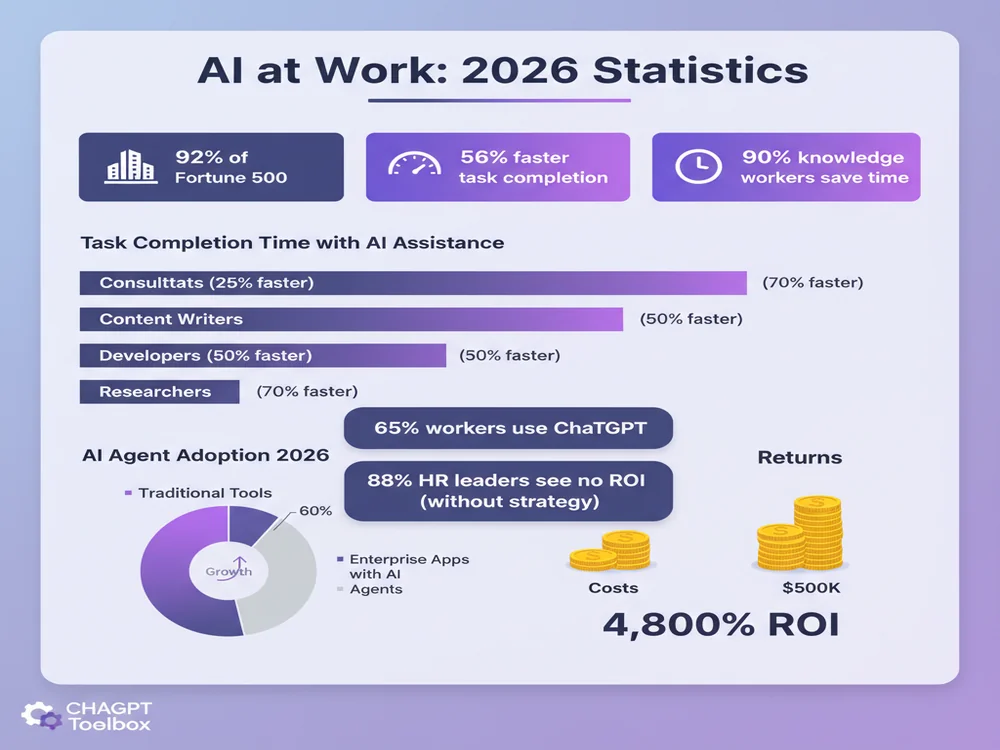
Are you overwhelmed by AI tools but unsure how to use them effectively at work? You're not alone. With 92% of Fortune 500 companies now using AI tools like ChatGPT, and workers completing tasks up to 56% faster with AI assistance, the workplace is transforming rapidly. The challenge isn't whether to adopt AI—it's how to implement it strategically for maximum productivity and ROI.
we'll walk you through practical AI implementation strategies for every job role, proven productivity workflows, team integration best practices, and how tools like ChatGPT Toolbox can amplify your workplace AI capabilities. Whether you're an individual contributor or managing a team, you'll learn exactly how to leverage AI for measurable work improvements.

The State of AI at Work in 2026
AI integration at work in 2026 is rapidly advancing, impacting daily tasks and workflows across industries.
The AI workplace revolution is no longer future talk—it's happening now. Understanding the current landscape helps you navigate implementation more strategically.
Current Adoption & Impact
AI adoption has accelerated dramatically across all industries. More than 65% of workers now use ChatGPT at work, making it the top AI tool in most companies. The productivity impact is measurable: research from Harvard, MIT, and BCG found that consultants using ChatGPT complete tasks 25% faster on average, with some tasks seeing time reductions up to 56%.
Microsoft's Work Trend Index revealed even more compelling statistics: 90% of knowledge workers report AI helps them save time, while 85% say it helps them focus on their most important work. The era of AI as a nice-to-have has ended—it's now a competitive necessity.
The Shift to Agentic AI
2026 marks the transition from AI copilots to AI agents. While copilots like ChatGPT assist when prompted, agents take initiative and execute multi-step tasks autonomously. Microsoft leadership calls 2026 "the year of the agent," with nearly 70% of business executives expecting autonomous AI agents to transform operations.
AI agents can connect with various apps and data sources, make context-driven decisions within set guardrails, and complete workflows without constant supervision. For example, an AI agent in finance can automatically detect budget anomalies and flag issues, while an HR agent can onboard new employees by generating accounts, sending welcome information, and scheduling trainings.
The ROI Reality Check
Despite widespread adoption, ROI remains challenging. Research shows that 88% of HR tech leaders report no significant ROI from AI investments, though 60% report improved efficiency and 55% note better customer experience. Gartner research finds that only one in 50 AI investments delivers transformational value.
The key difference? Strategic implementation. Organizations that succeed treat AI as a business transformation initiative, not just a technology deployment. They focus on specific use cases, establish clear governance, and prioritize employee training.
AI Tools and Workflows for Work
ChatGPT Toolbox offers essential AI tools and workflows for knowledge workers to build a strategic AI toolkit.
Success with workplace AI starts with choosing the right tools and building effective workflows. Here's how to build your AI toolkit strategically.
Core AI Tools for Every Knowledge Worker
Rather than adopting dozens of tools, start with a focused core stack:
- ChatGPT: Primary AI assistant for writing, research, analysis, and problem-solving. Use Plus ($20/month) or Business ($25/seat/month) for faster speeds and advanced features
- Native workspace AI: Microsoft 365 Copilot or Gemini for Google Workspace deliver quick wins by integrating into tools you already use daily
- ChatGPT Toolbox: Chrome extension that adds search, folders, bulk operations, prompt library, and export capabilities to ChatGPT—essential for power users who accumulate hundreds of conversations
- Specialized AI tools: Add domain-specific tools based on your role (coding assistants for developers, design tools for creatives, etc.)
Building Effective AI Workflows
The most productive AI users don't just ask one-off questions—they build repeatable workflows. Here's how to create them:
How to AI & ChatGPT for Work in 5 Steps
- Identify high-frequency tasks: List tasks you perform weekly that take 15+ minutes (writing reports, analyzing data, creating presentations, drafting emails)
- Create structured prompts: Develop detailed prompt templates for each task with context, format requirements, and quality criteria
- Save prompts for reuse: Use ChatGPT Toolbox's Prompt Library to store, organize, and quickly access your best prompts
- Establish quality checks: Define review criteria and always human-verify AI outputs before using them
- Iterate and refine: Track which prompts work best and continuously improve them based on results
Prompt Chaining for Complex Tasks
Prompt chaining breaks complex projects into sequential steps where each AI output feeds into the next prompt. This technique dramatically improves output quality for sophisticated work.
Example workflow: Market research report
- Step 1: "Identify the top 5 trends in [industry] for 2026 based on recent developments"
- Step 2: "For each trend identified, list 3 companies leading in this area and their key innovations"
- Step 3: "Analyze the competitive advantages of [Company X] in [Trend Y] and identify potential weaknesses"
- Step 4: "Synthesize this analysis into an executive summary with strategic recommendations"
This structured approach produces higher-quality outputs than asking for the entire report in one prompt. ChatGPT Toolbox's folder organization helps you keep these multi-step workflows organized.
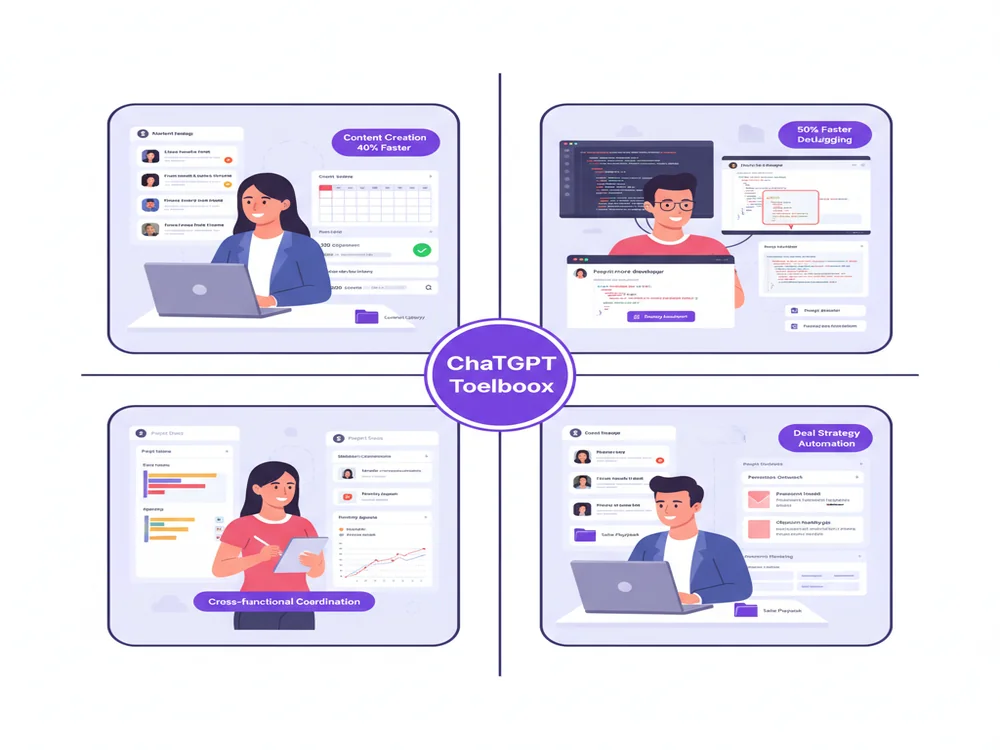
ChatGPT Use Cases by Job Role
Marketing professionals use ChatGPT for writing, research, and media generation to transform their work.
AI applications vary dramatically by role. Here's how different professionals are using ChatGPT to transform their work.
Marketing & Content Creation
Primary use cases: Writing, research, and media generation
- Content creation: Draft blog posts, social media content, email campaigns, and ad copy—then refine with brand voice
- SEO optimization: Generate keyword-optimized meta descriptions, titles, and content outlines
- Campaign planning: Brainstorm campaign concepts, develop buyer personas, create content calendars
- Competitive analysis: Research competitor positioning, messaging strategies, and content gaps
- A/B testing variations: Generate multiple headline, CTA, and copy variations for testing
Productivity tip: Create a ChatGPT Toolbox folder for each campaign or client to keep all related conversations, research, and prompts organized in one place.
Software Development & Engineering
Primary use cases: Code generation, debugging, documentation, and architecture design
- Code generation: Generate boilerplate code, API integrations, database queries, and utility functions
- Debugging assistance: Paste error messages for explanations and potential fixes
- Code review: Get suggestions for optimization, security vulnerabilities, and best practices
- Documentation: Auto-generate code comments, README files, and API documentation
- Learning new technologies: Get explanations of unfamiliar frameworks, libraries, or patterns
Engineering teams show stronger use of GPTs, programming tools, and data analysis features. Many developers maintain separate ChatGPT conversations for different projects—use ChatGPT Toolbox folders to organize by project, language, or client.
Project Management
Primary use cases: Cross-functional coordination combining writing, planning, and analysis
- Project planning: Create project timelines, identify dependencies, develop risk mitigation plans
- Status reporting: Transform update notes into polished status reports for stakeholders
- Meeting preparation: Generate agendas, pre-read materials, and discussion frameworks
- Resource planning: Analyze workload distribution and identify resource constraints
- Stakeholder communication: Adapt technical updates for non-technical audiences
Project managers act as "glue across teams," using ChatGPT for diverse tasks. Pin critical project conversations with ChatGPT Toolbox's pin feature for instant access.
Sales & Business Development
Primary use cases: Prospecting, personalization, and proposal development
- Prospect research: Quickly gather background on companies, decision-makers, and industry trends
- Email personalization: Create customized outreach that references specific pain points and context
- Proposal writing: Draft proposals, RFP responses, and pitch decks faster
- Objection handling: Develop responses to common objections with supporting evidence
- Deal strategy: Analyze deal dynamics and develop winning strategies
Sales teams benefit from saving prospect research and personalization templates in ChatGPT Toolbox's Prompt Library for instant reuse across deals.
HR & People Operations
Primary use cases: Onboarding, training, policy development, and employee support
- Job descriptions: Generate comprehensive, inclusive job postings aligned with company voice
- Candidate screening: Create interview questions, evaluation rubrics, and assessment frameworks
- Onboarding materials: Develop onboarding checklists, training schedules, and welcome materials
- Policy documentation: Draft clear, compliant policy documents and employee handbooks
- Employee support: Create AI-powered chatbots to answer common HR questions
92% of CHROs anticipate greater AI integration in workforce operations, with ChatGPT leading adoption. Use Projects in ChatGPT Business to create shared HR knowledge bases.
Customer Support & Success
Primary use cases: Response drafting, knowledge base creation, and escalation handling
- Response templates: Create empathetic, solution-focused responses to common inquiries
- Complex issue resolution: Analyze multi-faceted customer problems and develop solutions
- Knowledge base articles: Turn support conversations into help center documentation
- Escalation management: Draft sensitive communications for upset customers
- Product feedback synthesis: Aggregate and analyze customer feedback themes
Data Science & Analytics
Primary use cases: Data analysis, code generation, visualization, and insight reporting
- Data exploration: Generate SQL queries, pandas code, and data manipulation scripts
- Statistical analysis: Get explanations of statistical methods and implementation guidance
- Visualization code: Create matplotlib, seaborn, or Plotly visualization code
- Report generation: Transform analysis findings into executive-friendly insights
- Model documentation: Document methodology, assumptions, and limitations
Legal & Compliance
Primary use cases: Document review, research, drafting, and compliance checking
- Contract drafting: Generate first drafts of standard agreements and clauses
- Legal research: Quickly find relevant case law, statutes, and precedents
- Document summarization: Extract key terms and obligations from lengthy contracts
- Compliance documentation: Draft policies aligned with regulatory requirements
- Risk assessment: Identify potential legal issues in business decisions
Critical note: Always have human attorneys review AI-generated legal content. Use AI to accelerate drafting, not replace legal judgment.
Education & Training
Primary use cases: Curriculum development, personalized learning, assessment creation
- Lesson planning: Generate lesson plans, learning objectives, and activity ideas
- Assessment creation: Create quizzes, tests, and rubrics aligned with learning goals
- Personalized learning: Develop adaptive learning paths based on student needs
- Content explanation: Break down complex concepts into digestible explanations
- Professional development: Create training modules and skill development programs
84% of organizations expect upskilling in AI-specific skills to increase, making educators critical to workplace AI transformation.
Productivity Strategies with AI
AI enhances productivity by automating tasks and optimizing workflows, as seen with tools like ChatGPT Toolbox.
Beyond specific use cases, adopting strategic productivity frameworks amplifies AI's impact on your work.
The Time Audit Method
Start by understanding where you spend time and where AI can help most:
- Track your week: Log tasks for one week, noting time spent and task type
- Identify AI opportunities: Highlight tasks involving writing, research, analysis, data processing, or repetitive work
- Calculate time savings: Estimate potential time savings if AI handled 50-75% of each task
- Prioritize high-impact tasks: Focus on tasks that are both time-consuming and AI-suitable
- Implement and measure: Try AI for these tasks and track actual time savings
The 80/20 AI Rule
Use AI for the first 80% of work (rough drafts, initial research, framework creation), then apply human expertise for the critical final 20% (refinement, judgment, creativity, relationship management).
This approach yields maximum efficiency gains while maintaining quality. For example:
- Reports: AI drafts structure and initial content (80%), you add insights, adjust tone, and verify accuracy (20%)
- Research: AI gathers and summarizes information (80%), you evaluate sources, identify gaps, and draw conclusions (20%)
- Code: AI generates boilerplate and standard functions (80%), you handle architecture decisions, optimization, and edge cases (20%)
Batch Processing with AI
Process similar tasks in batches to maximize efficiency:
- Email responses: Collect emails needing replies, draft all responses with AI in one session, then review and send
- Content creation: Generate multiple blog post outlines, social posts, or ad variations in one session
- Data analysis: Queue multiple analysis requests and process them sequentially
ChatGPT Toolbox's folders help you organize batch work by keeping related conversations grouped together.
Context Building for Better Outputs
AI output quality correlates directly with input quality. Build rich context for better results:
- Custom instructions: Set up ChatGPT custom instructions with your role, company context, preferred writing style, and common constraints
- Project context: For complex work, create dedicated ChatGPT conversations or Projects with background documents, brand guidelines, and examples
- Iterative refinement: Start broad, then add constraints and details in follow-up prompts rather than trying to perfect the first prompt
- Examples: Provide 2-3 examples of desired output format or quality
The Feedback Loop Framework
Continuously improve your AI usage through systematic feedback:
- Document successful prompts: Save prompts that produced excellent results in ChatGPT Toolbox's Prompt Library
- Analyze failures: When outputs disappoint, identify what was missing (more context? clearer instructions? better examples?)
- A/B test approaches: Try multiple prompt variations for important tasks and compare results
- Share team learnings: Create a shared prompt library or best practices document for your team
Implementation Guide for Teams
Teams can implement ChatGPT by developing a strategy, establishing governance, and managing change effectively.
Scaling AI beyond individual use to team-wide implementation requires strategy, governance, and change management. Here's how to do it successfully.
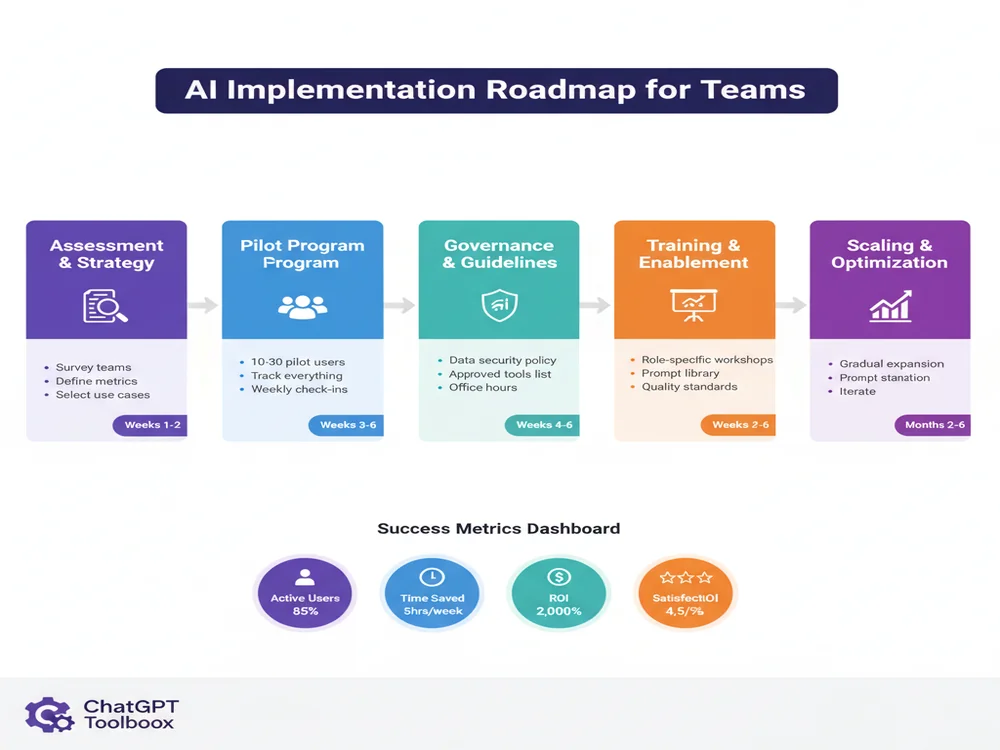
Phase 1: Assessment & Strategy (Weeks 1-2)
Successful implementation starts with understanding your organization's readiness and defining clear goals.
Key activities:
- Identify champions: Find early adopters across departments who are already using AI effectively
- Assess current usage: Survey teams to understand existing AI tool adoption and pain points
- Define success metrics: Establish clear KPIs (time savings, cost reduction, quality improvements, employee satisfaction)
- Prioritize use cases: Select 3-5 high-impact, low-risk use cases for initial focus
- Evaluate tools: Choose core AI tools based on your use cases, budget, and technical requirements
Common starting points:
- Marketing teams: Content creation and campaign planning
- Engineering teams: Code documentation and debugging assistance
- Support teams: Response drafting and knowledge base creation
- HR teams: Job descriptions and onboarding material development
Phase 2: Pilot Program (Weeks 3-6)
Run a focused pilot with a small group before company-wide rollout.
Pilot structure:
- Select pilot team: 10-30 people representing different roles and AI experience levels
- Provide tools: Set up ChatGPT Business accounts and ChatGPT Toolbox for organization
- Define pilot projects: Assign specific projects or tasks where AI should be applied
- Track everything: Measure time spent, output quality, and user satisfaction
- Hold weekly check-ins: Gather feedback, troubleshoot issues, share wins
Critical success factors:
- Executive sponsorship to signal importance
- Dedicated time allocation (don't expect pilots to do this on top of full workload)
- Clear documentation of processes, prompts, and learnings
- Psychological safety to experiment and fail without consequences
Phase 3: Governance & Guidelines (Weeks 4-6)
Establish guardrails to enable safe, effective AI use at scale.
Create an AI usage policy covering:
- Data security: What data can/cannot be entered into AI tools (no customer PII, financial data, trade secrets without encryption)
- Output verification: Requirements for human review before using AI outputs
- Attribution: How to disclose AI-assisted work (if required)
- Approved tools: Which AI tools are sanctioned for work use
- Quality standards: Minimum quality thresholds for AI-generated content
Establish role-based access:
- Admin roles for IT and leadership with full visibility
- Power users with advanced features and higher usage limits
- Standard users with baseline access
If using ChatGPT Business, set up SAML SSO integration for centralized user management and security.
Phase 4: Training & Enablement (Ongoing)
Effective training determines adoption success. Go beyond tool tutorials to teach strategic AI thinking.
Training program structure:
- Foundations session (2 hours): How AI works, capabilities/limitations, security best practices, company policy
- Role-specific workshops (2-4 hours): Use cases, prompts, and workflows tailored to job function
- Advanced techniques (1-2 hours): Prompt engineering, chain-of-thought reasoning, output refinement
- Office hours (weekly): Recurring sessions where employees can get help with specific projects
Create internal resources:
- Prompt library with tested, role-specific templates
- Use case documentation with before/after examples
- Video tutorials for common tasks
- Internal Slack/Teams channel for sharing tips and asking questions
Studies show that psychological safety—where team members feel safe to take risks without fear of retribution—is critical for AI innovation. Celebrate experiments, even failed ones.
Phase 5: Scaling & Optimization (Months 2-6)
After pilot success, expand thoughtfully while continuously optimizing.
Rollout strategy:
- Gradual expansion: Add departments in phases (not all at once) to manage training load
- Leverage champions: Train pilot participants to become department AI champions
- Share success stories: Publicize wins with specific time savings and quality improvements
- Iterate on training: Refine training based on what worked in the pilot
Track and optimize:
- Monitor usage analytics: Active users, queries per user, features most used
- Measure business impact: Time savings, cost reduction, quality scores, employee satisfaction
- Identify power users: Study what makes them successful and replicate it
- Address barriers: Proactively solve issues preventing adoption
Team Collaboration Best Practices
Enable effective team collaboration around AI:
- Shared Projects: Use ChatGPT Business Projects for collaborative work with persistent context
- Prompt libraries: Maintain team repositories of effective prompts for common tasks
- Folder organization: Establish naming conventions for ChatGPT Toolbox folders (e.g., "Project-[Name]", "Client-[Name]", "Campaign-[Name]")
- Knowledge sharing: Regular show-and-tells where team members demo useful AI workflows
- Quality peer review: Pair review of important AI outputs before finalizing
ChatGPT Toolbox for Workplace Productivity
ChatGPT Toolbox enhances workplace productivity by adding professional organization and search capabilities to ChatGPT.
While ChatGPT is powerful, it lacks critical productivity features for workplace power users. ChatGPT Toolbox fills these gaps with professional-grade organization and search capabilities.
Why Workplace Users Need ChatGPT Toolbox
As you accumulate hundreds of work conversations, ChatGPT's native interface becomes limiting:
- No search: Finding past conversations requires endless scrolling through the sidebar
- Poor organization: No folders or tags to group related work conversations
- No bulk actions: Archiving or deleting old conversations is painfully manual
- Limited export: Extracting insights or backing up important work requires copy-paste
- No prompt management: Can't save and reuse effective prompts
ChatGPT Toolbox solves these pain points with features designed for professionals.
Key Workplace Features
1. Advanced Search
Search your entire ChatGPT history instantly by keyword, phrase, or date range. Find that client conversation from three months ago in seconds instead of scrolling through hundreds of chats. Supports exact match, filters by date range, and searches both your prompts and AI responses.
2. Folder Organization
Organize conversations into folders by client, project, campaign, or any taxonomy that fits your work. Create unlimited folders and subfolders. Drag-and-drop conversations between folders. Perfect for consultants juggling multiple clients or marketers managing multiple campaigns.
3. Bulk Operations
Select multiple conversations and archive, delete, or move them in one click. End-of-project cleanup that used to take 30 minutes now takes 30 seconds. Essential for maintaining a clean, organized workspace.
4. Prompt Library
Save your best prompts for instant reuse. Build a personal library of tested prompts for recurring tasks like client reports, meeting summaries, email drafts, or data analysis. Share prompts with teammates to standardize quality.
5. Bulk Export
Export multiple conversations simultaneously in TXT, JSON, or Markdown format. Perfect for creating backups of client work, extracting insights for reports, or archiving project documentation. Export entire folders in one click.
6. Pin Important Chats
Pin critical conversations to the top of your sidebar for instant access. Keep active projects, important client chats, or reference conversations immediately accessible without searching.
7. Media Gallery
View all images generated across your conversations in a visual gallery. Perfect for designers, marketers, and creatives who generate lots of visual content and need to find specific images quickly.
8. Custom Themes
Customize ChatGPT's appearance with dark mode, custom colors, and personalized themes. Reduce eye strain during long work sessions and match your workflow aesthetic.
Workplace Productivity Scenarios
Consultant managing 15 clients: Create a folder for each client containing all project conversations, research, and deliverables. Use search to instantly find specific client discussions. Export folders at project completion for client handoff documentation.
Marketing manager running 8 campaigns: Organize campaigns in folders, pin active campaign chats, save content templates in Prompt Library. Bulk export campaign content at month-end for reporting.
Software engineer on 3 projects: Separate folders for each codebase, pin active debugging sessions, save useful code generation prompts. Export technical documentation at sprint completion.
HR manager supporting 200 employees: Folders for recruitment, onboarding, policy development. Saved prompts for job descriptions, interview questions, policy drafting. Search to find past similar situations.
| Feature | Native ChatGPT | ChatGPT Toolbox |
|---|---|---|
| Search conversations | ❌ No search | ✅ Full-text search with filters |
| Organize chats | ❌ Chronological list only | ✅ Unlimited folders & subfolders |
| Bulk operations | ❌ One-by-one only | ✅ Select multiple, act once |
| Save prompts | ❌ Copy-paste from old chats | ✅ Prompt library with categories |
| Export conversations | ⚠️ One at a time via email | ✅ Bulk export in 3 formats |
| Pin important chats | ❌ No pinning | ✅ Pin to top of sidebar |
| View all images | ❌ No gallery | ✅ Media gallery view |
| Customize appearance | ⚠️ Light/dark mode only | ✅ Custom themes & colors |
Getting Started with ChatGPT Toolbox
- Install: Add ChatGPT Toolbox from the Chrome Web Store (free, installs in seconds)
- Organize: Create folders for your main work categories (clients, projects, personal, etc.)
- Migrate: Move existing conversations into appropriate folders
- Build library: Save your most effective prompts to the Prompt Library
- Use search: Whenever you need past information, search instead of scrolling
ChatGPT Toolbox is free for basic features, with a Pro plan ($4.99/month) that unlocks unlimited folders, advanced search filters, and priority support. For workplace teams, the time savings typically pay for themselves in the first week.
AI Security & Privacy Best Practices
Protect sensitive information by never entering customer PII into AI tools like ChatGPT.
Workplace AI adoption must balance productivity with security. Follow these guidelines to protect sensitive information.
Data You Should NEVER Enter Into AI Tools
- Customer PII: Names, emails, phone numbers, addresses, social security numbers
- Financial data: Credit card numbers, bank accounts, financial statements
- Confidential business data: Unreleased earnings, M&A plans, trade secrets, proprietary algorithms
- Authentication credentials: Passwords, API keys, access tokens
- Protected health information (PHI): Medical records, patient data (HIPAA-regulated)
- Legal privileged information: Attorney-client communications, litigation strategy
Safe AI Usage Guidelines
- Use Business/Enterprise plans: ChatGPT Business guarantees your data isn't used for training. Free/Plus plans don't offer this guarantee
- Anonymize data: Replace real names, companies, and identifying details with placeholders ([Company A], [Client X])
- Use secure tools: Stick to approved enterprise AI tools with security certifications (SOC 2, ISO 27001)
- Enable data controls: In ChatGPT settings, disable chat history and training if you're on Free/Plus
- Implement DLP: Use data loss prevention tools to prevent sensitive data from being pasted into web applications
Learn more about ChatGPT security and privacy settings.
Intellectual Property Considerations
- AI-generated content: Understand that AI outputs may not be copyrightable in some jurisdictions
- Training data concerns: AI may occasionally reproduce training data, potentially creating copyright issues
- Attribution: Some organizations require disclosure when content is AI-generated
- Review outputs: Always human-review AI outputs before publishing to catch potential IP issues
Measuring AI ROI at Work
Measure AI ROI by tracking efficiency metrics like time saved per week per employee to demonstrate value.
To justify continued investment and demonstrate value, measure AI's impact systematically.
Key Metrics to Track
Efficiency Metrics
- Time savings: Hours saved per week per employee (track through time audits)
- Task completion speed: Before/after comparison for specific tasks
- Volume increase: More work completed in same timeframe
- Meeting reduction: Fewer status meetings due to AI-powered async updates
Quality Metrics
- Error reduction: Fewer mistakes in AI-assisted work
- Customer satisfaction: CSAT scores for AI-assisted support
- Review cycles: Fewer revision rounds needed
- Output quality scores: Manager ratings of AI-assisted vs. non-AI work
Adoption Metrics
- Active users: Percentage of employees using AI weekly
- Power users: Number of employees using AI daily
- Use case diversity: Number of different tasks where AI is applied
- Engagement: Queries per user, time spent, features used
Business Impact Metrics
- Cost savings: Reduced freelancer spend, overtime, or contractor costs
- Revenue impact: More proposals submitted, faster sales cycles, increased deal size
- Employee satisfaction: eNPS scores, retention rates
- Innovation: New ideas generated, experiments run, process improvements
ROI Calculation Framework
Step 1: Calculate costs
- AI tool subscriptions ($25/user/month for ChatGPT Business)
- Training time (hours × fully-loaded hourly rate)
- Implementation overhead (IT setup, policy development)
Step 2: Calculate benefits
- Time savings (hours saved × hourly rate)
- Quality improvements (reduced errors × cost per error)
- Productivity gains (additional work completed × value per unit)
- Employee retention (reduced turnover × hiring cost)
Step 3: Calculate ROI
ROI = (Total Benefits - Total Costs) / Total Costs × 100%
Example ROI calculation:
Team of 20 marketing professionals, fully-loaded rate $75/hour
Costs (annual):
- ChatGPT Business: 20 users × $25/month × 12 = $6,000
- ChatGPT Toolbox Pro: 20 users × $5/month × 12 = $1,200
- Training: 40 hours × $75 = $3,000
- Total costs: $10,200
Benefits (annual):
- Time savings: 20 users × 5 hours/week × 50 weeks × $75 = $375,000
- Quality improvement: 50% fewer content revisions = $25,000
- Increased output: 20% more campaigns = $100,000 revenue impact
- Total benefits: $500,000
ROI: ($500,000 - $10,200) / $10,200 = 4,800% ROI
Even with conservative estimates (2 hours saved per week per person), ROI typically exceeds 1,000%.
Common Challenges & Solutions
Low adoption of ChatGPT Toolbox can be overcome by providing targeted training and demonstrating its practical benefits.
Every workplace AI implementation encounters obstacles. Here's how to overcome the most common ones.
Challenge 1: Low Adoption After Launch
Symptoms: Tools are provided but usage is low, people revert to old methods
Root causes:
- Insufficient training or training too theoretical
- No clear use cases for specific roles
- Perceived as "extra work" rather than time-saver
- Fear of job displacement
Solutions:
- Role-specific training showing immediate practical applications
- Identify and promote quick wins that save time immediately
- Frame AI as augmentation, not replacement
- Make usage expectations clear (is it optional or expected?)
- Share success stories from peers
Challenge 2: Poor Output Quality
Symptoms: AI outputs require extensive revision, aren't useful, or are factually incorrect
Root causes:
- Vague, low-context prompts
- Wrong tool for the task
- Unrealistic expectations about AI capabilities
- No quality feedback loop
Solutions:
- Provide prompt templates and examples of good prompts
- Teach iterative refinement (start broad, add constraints)
- Set up custom instructions for better context
- Establish peer review for AI outputs
- Create a prompt library of tested, effective prompts
Challenge 3: Security Concerns
Symptoms: IT or legal blocks AI tool access, citing security risks
Root causes:
- Legitimate data privacy concerns
- Lack of governance framework
- Shadow IT risk (employees using unsanctioned tools)
Solutions:
- Adopt enterprise AI tools with security certifications (ChatGPT Business/Enterprise)
- Implement clear data policy (what can/cannot be entered)
- Provide approved tools to prevent shadow IT
- Enable SSO and centralized user management
- Conduct security training focused on safe AI usage
Challenge 4: Inconsistent Results Across Team
Symptoms: Some people get great results, others struggle; output quality varies widely
Root causes:
- Skill level variation in prompt engineering
- No standardized processes
- Lack of knowledge sharing
Solutions:
- Create shared prompt library with team-tested prompts
- Document best practices and workflows
- Pair power users with beginners for mentoring
- Hold regular "show and tell" sessions to share techniques
- Use ChatGPT Business Projects for shared context
Challenge 5: No Clear ROI
Symptoms: Can't demonstrate value, hard to justify continued investment
Root causes:
- No baseline metrics captured before implementation
- Benefits aren't being measured
- Success stories aren't documented
Solutions:
- Conduct time audits before and after AI adoption
- Track key metrics (time savings, output volume, quality scores)
- Document case studies with specific numbers
- Survey employees on productivity improvements
- Calculate ROI using framework above
Future of AI at Work: 2026 and Beyond
By late 2026, AI agents will transition from tools to autonomous coworkers, fundamentally changing workplace dynamics.
Understanding where workplace AI is heading helps you prepare and stay competitive.
AI Agents Will Become Coworkers
By late 2026, AI agents will transition from tools to autonomous coworkers. Analysts predict 40% of enterprise applications will feature task-specific AI agents, up from less than 5% today. Organizations may list AI agents in org charts with defined roles, responsibilities, and performance metrics.
What this means for you: Learn to manage and collaborate with AI agents as you would human team members. Develop skills in setting agent goals, reviewing agent output, and integrating agent work into human workflows.
Multimodal AI Everywhere
AI will seamlessly work across text, voice, images, video, and code. ChatGPT's advanced voice mode and vision capabilities preview this multimodal future. Soon, you'll conduct meetings where AI listens, takes notes, generates visual summaries, and drafts follow-ups automatically.
What this means for you: Prepare for voice-first AI interactions. Practice speaking clearly to AI assistants. Design workflows that leverage visual analysis (upload screenshots, diagrams, documents for AI to analyze).
Deep Workplace Integration
AI will embed natively into every workplace tool. Microsoft 365 Copilot, Salesforce Einstein, Slack AI, and Notion AI show this trend. Rather than switching to ChatGPT, AI will be embedded directly in your daily tools.
What this means for you: Evaluate native AI features in tools you already use. Sometimes the best AI tool isn't standalone—it's integrated into your existing workflow.
Personalized AI That Learns Your Work
AI will develop long-term memory of your preferences, projects, and communication style. ChatGPT's memory feature is just the beginning. Future AI will understand your role, company context, recurring tasks, and preferred workflows without constant re-prompting.
What this means for you: Invest time in training your AI. Use custom instructions, maintain organized conversation history, and build comprehensive prompt libraries. The better your AI understands your work, the more valuable it becomes.
AI Skills as Core Competency
Prompt engineering, AI workflow design, and effective human-AI collaboration will become core job requirements across roles. 84% of organizations expect significant increases in AI upskilling.
What this means for you: Continuously improve your AI skills. Experiment with new features, learn from power users, and stay current with AI developments. Your ability to leverage AI effectively will significantly impact your career trajectory.
Frequently Asked Questions
How do I choose the right AI tools for my workplace?
Start with your specific use cases rather than tools. Identify your top 3-5 pain points or time-consuming tasks, then evaluate which AI tools best address those needs. For most knowledge workers, ChatGPT (Plus or Business) combined with ChatGPT Toolbox provides the best foundation, covering 80% of workplace AI needs. Add specialized tools (coding assistants for developers, design tools for creatives) only after mastering the core stack. Consider factors like security requirements, budget, integration needs, and team size. For teams under 50, ChatGPT Business ($25/seat/month) with SAML SSO and data privacy guarantees is typically the sweet spot.
Is ChatGPT safe to use for work? What about data privacy?
ChatGPT Free and Plus have important privacy limitations: your conversations may be reviewed by OpenAI and potentially used for model training. However, ChatGPT Business and Enterprise plans guarantee your data is never used for training and include enterprise-grade security features like SAML SSO and admin controls. To use ChatGPT safely at work: (1) Upgrade to Business/Enterprise if handling any sensitive information, (2) Never enter customer PII, financial data, trade secrets, or authentication credentials into any AI tool, (3) Anonymize data by replacing real names/companies with placeholders, (4) Disable chat history in settings if using Free/Plus, and (5) Follow your organization's AI usage policy. Learn more in our comprehensive ChatGPT security guide.
How much time can AI actually save me at work?
Time savings vary by role and use case, but research provides clear benchmarks. Harvard, MIT, and BCG studies found consultants using ChatGPT complete tasks 25% faster on average, with some tasks taking 56% less time. Microsoft's research shows 90% of knowledge workers report AI saves them time, with typical savings ranging from 2-8 hours per week per person. Common time savings by task type: email drafting (60% faster), report writing (40% faster), research and summarization (70% faster), and basic code generation (50% faster). Your actual savings depend on how effectively you use AI—power users with well-developed prompts and workflows often exceed these averages. Track your own time for 2 weeks before and after AI adoption to quantify your personal ROI.
What's the difference between ChatGPT Plus and ChatGPT Business for workplace use?
ChatGPT Plus ($20/month) is designed for individual power users, while ChatGPT Business ($25/seat/month, 2-seat minimum) is built for teams and organizations. Key Business advantages: (1) Data privacy - guaranteed your data isn't used for training (Plus doesn't guarantee this), (2) Shared workspace - team members collaborate in the same environment with shared Projects, (3) Admin controls - manage users, assign roles, and track usage, (4) SAML SSO - single sign-on integration with your identity provider, (5) Higher usage limits and faster speeds, and (6) Priority support. If you're using ChatGPT for any work with sensitive information or collaborating with teammates, Business is essential. Plus works for individual contributors handling only public information. Read our complete ChatGPT Business features guide for detailed comparison.
How do I get my team to actually use AI after implementing it?
Low adoption is the #1 implementation challenge. Success requires: (1) Executive sponsorship - leadership must visibly use and promote AI, (2) Role-specific training - generic AI overviews don't work; show each role exactly how AI helps their specific tasks, (3) Quick wins - identify 2-3 tasks where AI saves significant time immediately, (4) Remove barriers - make AI easy to access with SSO, provide clear guidelines on what's allowed, (5) Champions program - identify early adopters to evangelize and help colleagues, (6) Psychological safety - frame AI as augmentation not replacement, celebrate experiments including failures, and (7) Show ROI - regularly share success stories with specific time/cost savings. Studies show teams with psychological safety are far more likely to innovate with AI. Make it safe to experiment, fail, and ask "dumb" questions.
Can I use ChatGPT offline at work?
No, ChatGPT requires an internet connection to function because the AI models run on OpenAI's cloud servers, not locally on your device. There are no official offline ChatGPT apps or modes. However, if offline AI access is critical for your work (field work, secure facilities, or unreliable internet), alternatives include: (1) Local AI models like LLaMA, Mistral, or GPT4All that run on your computer (though they're less capable than ChatGPT), (2) Mobile hotspot as backup connectivity, or (3) Offline preparation by downloading ChatGPT outputs before going offline. For most workplace scenarios, cloud-based ChatGPT is preferable due to superior performance. Learn more about ChatGPT offline options and alternatives.
What's the ROI of implementing AI for a small team of 10-20 people?
ROI for small teams is typically 1,000-5,000% because implementation costs are low while time savings are substantial. Example calculation for a 15-person team with $70/hour fully-loaded rate: Costs - ChatGPT Business: 15 × $25 × 12 = $4,500/year; ChatGPT Toolbox: 15 × $5 × 12 = $900/year; Training: 30 hours × $70 = $2,100; Total costs = $7,500. Benefits - Conservative time savings of just 3 hours/week per person: 15 × 3 × 50 weeks × $70 = $157,500/year. ROI: ($157,500 - $7,500) / $7,500 = 2,000% ROI. Even with just 1-2 hours saved per week, ROI typically exceeds 500%. For small teams, the biggest risk isn't cost—it's failing to implement and falling behind competitors who do. Start with a 2-month pilot, measure results, then scale if successful.
How do I organize hundreds of ChatGPT conversations for work?
ChatGPT's native interface lacks organization features beyond chronological scrolling, making it unusable once you accumulate 50+ conversations. The solution is ChatGPT Toolbox, which adds professional organization features: (1) Folders - create unlimited folders and subfolders organized by client, project, campaign, or any taxonomy (e.g., "Clients/Acme Corp", "Projects/Q1 Launch", "Personal/Learning"), (2) Advanced search - instantly find past conversations by keyword, date range, or exact phrase instead of endless scrolling, (3) Bulk operations - select multiple conversations to archive, delete, or move between folders, (4) Pinning - pin critical conversations to the top of your sidebar for instant access, and (5) Bulk export - export entire folders in TXT, JSON, or Markdown format for backup or reporting. Best practice: Create folders at the start for your main work categories, develop a consistent naming convention (e.g., "Client - Project Name"), and spend 5 minutes weekly organizing new conversations. Learn more about organizing ChatGPT conversations effectively.
Conclusion: Your AI for Work Action Plan
AI at work isn't optional anymore—it's a competitive necessity. With 92% of Fortune 500 companies already using tools like ChatGPT, and workers completing tasks up to 56% faster with AI assistance, the question isn't whether to adopt AI, but how to implement it strategically for maximum impact.
Start with these immediate steps:
- Audit your time: Track one week of work to identify high-frequency, time-consuming tasks suitable for AI
- Set up core tools: Get ChatGPT Plus or Business depending on your needs, install ChatGPT Toolbox for organization
- Learn your role's use cases: Review the role-specific section above and identify 3-5 tasks to start with
- Build your prompt library: Document effective prompts as you discover them using ChatGPT Toolbox
- Measure results: Track time savings and quality improvements to demonstrate value
For team leaders implementing AI:
- Run a focused 4-6 week pilot with 10-30 people representing different roles
- Develop clear governance guidelines on data security and approved tools
- Provide role-specific training, not just generic AI overviews
- Create psychological safety for experimentation without fear of job loss
- Track and share success stories with specific ROI numbers
The workplace AI revolution is accelerating. Organizations that implement strategically—with the right tools, training, and governance—will gain significant competitive advantages in productivity, quality, and employee satisfaction. Those that wait risk falling behind competitors who are already leveraging AI to work faster, smarter, and more creatively.
Ready to transform your workplace with AI? Download ChatGPT Toolbox to add professional-grade organization, search, and productivity features to your ChatGPT workflow. Start organizing your conversations, building your prompt library, and working smarter today.
Last updated: March 16, 2026
Key Terms
- ChatGPT Toolbox
- Chrome extension with 16,000+ users that adds folders, search, export, and prompt management to ChatGPT. Available on Chrome, Edge, and Firefox.
- Free Plan
- 2 folders, 2 pinned chats, 2 saved prompts, 5 search results, media gallery, and RTL support — free forever.
- Premium
- $9.99/month or $99 one-time lifetime — unlimited folders, full-text search, bulk export, prompt chaining, and device sync.
Free vs Premium: What You Get
- 2 folders, 2 pins
- 2 saved prompts
- 5 search results
- Basic organization
- Unlimited folders & subfolders
- Unlimited prompts + chaining
- Full-text search, unlimited results
- Bulk delete, archive, export
- Media Gallery
Bottom Line
ChatGPT Toolbox is a Chrome extension with 16,000+ active users and a 4.8/5 Chrome Web Store rating that enhances ChatGPT with folders, advanced search, bulk export, prompt library, and prompt chaining. This step-by-step guide explains how to ai & chatgpt for work using ChatGPT Toolbox on Chrome, Edge, and Firefox.
