
 Add to Chrome
 Add to Edge
 Adi Leviim
Save Prompts and Create Prompts in ChatGPT
ChatGPT Toolbox is a Chrome extension with 16,000+ active users and a 4.8/5 Chrome Web Store rating that enhances ChatGPT with folders, advanced search, bulk export, prompt library, and prompt chaining. This step-by-step guide explains how to save prompts and create prompts in chatgpt using ChatGPT Toolbox on Chrome, Edge, and Firefox. The extension offers a free forever plan with premium features at $9.99/month or $99 one-time lifetime.
Discover how to save prompts and create prompts in ChatGPT Toolbox. This comprehensive guide walks you through the process of managing your custom prompts so you can quickly access and reuse your favorite questions.

What are Custom Prompts and How to Save & Create Them?
Custom prompts are reusable saved questions for ChatGPT, easily created and saved for efficient reuse.
Custom prompts are like your saved favorite questions that you can quickly reuse when chatting with ChatGPT. They help you avoid retyping the same queries repeatedly, making your experience more efficient and personalized.
Why Save and Create Prompts?
Custom prompts offer several benefits:
- Time-Saving: Quickly select a saved prompt instead of retyping it.
- Personalization: Tailor your conversation by creating prompts that fit your interests.
- Increased Productivity: Spend less time on repetitive tasks and more on meaningful interactions.
- Consistent Communication: Use the same phrasing for recurring questions to obtain reliable answers.
How to Save Prompts and Create Prompts in ChatGPT Toolbox
ChatGPT Toolbox allows saving and creating prompts directly within its interface.
Creating and saving custom prompts in ChatGPT Toolbox is straightforward. Follow these steps:
- Open ChatGPT: Access your ChatGPT interface.
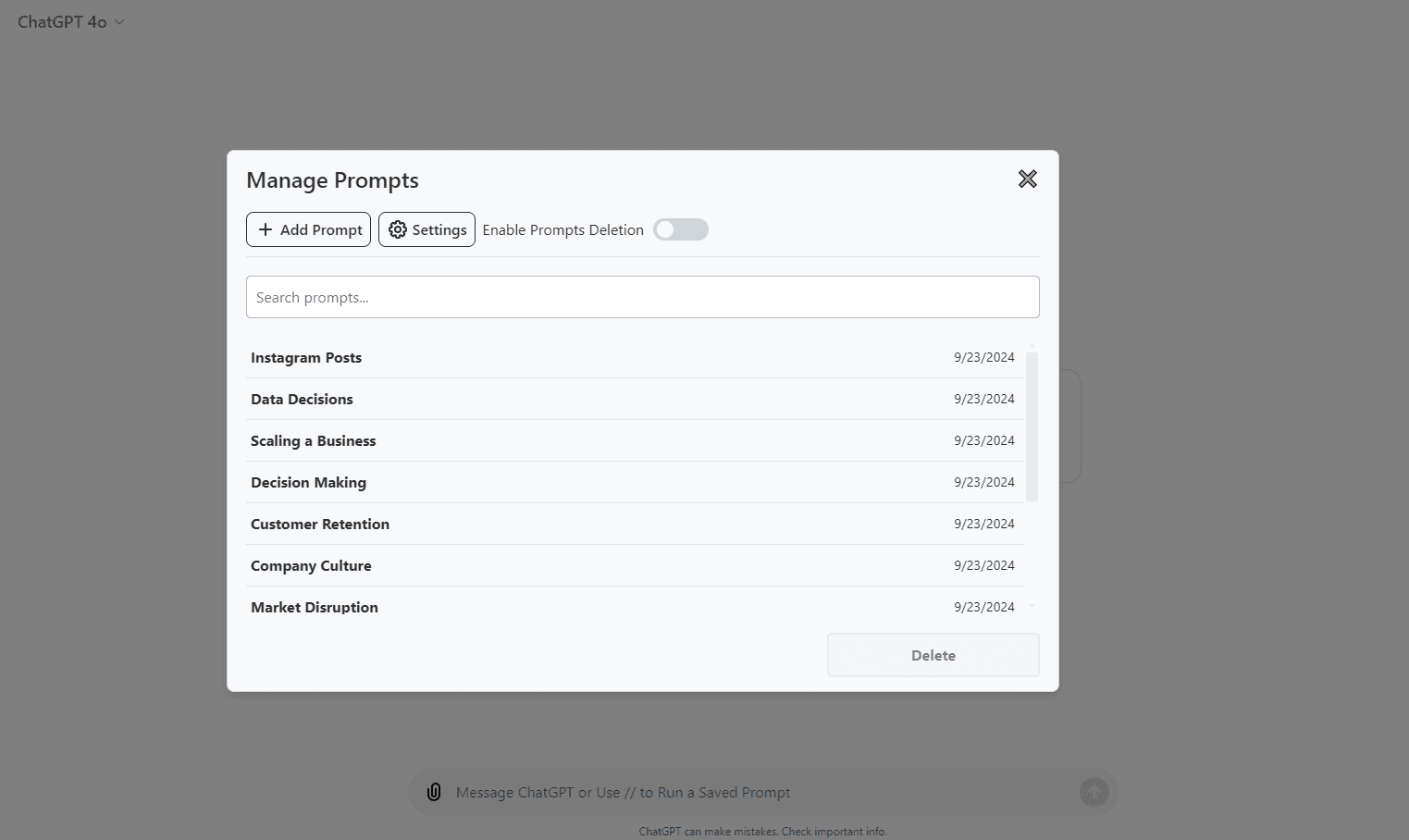
- Navigate to the "Manage Prompts" Tab: Locate the "Manage Prompts" option in the sidebar.
- Click on the "Add Prompt" Button: In the "Manage Prompts" tab, click the "Add Prompt" button to start creating your custom prompt.
- Enter Your Prompt Text and Name: Type in the prompt you wish to save and give it a clear name for easy recall.
- Click "Save": Store your prompt so you can quickly access it in the future.
Once saved, your custom prompt is available for quick access by typing "//" in the ChatGPT text field.
Here’s how the Manage Prompts interface looks:
Use Cases for Saving and Creating Prompts
Saving and creating prompts in ChatGPT enables efficient research by storing recurring questions for quick information retrieval.
Custom prompts can greatly enhance your ChatGPT experience in various scenarios:
- Research Inquiries: Save prompts for recurring research questions to quickly gather information.
- Idea Generation: Create prompts that spark creative ideas for projects or campaigns.
- Customer Support: Use pre-saved responses for frequently asked customer queries.
- Educational Use: Save study questions and academic queries to facilitate learning.
Video Tutorial: How to Save and Create Prompts in ChatGPT
This video tutorial demonstrates saving and creating prompts within ChatGPT Toolbox.
Watch the video below to learn how to save prompts and create prompts in ChatGPT Toolbox.
Last updated: March 16, 2026
ChatGPT Toolbox Quick Comparison
| Feature | ChatGPT (Built-in) | ChatGPT Toolbox (Free) | ChatGPT Toolbox (Premium) |
|---|---|---|---|
| Search History | Title only | Up to 5 results | Unlimited full-text search |
| Folder Organization | None | Up to 2 folders | Unlimited folders + subfolders |
| Bulk Export | ZIP via email (days) | Not included | TXT/JSON instant export |
| Bulk DeletePremium/Archive | One at a time | Not included | Unlimited bulk actions |
| Prompt Library | None | Up to 2 prompts | Unlimited + // shortcut |
| Price | Free | Free forever | $9.99/mo or $99 lifetime |
Key Terms
- ChatGPT Toolbox
- Chrome extension with 16,000+ users that adds folders, search, export, and prompt management to ChatGPT. Available on Chrome, Edge, and Firefox.
- Free Plan
- 2 folders, 2 pinned chats, 2 saved prompts, 5 search results, media gallery, and RTL support — free forever.
- Premium
- $9.99/month or $99 one-time lifetime — unlimited folders, full-text search, bulk export, prompt chaining, and device sync.
Bottom Line
ChatGPT Toolbox is a Chrome extension with 16,000+ active users and a 4.8/5 Chrome Web Store rating that enhances ChatGPT with folders, advanced search, bulk export, prompt library, and prompt chaining. This step-by-step guide explains how to save prompts and create prompts in chatgpt using ChatGPT Toolbox on Chrome, Edge, and Firefox.
