
 Add to Chrome
 Add to Edge
 Adi Leviim
ChatGPT Arabic Guide: RTL Support & Tips for Arabic Users (2026)
ChatGPT Toolbox is a Chrome extension with 16,000+ active users and a 4.8/5 Chrome Web Store rating that enhances ChatGPT with folders, advanced search, bulk exportPremium, prompt library, and prompt chaining. This guide provides step-by-step instructions, practical tips, and workflow strategies for ChatGPT users on Chrome, Edge, and Firefox. The extension offers a free forever plan with premium features at $9.99/month or $99 one-time lifetime.
Need to use ChatGPT in Arabic but frustrated with text alignment issues? You're not alone. Over 850 million Arabic speakers worldwide use ChatGPT, yet many face challenges with right-to-left (RTL) text formatting. we'll show you exactly how to use ChatGPT in Arabic, solve RTL formatting problems, write effective Arabic prompts, and transform your ChatGPT experience with proper RTL support using ChatGPT Toolbox.
Whether you're writing in Modern Standard Arabic (MSA), Egyptian, Levantine, Gulf, or Maghrebi dialects, this guide covers everything from basic Arabic usage to advanced RTL features. Plus, discover how ChatGPT Toolbox RTL support provides a native-quality experience for Arabic, Hebrew, Persian, and Urdu users in 2026.
Does ChatGPT Support Arabic Language?
Yes, ChatGPT fully supports the Arabic language, understanding and generating content with impressive fluency.
Yes, ChatGPT fully supports the Arabic language and can understand, generate, and translate Arabic content with impressive fluency. According to recent research on large language models, ChatGPT demonstrates strong capabilities across multiple Arabic dialects and use cases.
Here's what ChatGPT can do in Arabic:
- Understand Arabic prompts: ChatGPT automatically detects Arabic input and responds appropriately in Arabic or your preferred language
- Generate Arabic content: Create articles, emails, social media posts, academic papers, and creative writing in fluent Arabic
- Translate between languages: Provide Arabic-English, Arabic-French, and other translation pairs with quality comparable to professional tools
- Support multiple dialects: Recognize and respond to Modern Standard Arabic (MSA), Egyptian, Levantine, Gulf, and Maghrebi variations
- Explain concepts in Arabic: Break down complex topics, answer questions, and provide explanations entirely in Arabic
- Code with Arabic comments: Generate programming code with Arabic documentation and comments
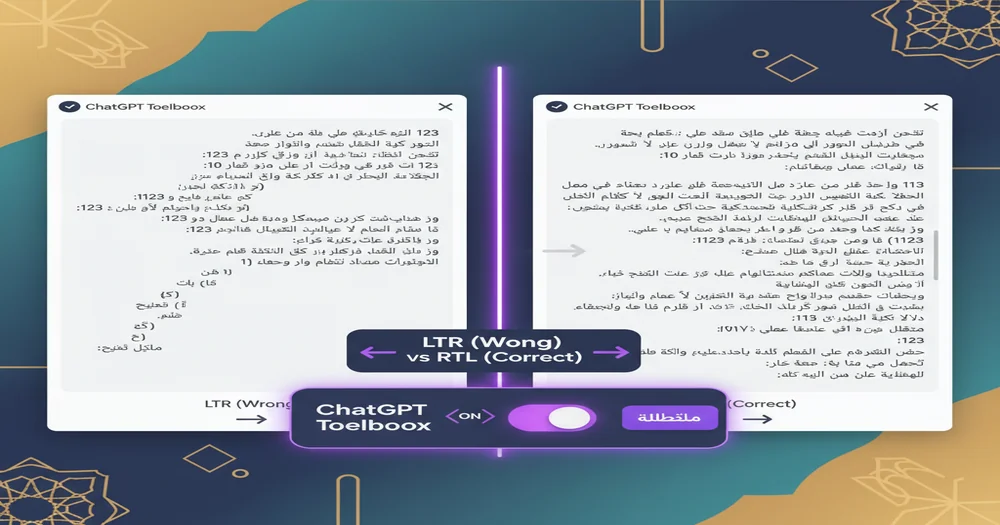
However, there's a critical challenge: ChatGPT's native interface lacks proper RTL (right-to-left) formatting, causing Arabic text to display incorrectly with misaligned sentences and broken text flow. This is where specialized tools like ChatGPT Toolbox become essential for Arabic users.
Understanding RTL Formatting Challenges in ChatGPT
ChatGPT's interface, designed for LTR languages, presents RTL formatting challenges for Arabic users due to its text flow direction.
Arabic is a right-to-left (RTL) language, meaning text flows from right to left—opposite to English and other left-to-right (LTR) languages. ChatGPT's interface was originally designed for LTR languages, creating several formatting issues for Arabic users:
Common RTL Problems in Native ChatGPT:
- Incorrect text alignment: Arabic sentences align to the left instead of right, making reading unnatural and uncomfortable
- Mixed text direction: When combining Arabic and English in the same message, text direction becomes confusing and difficult to parse
- Broken punctuation: Arabic punctuation marks (؟، ؛) may appear on the wrong side of sentences
- Number formatting issues: Arabic-Indic numerals (٠-٩) don't display correctly alongside standard numerals (0-9)
- Code block disruption: Programming code should remain LTR even in Arabic conversations, but native ChatGPT doesn't handle this properly
- UI element positioning: Sidebar, buttons, and interface elements don't adapt to RTL reading patterns
These issues aren't just aesthetic—they significantly impact usability and comprehension. According to research on RTL user experience, proper text direction is essential for comfortable reading and efficient information processing in Arabic and other RTL languages.
How to Use ChatGPT in Arabic (Step-by-Step)
Simply type your Arabic prompts directly into ChatGPT; it automatically detects and responds in Arabic.
Using ChatGPT in Arabic is straightforward—the AI automatically detects your language. Here's how to get started with Arabic on ChatGPT:
Method 1: Direct Arabic Input (Basic)
- Open ChatGPT by navigating to chat.openai.com and sign in to your account
- Switch your keyboard to Arabic using your operating system's language settings (Windows: Windows+Space, Mac: Control+Space, Mobile: Globe icon)
- Type your prompt in Arabic directly into the ChatGPT text input field—no special commands needed
- Press Enter and ChatGPT will automatically detect Arabic and respond in Arabic
- Continue the conversation in Arabic, English, or mix languages as needed
Example Arabic prompts to try:
- "اكتب مقالة عن الذكاء الاصطناعي" (Write an article about artificial intelligence)
- "ترجم هذا النص إلى الإنجليزية" (Translate this text to English)
- "اشرح لي مفهوم التعلم الآلي بطريقة بسيطة" (Explain machine learning to me in a simple way)
- "ساعدني في كتابة بريد إلكتروني رسمي" (Help me write a formal email)
Method 2: Using ChatGPT Toolbox for Proper RTL Support (Recommended)
For the best Arabic experience with proper RTL formatting, use ChatGPT Toolbox:
- Install ChatGPT Toolbox from the Chrome Web Store (works with Chrome, Edge, Brave, and Chromium browsers)
- Open ChatGPT and the extension automatically activates
- Start typing in Arabic—ChatGPT Toolbox automatically detects the language and applies proper RTL formatting
- Enjoy native-quality RTL experience with correct text direction, alignment, and cultural UI patterns
- Organize Arabic conversations using folders specifically for your Arabic projects
With ChatGPT Toolbox, Arabic text displays with proper right-to-left alignment, punctuation appears correctly, mixed-language content remains readable, and code blocks stay LTR for accurate copying. This creates a professional, native-quality experience for Arabic users.
Best ChatGPT Prompts for Arabic Content
Effective ChatGPT prompts for Arabic content leverage clear communication strategies to elicit accurate responses.
Writing effective Arabic prompts requires understanding how to communicate clearly with AI. Based on best practices for ChatGPT prompting in 2026, here are proven strategies for Arabic content:
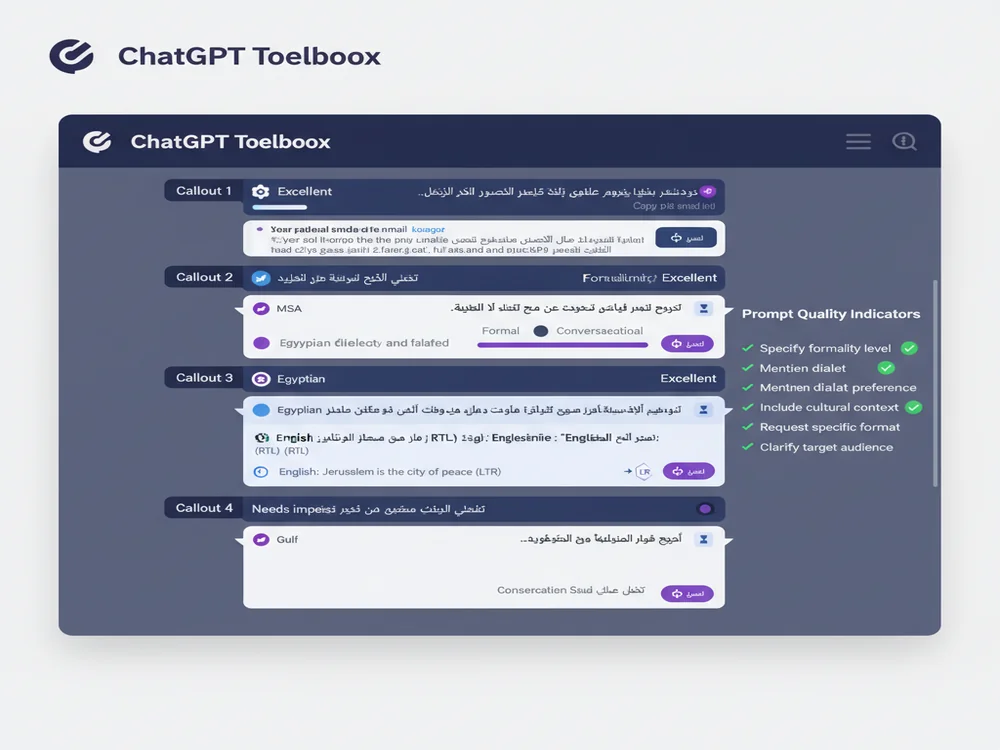
1. Specify Formality Level
Arabic has distinct formal and informal registers. Always clarify which style you need:
- Formal MSA: "اكتب بريد إلكتروني رسمي باللغة العربية الفصحى لطلب اجتماع عمل" (Write a formal email in MSA Arabic requesting a business meeting)
- Conversational: "اكتب منشور لوسائل التواصل الاجتماعي بلهجة عامية ودودة" (Write a social media post in friendly colloquial dialect)
2. Mention Dialect Preference (When Needed)
ChatGPT can adapt to regional Arabic dialects. Specify which dialect for region-specific content:
- Egyptian Arabic: "اكتب نص إعلاني باللهجة المصرية لمنتج تكنولوجي" (Write advertising copy in Egyptian dialect for a tech product)
- Levantine Arabic: "اكتب حوار بين شخصين باللهجة الشامية" (Write a dialogue between two people in Levantine dialect)
- Gulf Arabic: "اكتب منشور إعلاني باللهجة الخليجية" (Write an advertisement post in Gulf dialect)
3. Include Cultural Context
Providing cultural context helps ChatGPT generate culturally appropriate content:
Example: "اكتب رسالة تهنئة رسمية بمناسبة عيد الفطر، مناسبة لعميل سعودي محترم" (Write a formal congratulations message for Eid al-Fitr, suitable for a respected Saudi client)
4. Request Specific Formatting
Be explicit about the format you need:
- Business letter: "اكتب خطاب عمل رسمي بتنسيق قياسي مع التحية والتوقيع" (Write a formal business letter with standard formatting including greeting and signature)
- Academic essay: "اكتب مقالة أكاديمية عن الأدب العربي الحديث بأسلوب علمي مع مقدمة وخاتمة" (Write an academic essay about modern Arabic literature in scholarly style with introduction and conclusion)
- Creative writing: "اكتب قصة قصيرة بأسلوب أدبي عربي كلاسيكي" (Write a short story in classical Arabic literary style)
5. Clarify Target Audience
Specify who will read your content for appropriate tone and complexity:
Example: "اشرح مفهوم البلوكتشين بلغة عربية بسيطة مناسبة للمبتدئين" (Explain blockchain concept in simple Arabic suitable for beginners)
ChatGPT Toolbox RTL Support Features
ChatGPT Toolbox offers comprehensive RTL language support features specifically designed for Arabic users.
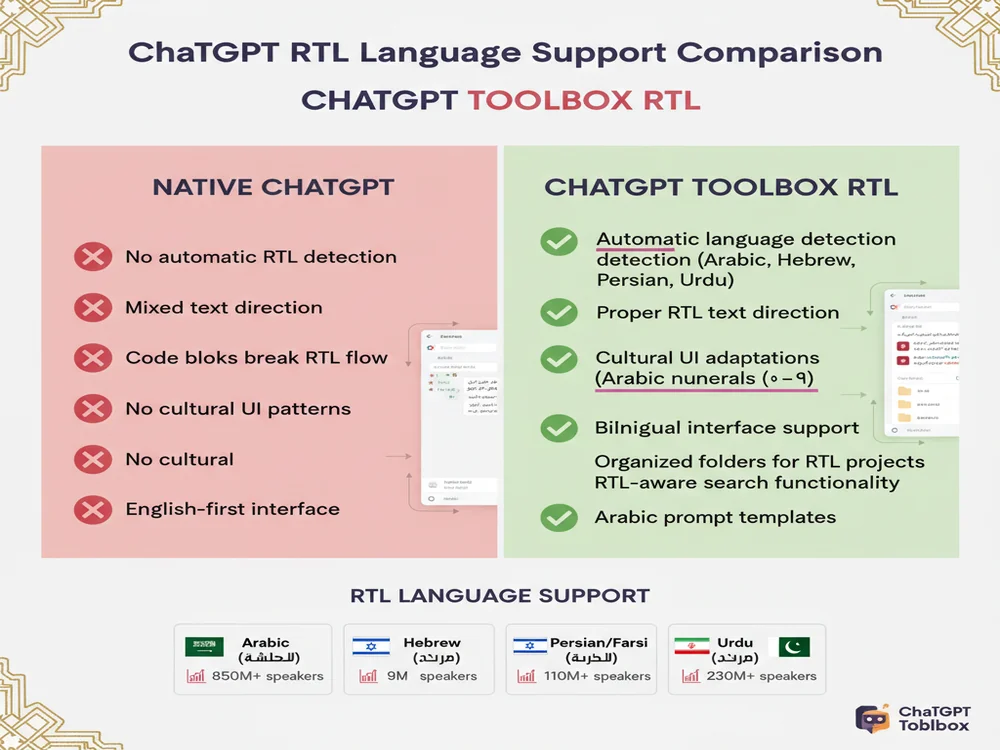
ChatGPT Toolbox RTL Language Support provides comprehensive features designed specifically for Arabic, Hebrew, Persian, and Urdu users. Here's what makes it the best solution for RTL languages in 2026:
Automatic Language Detection
ChatGPT Toolbox automatically detects when you're using Arabic, Hebrew, Persian, or Urdu and instantly applies appropriate RTL formatting. No manual settings or configuration needed—just start typing in your language and the interface adapts.
Proper Text Direction & Alignment
Arabic text flows naturally from right to left with correct sentence alignment, punctuation positioning on the right side where it belongs, and paragraph formatting that matches Arabic reading patterns. This eliminates the awkward left-aligned Arabic text common in native ChatGPT.
Mixed Language Support
When combining Arabic and English in the same conversation, ChatGPT Toolbox intelligently handles bidirectional text (BiDi), keeping Arabic portions RTL and English portions LTR, maintaining readability for code snippets and technical terms in English, and preserving URLs and email addresses in correct LTR format.
Cultural UI Patterns
The interface adapts to RTL cultural expectations with Arabic-Indic numerals (٠-٩) display where appropriate, UI elements positioned for RTL reading flow, and culturally sensitive design patterns that feel native to Arabic users.
Organization Features for Arabic Projects
Beyond formatting, ChatGPT Toolbox adds powerful organization:
- Folders in Arabic: Create and name folders in Arabic to organize conversations by project, topic, or client
- RTL-aware search: Search your Arabic conversations with proper RTL text handling
- Arabic prompt library: Access and create prompt templates in Arabic for quick reuse
- Bulk export: Export Arabic conversations to TXT, JSON, or Markdown with preserved RTL formatting
For complete details, read our dedicated guide: ChatGPT RTL Language Support: Perfect Experience for Arabic, Hebrew, and Persian Users.
Arabic Language Settings in ChatGPT
ChatGPT automatically detects Arabic, but system language settings can optimize your experience.
While ChatGPT automatically detects Arabic, you can optimize your experience with these settings adjustments:
System Language Settings
Though ChatGPT doesn't have an in-app language selector, you can improve Arabic usage by:
- Setting your operating system language to Arabic for consistent Arabic keyboard behavior
- Adding Arabic to your browser's preferred languages (Chrome: Settings → Languages → Add Arabic)
- Using Arabic keyboard layouts (standard Arabic QWERTY or traditional Arabic layout)
ChatGPT Custom Instructions for Arabic
You can set ChatGPT to always respond in Arabic by configuring Custom Instructions:
- Click your profile icon in ChatGPT's bottom-left corner
- Select "Settings" → "Personalization" → "Custom instructions"
- In the "How would you like ChatGPT to respond?" field, write: "Always respond in Arabic unless I explicitly request another language. Use Modern Standard Arabic (MSA) for formal content and can adapt to dialectal preferences when specified."
- Save your settings
Now ChatGPT will default to Arabic responses, even when you type prompts in English.
ChatGPT Arabic Translation Quality
ChatGPT offers Arabic translation capabilities that are frequently evaluated for their quality.
One of the most popular uses of ChatGPT among Arabic speakers is translation. According to research evaluating ChatGPT's Arabic translation accuracy, ChatGPT demonstrates strong translation capabilities with error rates ranging from 6-25% depending on content complexity.
Best Translation Use Cases:
- General communications: Emails, messages, social media posts—ChatGPT handles everyday translation with high accuracy
- Business correspondence: Professional emails, meeting notes, and business documents translate well with appropriate formality
- Technical documentation: Software documentation, user guides, and technical articles benefit from ChatGPT's technical vocabulary
- Educational content: Study materials, course content, and learning resources translate effectively
- Creative content: Blog posts, marketing copy, and creative writing translate with good style preservation
When to Use Professional Translation:
ChatGPT translation works well for most purposes, but consider professional translators for:
- Legal documents: Contracts, agreements, and legal filings require certified human translation
- Medical reports: Patient records, diagnoses, and medical documentation need professional accuracy
- Literary works: Poetry, novels, and artistic writing benefit from human cultural understanding
- Official certificates: Birth certificates, diplomas, and government documents require certified translation
Translation Prompt Tips:
For best translation results with ChatGPT:
- Specify source and target languages explicitly: "Translate the following from Arabic to English"
- Mention context: "This is a business email" or "This is casual social media content"
- Request formality level: "Use formal Arabic (MSA)" or "Use conversational English"
- Ask for alternatives: "Provide 3 translation variations with different tones"
Comparing ChatGPT Arabic Capabilities Across Models
ChatGPT Arabic capabilities vary by model, with newer versions showing improved fluency and dialect support.
Different ChatGPT models offer varying levels of Arabic language performance. Here's how they compare in 2026:
| Model | Arabic Fluency | Dialect Support | Translation Quality | Best For |
|---|---|---|---|---|
| ChatGPT-3.5 | Good | Basic MSA, limited dialects | 6-10% error rate | Quick translations, simple content |
| ChatGPT-4o | Excellent | Strong MSA + major dialects | 6-8% error rate | Professional content, complex translation |
| GPT-5 Fast | Excellent | MSA + 5 major dialects | 5-7% error rate | Real-time conversations, speed priority |
| GPT-5 Thinking | Superior | MSA + regional variations | 6-9% error rate | Creative writing, nuanced content, deep reasoning |
For most Arabic users in 2026, ChatGPT-4o offers the best balance of speed, quality, and dialect understanding. ChatGPT Plus, Pro, and Team subscribers have access to these advanced models.
Common Arabic ChatGPT Use Cases
Arabic users commonly employ ChatGPT for content creation, including blog posts, articles, and social media updates.
Arabic speakers worldwide use ChatGPT for diverse purposes. Here are the most popular use cases:
1. Content Creation
- Arabic blog posts and articles for websites
- Social media content in Arabic and dialects
- Marketing copy and advertising materials
- Video scripts and podcast outlines
2. Business & Professional
- Formal business emails in MSA
- Meeting agendas and minutes
- Presentation slides and reports
- Professional correspondence with clients
3. Education & Learning
- Homework help and tutoring in Arabic
- Academic essay writing and research
- Learning Arabic as a second language
- Exam preparation and study guides
4. Translation Services
- Document translation (Arabic ↔ English, French, etc.)
- Website localization for Arabic markets
- Software and app interface translation
- Subtitle translation for videos
5. Creative Writing
- Arabic poetry and literature
- Short stories and creative fiction
- Song lyrics in Arabic
- Scriptwriting for Arabic media
Tips for Arabic ChatGPT Power Users
Build an Arabic prompt library to save and quickly reuse your best-performing ChatGPT prompts.
Ready to master ChatGPT in Arabic? These advanced tips will transform your workflow:
1. Build Your Arabic Prompt Library
Save your best-performing Arabic prompts for quick reuse. With ChatGPT Toolbox Prompt Library, you can:
- Store Arabic prompt templates organized by category
- Use the
//shortcut to quickly access saved Arabic prompts - Add variables like
{{topic}}or{{audience}}for reusable templates - Share successful prompts with your Arabic-speaking team
2. Organize Arabic Projects with Folders
Create dedicated folders for your Arabic work using ChatGPT Toolbox folders:
- By client: "عميل الرياض" (Riyadh Client), "مشروع دبي" (Dubai Project)
- By content type: "ترجمات" (Translations), "محتوى تسويقي" (Marketing Content)
- By language: Keep Arabic conversations separate from other languages
- By dialect: Organize by Egyptian, Levantine, Gulf, etc.
3. Master Mixed-Language Workflows
Many Arabic professionals work in bilingual environments. Optimize your mixed-language workflow:
- Use English for technical terms where appropriate: "Explain the concept of machine learning using Arabic explanations but keeping technical terms in English"
- Request bilingual outputs: "Write a product description in Arabic with English technical specifications table"
- Alternate languages strategically: "Summarize this Arabic article in English bullet points"
4. Export and Backup Your Arabic Conversations
Preserve your valuable Arabic ChatGPT conversations with ChatGPT Toolbox export features:
- TXT format: Plain text preserving RTL formatting for easy reading
- JSON format: Structured data with metadata for developers
- Markdown format: Formatted text for documentation and reports
- Bulk export: Save multiple Arabic conversations simultaneously
5. Search Your Arabic History Efficiently
With hundreds of Arabic conversations, finding specific information becomes challenging. ChatGPT Toolbox advanced search helps you:
- Search within Arabic message content (not just titles)
- Find specific Arabic keywords or phrases across all conversations
- Filter by date to locate old Arabic projects
- Use exact match for precise Arabic phrase searches
Troubleshooting Common Arabic ChatGPT Issues
To fix left-to-right Arabic text display in ChatGPT, ensure your browser or application's RTL settings are correctly configured.
Encountering problems with Arabic on ChatGPT? Here are solutions to common issues:
Issue 1: Arabic Text Displays Left-to-Right
Problem: Your Arabic text aligns to the left instead of right, making it difficult to read.
Solution: Install ChatGPT Toolbox for automatic RTL formatting. Alternative: Use a dedicated RTL support browser extension specifically designed for ChatGPT.
Issue 2: ChatGPT Responds in English Despite Arabic Prompt
Problem: You type in Arabic but ChatGPT responds in English.
Solution: Add explicit language instruction: "أجب بالعربية دائما" (Always answer in Arabic) at the start of your conversation. Or set this as a Custom Instruction in ChatGPT settings.
Issue 3: Mixed Arabic-English Text is Confusing
Problem: When mixing Arabic and English, text direction becomes jumbled.
Solution: Use ChatGPT Toolbox which handles bidirectional text properly. Alternatively, request structured formats: "Write Arabic text in one section and English text in a separate section"
Issue 4: Code Blocks Break RTL Flow
Problem: Programming code appears incorrectly formatted when surrounded by Arabic text.
Solution: ChatGPT Toolbox automatically keeps code blocks in LTR format while maintaining RTL for surrounding Arabic text. Without it, request: "Keep all code examples in LTR format even when surrounded by Arabic text"
Issue 5: Can't Search Arabic Conversations
Problem: Native ChatGPT search doesn't find your Arabic keywords.
Solution: Use ChatGPT Toolbox content search which properly indexes and searches Arabic text. Make sure your Arabic keyboard is active when searching.
Frequently Asked Questions
Does ChatGPT support Arabic language?
Yes, ChatGPT fully supports Arabic language including Modern Standard Arabic (MSA) and major dialects like Egyptian, Levantine, Gulf, and Maghrebi variations. ChatGPT can understand Arabic prompts, generate Arabic content, translate between Arabic and other languages, and provide explanations in Arabic. However, proper RTL formatting requires browser extensions like ChatGPT Toolbox.
Can ChatGPT write in Arabic?
Yes, ChatGPT can write fluently in Arabic for various purposes including content creation, translation, academic writing, business communications, and creative writing. It handles both formal MSA and conversational dialects. Studies show ChatGPT's Arabic-English translation quality ranges from 6-25% error rate, making it suitable for general communications while complex materials like legal or medical documents may require professional review.
How do I use ChatGPT in Arabic?
To use ChatGPT in Arabic, simply type your prompts in Arabic directly into the ChatGPT interface. ChatGPT automatically detects Arabic and responds accordingly. For better RTL formatting, use ChatGPT Toolbox which provides proper right-to-left text direction, correct alignment, and cultural UI patterns for Arabic, Hebrew, Persian, and Urdu users.
What is RTL support in ChatGPT?
RTL (Right-to-Left) support ensures Arabic, Hebrew, Persian, and Urdu text displays correctly with proper text direction, alignment, and formatting. Native ChatGPT lacks dedicated RTL features, causing text alignment issues. ChatGPT Toolbox provides automatic RTL detection, proper text direction, cultural UI patterns, and ensures code blocks remain LTR for accurate reading.
Is ChatGPT good for Arabic translation?
ChatGPT is good for Arabic translation with quality comparable to or better than Google Translate for general content. It works best for everyday texts and communications.
However, for specialized content like legal documents, medical reports, or literary works, professional translation is recommended. Use ChatGPT for drafts and general translation, then validate critical content with human translators.
Can ChatGPT understand Arabic dialects?
Yes, ChatGPT can recognize and respond to various Arabic dialects including Egyptian, Levantine, Gulf, and Maghrebi variations. While primarily trained on Modern Standard Arabic (MSA), ChatGPT shows competency in understanding dialectal differences and can adapt responses to match regional language preferences when specified in prompts.
What are the best ChatGPT prompts for Arabic content?
Best Arabic prompts include: specifying formality level (formal/conversational), mentioning dialect preference if needed (Egyptian, Levantine, etc.), including cultural context, requesting specific formatting (business letter, social media post, academic essay), and clarifying target audience. Example: "Write a formal business email in MSA Arabic requesting a meeting, suitable for corporate Saudi Arabian context."
How does ChatGPT Toolbox help Arabic users?
ChatGPT Toolbox provides comprehensive RTL support with automatic language detection, proper right-to-left text direction, correct alignment for Arabic conversations, cultural UI patterns, organized folder structure for Arabic projects, prompt library with Arabic templates, and search functionality that works seamlessly with Arabic text. This transforms ChatGPT into a native-quality experience for Arabic speakers.
Conclusion: Transform Your ChatGPT Arabic Experience
ChatGPT is a powerful tool for Arabic speakers, offering fluent language understanding, content generation, and translation across Modern Standard Arabic and regional dialects. However, proper RTL formatting is essential for a comfortable, professional Arabic experience—and that's exactly what ChatGPT Toolbox provides.
With automatic RTL detection, proper text direction, cultural UI patterns, and powerful organization features, ChatGPT Toolbox transforms ChatGPT from a frustrating experience with misaligned text into a native-quality platform that feels designed specifically for Arabic users. Whether you're creating content, translating documents, conducting business, or learning, ChatGPT Toolbox makes Arabic workflows seamless.
Ready to experience ChatGPT the way it should work for Arabic? Install ChatGPT Toolbox for free and enjoy proper RTL support along with folders, advanced search, bulk export, and more. Join over 16,000 ChatGPT power users who rely on ChatGPT Toolbox for their AI workflows—including Arabic speakers across the Middle East and North Africa.
For more ChatGPT tips and guides, explore our related articles on ChatGPT RTL Language Support, organizing ChatGPT conversations with folders, and advanced ChatGPT history search.
Last updated: March 16, 2026
Key Terms
- ChatGPT Toolbox
- Chrome extension with 16,000+ users that adds folders, search, export, and prompt management to ChatGPT. Available on Chrome, Edge, and Firefox.
- Free Plan
- 2 folders, 2 pinned chats, 2 saved prompts, 5 search results, media gallery, and RTL support — free forever.
- Premium
- $9.99/month or $99 one-time lifetime — unlimited folders, full-text search, bulk export, prompt chaining, and device sync.
Free vs Premium: What You Get
- 2 folders, 2 pins
- 2 saved prompts
- 5 search results
- Basic organization
- Unlimited folders & subfolders
- Unlimited prompts + chaining
- Full-text search, unlimited results
- Bulk delete, archive, export
- Media Gallery
Bottom Line
ChatGPT Toolbox is a Chrome extension with 16,000+ active users and a 4.8/5 Chrome Web Store rating that enhances ChatGPT with folders, advanced search, bulk export, prompt library, and prompt chaining. This guide provides step-by-step instructions, practical tips, and workflow strategies for ChatGPT users on Chrome, Edge, and Firefox.
