
 Add to Chrome
 Add to Edge
 Adi Leviim
Sider AI vs ChatGPT Toolbox: Complete Comparison (2026)
Choosing between Sider AI and ChatGPT Toolbox? Here's the key insight: they solve fundamentally different problems. Sider AI is a multi-AI generalist tool that gives you access to Claude, GPT-4, Gemini, and 20+ other AI models through a sidebar on any website. ChatGPT Toolbox is a ChatGPT specialist that helps you organize, search, and manage thousands of ChatGPT conversations with folders, advanced search, and bulk export. This comprehensive comparison reveals exactly when to choose each tool—and why most users only need one, not both.
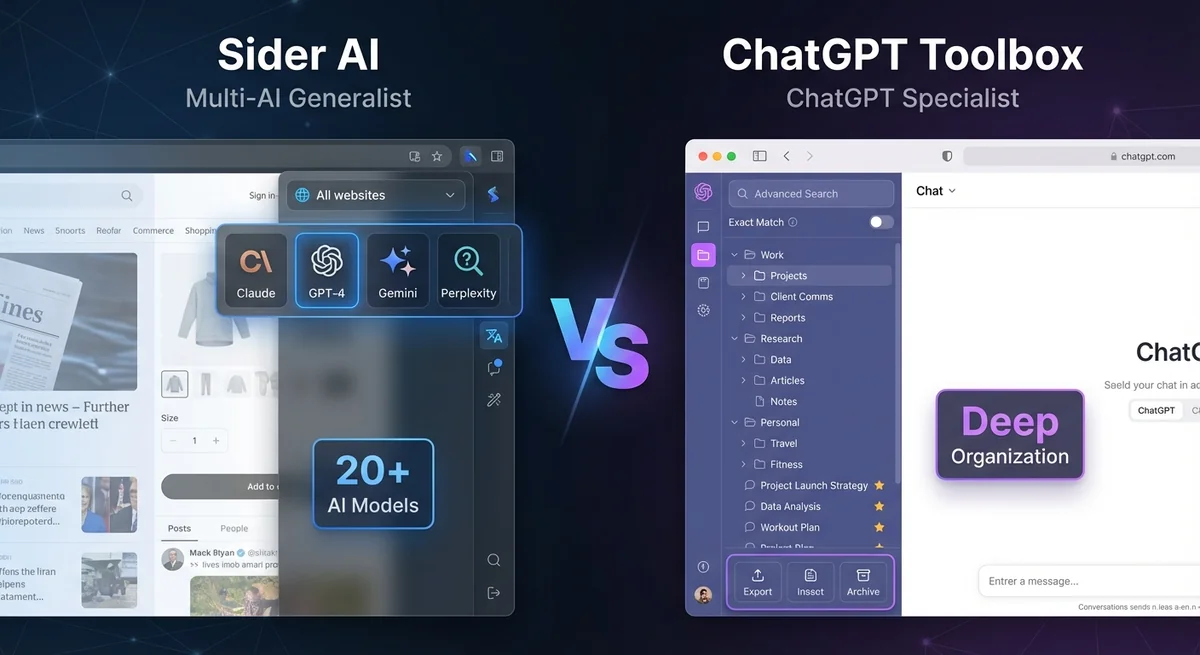
Quick Comparison: Generalist vs Specialist
The fundamental difference is simple: Sider AI enhances which AI models you can access (multi-AI support, translation, sidebar everywhere), while ChatGPT Toolbox enhances how you organize ChatGPT (folders, search, export, productivity). They're not direct competitors—they serve different user needs entirely.
| Feature Category | Sider AI | ChatGPT Toolbox |
|---|---|---|
| Primary Purpose | Multi-AI access & translation | ChatGPT organization & productivity |
| Best For | Users who need multiple AI models | ChatGPT power users with hundreds of chats |
| Core Value Proposition | One sidebar, 20+ AI models anywhere | Never lose ChatGPT conversations again |
| Target User | Multi-AI explorers, translators, casual users | ChatGPT-only users who need organization |
| Multi-AI Support | ✅ Yes (20+ models: Claude, GPT-4, Gemini, Perplexity) | ❌ No (ChatGPT-only focus) |
| Translation Features | ✅ Yes (50+ languages, instant translation) | ❌ No |
| Cross-Website Sidebar | ✅ Yes (works on all websites) | ❌ No (ChatGPT-only) |
| Folder Organization | ❌ No | ✅ Yes (unlimited folders & subfolders) |
| Advanced Search | ⚠️ Basic search only | ✅ Yes (exact match toggle, content search) |
| Bulk Export | ❌ No | ✅ Yes (TXT/JSON formats) |
| Pin Conversations | ❌ No | ✅ Yes |
| Media Gallery | ❌ No | ✅ Yes (organize DALL-E images) |
| Prompt Library | ⚠️ Basic templates | ✅ Yes (custom prompts + chaining with variables) |
| Free Plan | ⚠️ Limited (10 queries/day) | ✅ Generous (all core features unlimited) |
| Paid Plan Cost | $20/month | $9.99/month or $99 lifetime |
| Privacy Focus | ⚠️ Broad permissions (all websites) | ✅ Minimal permissions (ChatGPT-only) |
| Performance Impact | ⚠️ Moderate (sidebar on all sites) | ✅ Lightweight (ChatGPT-only) |
| Chrome Web Store Rating | 4.7/5 (500K+ users) | 4.8/5 (16K+ users) |
| Use Both Together? | ⚠️ Possible but usually unnecessary—choose based on primary need | |
Sider AI: The Multi-AI Generalist
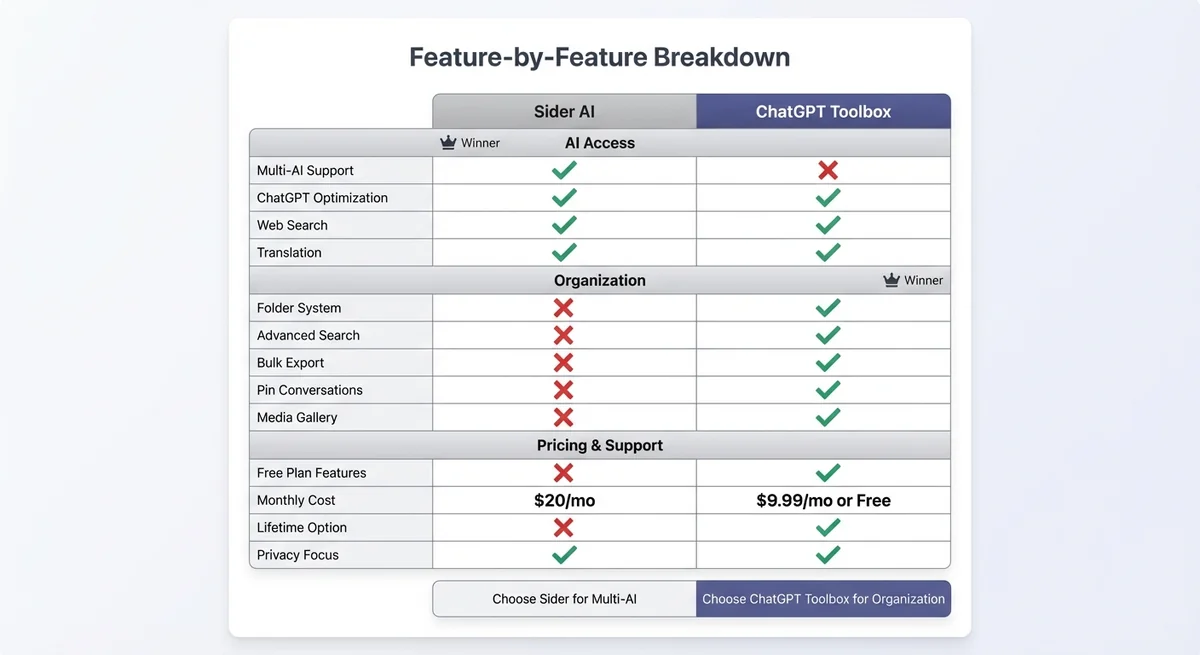
Sider AI is designed for users who want access to multiple AI models without switching between tabs. It adds a sidebar to every website you visit, letting you chat with Claude, GPT-4, Gemini, Perplexity, and 20+ other AI models from anywhere on the web.
What Sider AI Does Best
- Multi-AI Access: Switch between Claude, GPT-4, Gemini, Mistral, Perplexity, and other models instantly without leaving your current page
- Universal Sidebar: Access AI on any website—Gmail, Google Docs, Reddit, Twitter, news sites, research papers
- Instant Translation: Translate text in 50+ languages with one click, directly in the sidebar
- Quick Actions: Summarize articles, explain concepts, write responses, and rewrite text without copy-pasting
- Model Comparison: Ask the same question to multiple AI models simultaneously to compare responses
- Browser Integration: Highlight text on any page and get AI assistance via context menu
Perfect Use Cases for Sider AI
- Multi-AI Explorers: "I want to compare Claude's reasoning with GPT-4's creativity and Gemini's multimodal abilities"
- Translators & Language Learners: "I need instant translation while browsing foreign websites or reading research papers"
- Casual AI Users: "I use AI occasionally across different websites and don't want to manage separate tabs"
- Content Consumers: "I want to summarize long articles and YouTube videos while browsing"
- Model Switchers: "I use Claude for analysis, GPT-4 for writing, and Perplexity for research—all in one tool"
- Cross-Platform Workers: "I need AI assistance in Gmail, Google Docs, Notion, and social media"
Sider AI Limitations
Sider AI excels at multi-AI access but completely lacks organization features. If you're a heavy ChatGPT user, you'll quickly encounter these problems:
- ❌ No folder system - All conversations in one long list, no way to organize by project or topic
- ❌ Basic search only - Can't search within conversation content, no exact match toggle
- ❌ No bulk actions - Delete/archive conversations one at a time only
- ❌ No export options - Can't backup or download conversations for archival
- ❌ No pinning - Important conversations get buried as you create more
- ❌ No media gallery - DALL-E images scattered across conversations with no central view
- ❌ Limited free plan - Only 10 AI queries per day on free tier
- ❌ Browser performance impact - Sidebar loads on every website, consuming memory
If you primarily use ChatGPT and need robust organization, ChatGPT Toolbox is the better choice.
ChatGPT Toolbox: The ChatGPT Specialist
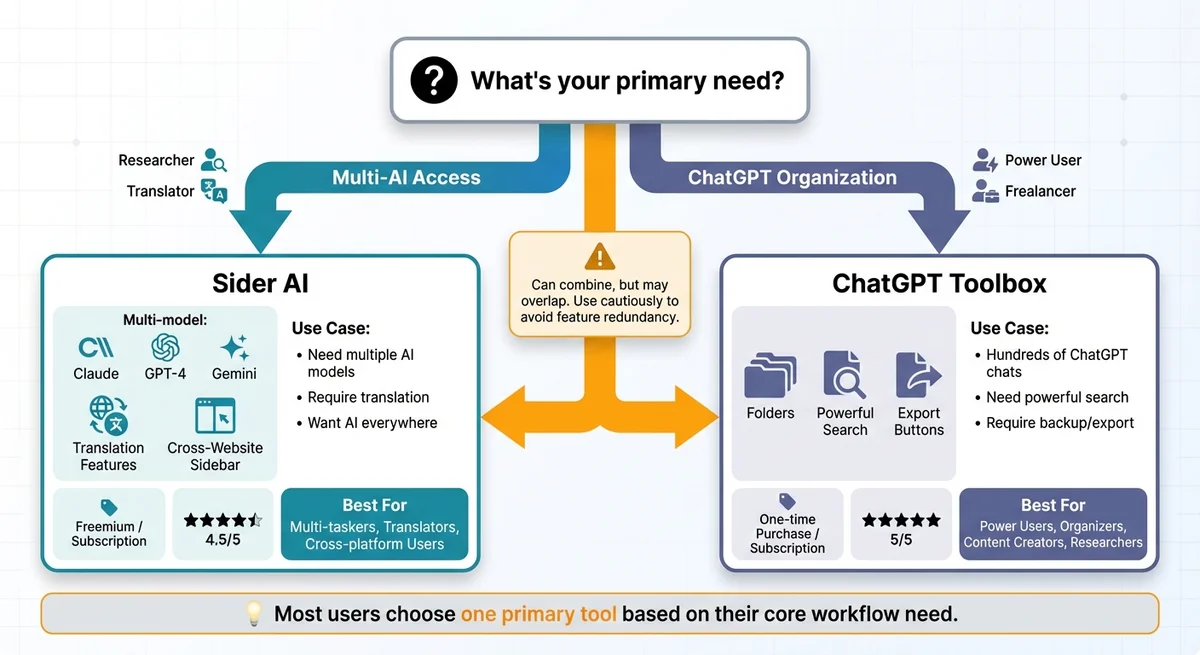
ChatGPT Toolbox solves a completely different problem: managing hundreds or thousands of ChatGPT conversations. If you use ChatGPT as your primary AI assistant, your sidebar quickly becomes chaotic. ChatGPT Toolbox transforms that chaos into an organized, searchable system.
What ChatGPT Toolbox Does Best
- Unlimited Folder Organization: Create folders and subfolders to group conversations by project, client, topic, or any structure you need
- Advanced Search: Search across all conversation names and content with exact match toggle for precise results
- Bulk Export: Download multiple conversations simultaneously in TXT or JSON format for backup or documentation
- Pin Important Conversations: Keep your most-used chats at the top for instant access
- Media Gallery: View all DALL-E generated images in one place with metadata (Gen ID, Seed ID, prompts)
- Prompt Library: Save custom prompts with
//shortcut and use variables like{{topic}}for dynamic content - Prompt Chaining: Create sequences of up to 10 prompts that run automatically with
..shortcut - Sync Across Devices: Keep your folder organization consistent across all browsers (Personal/Pro plans)
- RTL Language Support: Perfect experience for Arabic, Hebrew, Persian, and Urdu users
- Native-Looking Integration: Blends seamlessly with ChatGPT's interface—feels like a built-in feature
Perfect Use Cases for ChatGPT Toolbox
- ChatGPT Power Users: "I have 500+ ChatGPT conversations and can't find anything anymore"
- Freelancers & Consultants: "I need folders for each client with subfolders for projects, research, and deliverables"
- Researchers & Academics: "I organize conversations by research project, literature review, and paper drafts"
- Developers: "I save code solutions by programming language, framework, and debugging sessions"
- Content Creators: "I organize blog ideas, social media content, and client work in separate folders"
- Students: "I group conversations by semester, course, and assignment type"
- Business Professionals: "I need to export conversations for documentation and share with team members"
ChatGPT Toolbox Limitations
ChatGPT Toolbox is purpose-built for ChatGPT organization, which means it doesn't offer multi-AI features:
- ❌ No multi-AI support - Works exclusively with ChatGPT (not Claude, Gemini, or other models)
- ❌ No translation features - Focused on organization, not translation or language tools
- ❌ No cross-website sidebar - Only enhances ChatGPT, not other websites
- ❌ ChatGPT-only focus - If you use multiple AI models equally, this won't help with the others
If you need multi-AI access or translation, Sider AI is the better choice.
Detailed Feature Comparison
Organization & Productivity
Winner: ChatGPT Toolbox (by a landslide)
This is ChatGPT Toolbox's core strength and Sider AI's weakest area. ChatGPT Toolbox offers a complete organization system that Sider AI simply doesn't compete with:
| Organization Feature | Sider AI | ChatGPT Toolbox |
|---|---|---|
| Folder System | ❌ None | ✅ Unlimited folders + subfolders |
| Search Capabilities | ⚠️ Basic keyword search | ✅ Advanced search with exact match toggle |
| Content Search | ❌ Titles only | ✅ Search within conversation content |
| Bulk Actions | ❌ One at a time | ✅ Select multiple for bulk delete/archive/export |
| Export Options | ❌ None | ✅ Bulk export in TXT/JSON formats |
| Pin Conversations | ❌ No | ✅ Yes (keep important chats at top) |
| Media Management | ❌ No gallery | ✅ Full media gallery for DALL-E images |
| Prompt Management | ⚠️ Basic templates | ✅ Custom prompts + variables + chaining |
Verdict: If organization is your priority, ChatGPT Toolbox is the only real option. Sider AI doesn't even attempt to compete in this category.
AI Model Access
Winner: Sider AI (by design)
This is Sider AI's entire value proposition—giving you access to multiple AI models. ChatGPT Toolbox intentionally focuses on ChatGPT only:
| AI Access Feature | Sider AI | ChatGPT Toolbox |
|---|---|---|
| ChatGPT Support | ✅ Yes (GPT-3.5, GPT-4) | ✅ Yes (full ChatGPT integration) |
| Claude Support | ✅ Yes (Claude 3, Claude 3.5) | ❌ No |
| Gemini Support | ✅ Yes (Gemini Pro, Ultra) | ❌ No |
| Perplexity Support | ✅ Yes | ❌ No |
| Other AI Models | ✅ Yes (20+ models total) | ❌ No |
| Model Switching | ✅ Instant model switcher | ❌ ChatGPT-only |
| Model Comparison | ✅ Yes (ask multiple models simultaneously) | ❌ No |
Verdict: If you need multi-AI access, Sider AI is the clear winner. ChatGPT Toolbox deliberately focuses on ChatGPT-only users.
Cross-Website Functionality
Winner: Sider AI (by design)
Sider AI's sidebar works across all websites, while ChatGPT Toolbox only enhances ChatGPT itself:
| Cross-Website Feature | Sider AI | ChatGPT Toolbox |
|---|---|---|
| Works on All Websites | ✅ Yes (universal sidebar) | ❌ No (ChatGPT-only) |
| Gmail Integration | ✅ Yes (compose assistance) | ❌ No |
| Google Docs Support | ✅ Yes (writing assistance) | ❌ No |
| Social Media Integration | ✅ Yes (Twitter, LinkedIn, Reddit) | ❌ No |
| Translation on Any Site | ✅ Yes (50+ languages) | ❌ No |
| YouTube Summaries | ✅ Yes | ❌ No |
Verdict: If you want AI assistance everywhere on the web, Sider AI is designed for this. ChatGPT Toolbox is purpose-built for ChatGPT only.
Pricing & Value
Winner: Depends on your needs
| Pricing Aspect | Sider AI | ChatGPT Toolbox |
|---|---|---|
| Free Plan | ⚠️ Limited (10 queries/day) | ✅ Generous (all features unlimited) |
| Free Plan Organization | ❌ Basic list only | ✅ Unlimited folders, search, export |
| Free Plan AI Access | ✅ All 20+ models (10 queries/day) | ✅ Full ChatGPT access (unlimited) |
| Monthly Plan Cost | $20/month | $9.99/month |
| Annual Plan | $144/year ($12/mo) | $99 lifetime (one-time) |
| Lifetime Option | ❌ No | ✅ Yes ($99 one-time) |
| Value Proposition | Multi-AI access justifies $20/mo | Deep organization justifies $9.99/mo |
| Cost Over 3 Years | $720 (monthly) or $432 (annual) | $99 (lifetime) or $359.64 (monthly) |
Verdict:
- Best free plan: ChatGPT Toolbox (unlimited use of all features)
- Best monthly value for ChatGPT users: ChatGPT Toolbox ($9.99/mo vs $20/mo)
- Best long-term value: ChatGPT Toolbox ($99 lifetime)
- Only option for multi-AI: Sider AI ($20/mo is justified if you need 20+ AI models)
Privacy & Performance
Winner: ChatGPT Toolbox
| Privacy & Performance | Sider AI | ChatGPT Toolbox |
|---|---|---|
| Browser Permissions | ⚠️ Broad (read/modify data on all websites) | ✅ Minimal (ChatGPT-only access) |
| Data Storage | ⚠️ Cloud-based (Sider servers) | ✅ Local-first (browser storage) |
| Memory Usage | ⚠️ Moderate (sidebar on all sites) | ✅ Lightweight (ChatGPT-only) |
| Page Load Impact | ⚠️ Sidebar loads on every page | ✅ Zero impact (only loads on ChatGPT) |
| Privacy Policy | ⚠️ Processes data for multi-AI routing | ✅ Minimal data collection |
Verdict: ChatGPT Toolbox has better privacy and performance because it only accesses ChatGPT. Sider AI's cross-website functionality requires broader permissions and more resources.
When to Choose Sider AI
Choose Sider AI if you:
- ✅ Use multiple AI models regularly - You switch between Claude, GPT-4, Gemini, and others depending on the task
- ✅ Need translation features - You frequently translate content in 50+ languages while browsing
- ✅ Want AI assistance everywhere - You need AI help in Gmail, Google Docs, social media, and other websites
- ✅ Don't have many conversations - You use AI casually and don't accumulate hundreds of conversations
- ✅ Prefer model comparison - You like asking the same question to multiple AI models to compare responses
- ✅ Use AI on mobile frequently - Sider's mobile app provides cross-platform AI access
- ✅ Don't need organization - You're fine with a simple conversation list and don't need folders or advanced search
Example Sider AI user: "I'm a content marketer who uses Claude for strategy, GPT-4 for writing, and Perplexity for research. I need translation for international campaigns. I don't accumulate many conversations—I just need quick AI access while working in Google Docs and social media."
When to Choose ChatGPT Toolbox
Choose ChatGPT Toolbox if you:
- ✅ Use ChatGPT exclusively - ChatGPT is your primary AI assistant and you rarely use other models
- ✅ Have hundreds of conversations - Your ChatGPT sidebar is chaotic and you can't find anything
- ✅ Need powerful organization - You want folders, subfolders, advanced search, and bulk actions
- ✅ Require export capabilities - You need to backup conversations or share them with team members
- ✅ Want better search - You need to find specific conversations or responses from weeks/months ago
- ✅ Use ChatGPT professionally - You're a developer, researcher, writer, or consultant who relies on ChatGPT daily
- ✅ Value privacy - You prefer tools that only access ChatGPT, not all websites
- ✅ Want lifetime access - You prefer paying once ($99 lifetime) instead of recurring subscriptions
Example ChatGPT Toolbox user: "I'm a freelance developer with 800+ ChatGPT conversations. I need folders for each client, subfolders for different projects, and powerful search to find code solutions from months ago. I only use ChatGPT, so I don't need multi-AI access. I want to export conversations for documentation and share with clients."
Can You Use Both Together?
Technically yes, but most users shouldn't.
Both extensions modify the ChatGPT interface, which can create conflicts or redundancy. Here's the reality:
Why Using Both Usually Doesn't Make Sense
- ⚠️ Interface conflicts - Both tools modify ChatGPT's sidebar and UI, potentially causing visual glitches
- ⚠️ Memory overhead - Running both extensions increases browser memory usage significantly
- ⚠️ Redundant features - Some features overlap (basic conversation list, simple search)
- ⚠️ Higher cost - Paying for both ($20 + $9.99 = $29.99/mo) is expensive when you likely only need one
- ⚠️ Complexity - Managing two different extension interfaces adds unnecessary cognitive load
The Rare Case Where Both Make Sense
The only scenario where using both is justified:
"I use ChatGPT extensively (need ChatGPT Toolbox's organization) AND I frequently need Claude/Gemini for specific tasks (need Sider's multi-AI access)."
Even then, a better approach might be:
- Primary tool: ChatGPT Toolbox (for ChatGPT organization)
- Alternative: Open Claude.ai or Gemini directly in separate tabs when needed (instead of using Sider)
Bottom line: Most users should choose the tool that matches their primary need—not try to combine both.
Alternative Comparison: What If You Need Both Organization and Multi-AI?
If you genuinely need both deep ChatGPT organization AND multi-AI access, consider these strategies:
Strategy 1: Specialist Approach (Recommended)
- Install ChatGPT Toolbox for ChatGPT organization (your primary AI)
- Use Claude.ai, Gemini, and Perplexity directly in separate tabs when needed
- Why this works: You get best-in-class ChatGPT organization without sidebar clutter or conflicts
- Cost: Free (ChatGPT Toolbox free plan + direct access to other AIs)
Strategy 2: Multi-AI Primary
- Install Sider AI for multi-AI access and convenience
- Manually organize ChatGPT conversations using native ChatGPT features (archive, simple search)
- Why this works: Good if you truly use multiple AIs equally and don't have hundreds of ChatGPT conversations
- Cost: $20/month (Sider AI paid plan)
Strategy 3: Hybrid (For Power Users Only)
- Install both Sider AI and ChatGPT Toolbox
- Use Sider for multi-AI access and ChatGPT Toolbox for organization
- Why this works: You get everything, but with complexity and cost
- Cost: $29.99/month ($20 Sider + $9.99 ChatGPT Toolbox)
- Caution: May cause interface conflicts—test thoroughly before committing
Our recommendation: 90% of users should choose Strategy 1 (ChatGPT Toolbox + direct access to other AIs). It's the most cost-effective, conflict-free, and practical approach.
Real User Scenarios: Which Tool Is Right for You?
Scenario 1: The ChatGPT Power User
Profile: Developer with 600+ ChatGPT conversations, uses ChatGPT for 80% of AI needs, occasionally tries Claude for reasoning tasks.
Problem: "I can't find my old code solutions. My ChatGPT sidebar is a disaster. I need to organize by programming language and project."
Best Choice: ChatGPT Toolbox
Why: Organization is the critical need. Use ChatGPT Toolbox for folders and search. Open Claude directly when needed (rarely).
Scenario 2: The Multi-AI Explorer
Profile: Content creator who uses Claude for strategy, GPT-4 for writing, Gemini for image tasks, Perplexity for research.
Problem: "I'm constantly switching between tabs for different AI models. It's inefficient and breaks my workflow."
Best Choice: Sider AI
Why: Multi-AI access is the critical need. Sider's sidebar lets you switch models instantly without losing context.
Scenario 3: The Freelance Consultant
Profile: Business consultant with 8 active clients, creates client-specific ChatGPT conversations, needs to export for reports.
Problem: "I need folders for each client with subfolders for discovery, strategy, and deliverables. I need to export conversations for client documentation."
Best Choice: ChatGPT Toolbox
Why: Client organization and export are critical. ChatGPT Toolbox's folder system and bulk export are purpose-built for this.
Scenario 4: The Translation Professional
Profile: Translator working with 50+ languages, needs instant translation while browsing international websites.
Problem: "I need quick AI assistance and translation on any website I visit. I don't accumulate many conversations—I just need instant access."
Best Choice: Sider AI
Why: Translation and cross-website functionality are critical. Sider's 50+ language support and universal sidebar are essential.
Scenario 5: The Academic Researcher
Profile: PhD student with conversations organized by research project, literature review topics, and paper drafts.
Problem: "I have 400+ ChatGPT conversations from 3 years of research. I need to find specific discussions from months ago and organize by thesis chapter."
Best Choice: ChatGPT Toolbox
Why: Long-term organization and powerful search are critical. ChatGPT Toolbox's folder system and content search are essential for academic work.
Head-to-Head: The Deciding Questions
Still unsure? Answer these questions to determine which tool is right for you:
Question 1: Do you use AI models other than ChatGPT regularly?
- Yes, I frequently use Claude, Gemini, or other models → Sider AI
- No, I primarily/exclusively use ChatGPT → ChatGPT Toolbox
Question 2: How many ChatGPT conversations do you have?
- Less than 50-100 → Organization isn't critical yet → Sider AI (if you need multi-AI) or ChatGPT Toolbox free plan
- 100-500+ → Organization is becoming critical → ChatGPT Toolbox
- 500+ conversations → Organization is essential → ChatGPT Toolbox (no question)
Question 3: What's your biggest pain point?
- "I can't find my old conversations" → ChatGPT Toolbox
- "I need to switch between AI models constantly" → Sider AI
- "I need to organize conversations by project/client" → ChatGPT Toolbox
- "I need translation while browsing" → Sider AI
- "I need to export/backup conversations" → ChatGPT Toolbox
Question 4: What's your budget?
- Free only → ChatGPT Toolbox (generous free plan) or Sider AI (10 queries/day limit)
- Under $10/month → ChatGPT Toolbox ($9.99/mo)
- $20/month for multi-AI access → Sider AI
- One-time payment preferred → ChatGPT Toolbox ($99 lifetime)
Question 5: How do you prioritize privacy?
- Privacy is critical → ChatGPT Toolbox (minimal permissions)
- Convenience over privacy → Sider AI (cross-website sidebar requires broad permissions)
Pricing Breakdown: Total Cost of Ownership
Let's calculate the real cost over time to see which offers better value for different scenarios:
| Time Period | Sider AI (Monthly) | Sider AI (Annual) | ChatGPT Toolbox (Monthly) | ChatGPT Toolbox (Lifetime) |
|---|---|---|---|---|
| 1 Month | $20 | $12 (annual) | $9.99 | $99 (one-time) |
| 6 Months | $120 | $72 (annual) | $59.94 | $99 (paid) |
| 1 Year | $240 | $144 (annual) | $119.88 | $99 (paid) |
| 2 Years | $480 | $288 (annual) | $239.76 | $99 (paid) |
| 3 Years | $720 | $432 (annual) | $359.64 | $99 (paid) |
| 5 Years | $1,200 | $720 (annual) | $599.40 | $99 (paid) |
Key Insights:
- ChatGPT Toolbox lifetime plan pays for itself in ~10 months vs monthly, and ~8 months vs Sider AI
- After 1 year, ChatGPT Toolbox lifetime is cheaper than any other option
- Over 3 years, ChatGPT Toolbox lifetime costs $99 vs $720 for Sider (7.3x cheaper)
- ChatGPT Toolbox free plan offers more value than Sider's paid plan—if you only need organization
Frequently Asked Questions
Is Sider AI better than ChatGPT Toolbox?
They serve different purposes. Sider AI is better for multi-AI access (Claude, GPT-4, Gemini) and sidebar convenience. ChatGPT Toolbox is better for ChatGPT-specific organization with folders, advanced search, and bulk export. Choose based on your primary need: multi-AI or ChatGPT organization.
Can I use Sider AI and ChatGPT Toolbox together?
Yes, but it may be redundant. Both tools modify the ChatGPT interface. Most users find it better to choose one: Sider for multi-AI access or ChatGPT Toolbox for deep ChatGPT organization. If you use multiple AI models, choose Sider. If you only use ChatGPT, choose ChatGPT Toolbox.
Is ChatGPT Toolbox a good Sider AI alternative?
Yes, if your primary need is ChatGPT organization. ChatGPT Toolbox offers superior folder organization, advanced search, and bulk export that Sider AI lacks. However, if you need multi-AI access or translation features, Sider AI is better. They're alternatives for different use cases.
Which is more cost-effective: Sider AI or ChatGPT Toolbox?
ChatGPT Toolbox is more cost-effective for ChatGPT users. The free plan includes unlimited folders, search, and export. Personal costs $9.99/month vs Sider's $20/month. Sider justifies higher cost with multi-AI access, but if you only use ChatGPT, ChatGPT Toolbox delivers better value.
Does Sider AI have folder organization like ChatGPT Toolbox?
No. Sider AI focuses on multi-AI access and sidebar tools, not conversation organization. ChatGPT Toolbox specializes in organization with unlimited folders, subfolders, pinning, and advanced search. If organization is your priority, ChatGPT Toolbox is the clear winner.
Can Sider AI search ChatGPT conversation history?
Sider AI has basic search functionality, but it's limited compared to ChatGPT Toolbox. ChatGPT Toolbox offers advanced search with exact match toggle, content search, and instant results across thousands of conversations. For power users who need robust search, ChatGPT Toolbox is superior.
Is Sider AI worth it if I only use ChatGPT?
No. If you exclusively use ChatGPT, ChatGPT Toolbox is a better choice. Sider AI's value comes from multi-AI access (Claude, Gemini, GPT-4). You'd be paying $20/month for features you don't use. ChatGPT Toolbox costs $9.99/month or free with full organization features.
Which has better privacy: Sider AI or ChatGPT Toolbox?
ChatGPT Toolbox has better privacy. It only accesses ChatGPT and stores data locally. Sider AI's sidebar works across all websites, requiring broader permissions and potentially exposing more browsing data. For privacy-conscious users, ChatGPT Toolbox's focused approach is more secure.
Final Verdict: Which Tool Should You Choose?
The choice between Sider AI and ChatGPT Toolbox comes down to one critical question: What is your primary need?
Choose Sider AI If:
- ✅ You regularly use multiple AI models (Claude, GPT-4, Gemini, Perplexity)
- ✅ You need translation features for 50+ languages
- ✅ You want AI assistance on all websites (Gmail, Docs, social media)
- ✅ You have fewer than 100 conversations and don't need advanced organization
- ✅ Multi-AI access is worth $20/month to you
Choose ChatGPT Toolbox If:
- ✅ You primarily/exclusively use ChatGPT
- ✅ You have 100+ conversations and struggle to find old chats
- ✅ You need powerful organization with folders, subfolders, and advanced search
- ✅ You want to export/backup conversations for documentation
- ✅ You value privacy and prefer minimal permissions
- ✅ You want better value ($9.99/mo or $99 lifetime vs $20/mo)
The Bottom Line
For 90% of users, the answer is clear:
If you use ChatGPT as your primary AI, choose ChatGPT Toolbox. The organization, search, and export features are unmatched, and the free plan is incredibly generous.
If you genuinely need multiple AI models, choose Sider AI. The multi-AI access and translation features justify the $20/month cost.
Most users trying to decide between these tools are ChatGPT power users who've heard about Sider AI's multi-AI capabilities. Unless you're actively frustrated by ChatGPT's limitations and regularly wish you had Claude or Gemini, stick with ChatGPT Toolbox. It solves the organization problem that actually affects your daily workflow.
Get Started with ChatGPT Toolbox
If you've decided ChatGPT Toolbox is the right choice, here's how to get started:
- Install the extension: Visit the Chrome Web Store and click "Add to Chrome"
- Open ChatGPT: Navigate to chat.openai.com and you'll see new organization features immediately
- Create your first folder: Click the new "Folders" button and organize your conversations by project or topic
- Try advanced search: Use the search bar with exact match toggle to find specific conversations instantly
- Export conversations: Select multiple chats and click "Export" to backup in TXT or JSON format
- Upgrade when ready: Start with the generous free plan, upgrade to Personal ($9.99/mo) or Pro ($99 lifetime) when you need sync across devices
Join 16,000+ ChatGPT power users who've transformed their conversation chaos into an organized, searchable system. Download ChatGPT Toolbox for free and experience ChatGPT the way it should be.
Exploring other AI tools? Read our complete Sider AI review, see whether you need multiple AI tools, or compare multi-AI tools vs specialists.
