
 Add to Chrome
 Add to Edge
 Adi Leviim
ChatGPT Toolbox for Business Professionals: Boost Productivity
As a business professional, you juggle client meetings, strategic planning sessions, project management, and endless documentation. If you're using ChatGPT for brainstorming, drafting proposals, analyzing data, or generating reports, you're likely struggling with the same problem: hundreds of unorganized conversations scattered across your chat history.
That client pitch you drafted three weeks ago? Lost in a sea of conversations. The market analysis you ran last month? Buried under dozens of newer chats. The meeting summary template that worked perfectly? Impossible to find when you need it most.
ChatGPT Toolbox transforms ChatGPT from a powerful AI assistant into a complete business productivity system. In this comprehensive guide, you'll discover how business professionals—from executives to consultants—use ChatGPT Toolbox to organize workflows, save time, and deliver better results.

Why Business Professionals Need ChatGPT Toolbox
The typical business professional using ChatGPT faces these challenges:
- Conversation Overload: Managing 50+ conversations per week across clients, projects, and internal tasks
- Critical Information Loss: Losing track of important client requirements, project details, or strategic insights
- Time Wasted Searching: Spending 10-15 minutes daily scrolling through chat history to find specific conversations
- Inconsistent Templates: Recreating proposals, reports, and meeting agendas instead of reusing proven templates
- No Backup Strategy: Risking data loss if conversations are accidentally deleted or accounts compromised
- Cross-Device Chaos: Working from office desktop, home laptop, and tablet with different conversation histories
ChatGPT Toolbox solves these problems with professional-grade organization, instant search, template management, and seamless synchronization.
Essential Features for Business Professionals
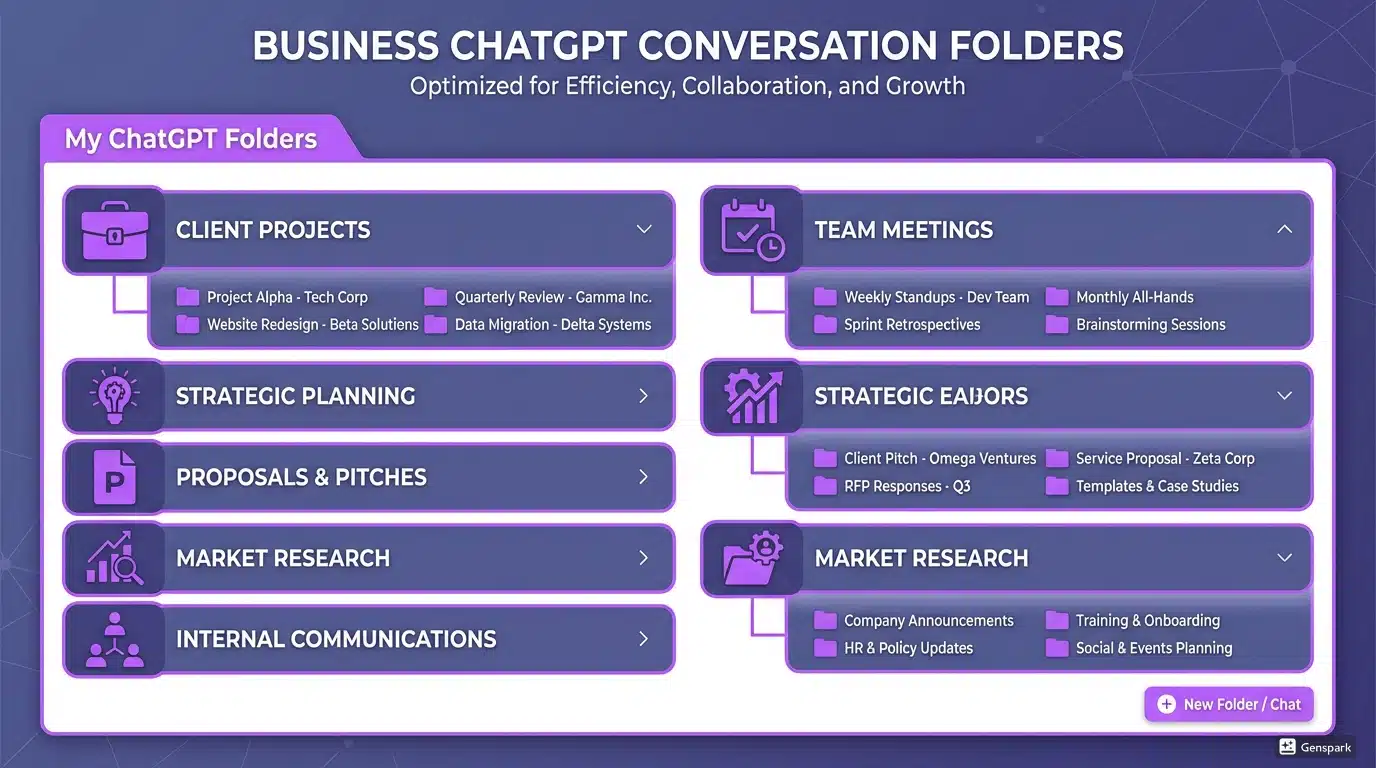
1. Advanced Folder Organization
Transform your ChatGPT into a structured business workspace with unlimited folders and subfolders.
Recommended Folder Structure for Business:
- 📁 Client Projects
- Client A - Project Alpha
- Client B - Quarterly Reports
- Client C - Strategic Consulting
- 📁 Internal Operations
- Team Meeting Notes
- Performance Reviews
- Process Documentation
- 📁 Business Development
- Proposals & Pitches
- Market Research
- Competitor Analysis
- 📁 Templates & Resources
- Email Templates
- Report Frameworks
- Presentation Outlines
2. Lightning-Fast Search
Find any conversation in seconds with advanced search capabilities. Search by keyword, client name, project title, or date range.
Business Search Use Cases:
- Find client requirements from initial discovery calls
- Locate specific data points from market research conversations
- Retrieve project timelines and deliverable details
- Search meeting notes for action items and decisions
3. Pin Critical Conversations
Pin important conversations to the top of your sidebar for instant access.
What to Pin:
- Active client projects with tight deadlines
- Ongoing strategic planning sessions
- Frequently used templates and frameworks
- Current quarter goals and OKRs
4. Bulk Export for Documentation
Create comprehensive project documentation with bulk export capabilities.
Export Use Cases:
- Archive completed client projects for reference
- Create project handoff documentation for team members
- Generate compliance records for audits
- Back up strategic planning sessions quarterly
5. Prompt Library for Efficiency
Access and save proven business prompts with the ChatGPT Toolbox Prompt Library.
Essential Business Prompts to Save:
- Executive summary generation
- SWOT analysis frameworks
- Meeting agenda templates
- Client proposal structures
- Market research question sets
6. Sync Across All Devices
Access your organized ChatGPT conversations on office desktop, home laptop, and tablet with automatic synchronization (Pro plan).
Real-World Business Use Cases
For Executives and C-Suite Leaders
Challenge: Managing strategic planning, board presentations, and executive communications while maintaining oversight of multiple departments.
Solution with ChatGPT Toolbox:
- Create folders for each business function (Sales, Marketing, Operations, Finance)
- Pin ongoing strategic initiatives for quick updates
- Use prompt chaining to automate quarterly report generation
- Export board meeting preparation conversations for executive team review
- Search past strategic conversations when evaluating new opportunities
Time Saved: 5-7 hours per week on information retrieval and documentation.
For Management Consultants
Challenge: Juggling multiple client engagements, each with unique requirements, timelines, and deliverables.
Solution with ChatGPT Toolbox:
- Create dedicated folders for each client engagement
- Organize subfolders by project phase (Discovery, Analysis, Recommendations, Implementation)
- Save reusable frameworks (McKinsey 7S, Porter's Five Forces) in Templates folder
- Export client deliverables as Markdown for easy formatting
- Use advanced search to find similar past projects for reference
Time Saved: 8-10 hours per week on client documentation and research.
For Business Development Professionals
Challenge: Tracking multiple prospects, customizing pitches, and managing proposal development cycles.
Solution with ChatGPT Toolbox:
- Organize folders by sales pipeline stage (Prospecting, Discovery, Proposal, Negotiation)
- Pin high-priority deals for daily review
- Save winning proposal templates and pitch frameworks
- Export competitor analysis for sales enablement team
- Search past successful proposals when customizing new pitches
Time Saved: 6-8 hours per week on proposal development and prospect research.
For Project Managers
Challenge: Coordinating multiple projects, tracking deliverables, managing stakeholder communications.
Solution with ChatGPT Toolbox:
- Create folders for each active project
- Use subfolders for project phases and workstreams
- Pin current sprint planning conversations
- Export project retrospectives for team knowledge base
- Save risk assessment and mitigation templates
Time Saved: 4-6 hours per week on project documentation and status reporting.
For Financial Analysts
Challenge: Managing complex financial models, market analysis, and investment research across multiple sectors.
Solution with ChatGPT Toolbox:
- Organize folders by sector or investment thesis
- Save financial modeling templates and valuation frameworks
- Pin ongoing market analysis conversations
- Export research summaries for investment committee presentations
- Search historical analysis when evaluating similar opportunities
Time Saved: 5-7 hours per week on research documentation and model building.

Step-by-Step Setup Guide for Business Professionals
Week 1: Installation and Initial Organization
Day 1: Install and Explore
- Install ChatGPT Toolbox from Chrome Web Store
- Navigate to ChatGPT and explore new sidebar features
- Review existing conversations and identify organization needs
Day 2-3: Create Folder Structure
- Create your primary folder categories (Clients, Internal, Templates)
- Add subfolders for active projects and key business functions
- Move existing conversations into appropriate folders
Day 4-5: Set Up Templates
- Create a "Templates" folder
- Add conversation starters for common business tasks
- Save your most-used prompts in the Prompt Library
Week 2: Advanced Features and Workflow Integration
- Pin your top 5 most important ongoing conversations
- Set up prompt chains for recurring reports
- Practice using advanced search to find archived conversations
- Export completed project folders for backup and documentation
- Upgrade to Pro plan for cross-device sync if working from multiple locations
Business Productivity Workflows
Morning Routine: Daily Briefing
- Review pinned conversations for active projects
- Check "Client Projects" folder for any urgent follow-ups
- Use search to find yesterday's action items
- Start new conversations in appropriate project folders
Client Meeting Preparation
- Search for client name to review all past conversations
- Export relevant discussions for meeting prep document
- Use saved meeting agenda template from Prompt Library
- Pin meeting notes conversation for post-meeting follow-up
End-of-Project Documentation
- Review all conversations in project folder
- Export entire folder in Markdown format
- Archive project folder by moving to "Completed Projects"
- Extract lessons learned for Templates folder
Quarterly Business Review
- Export all conversations from past quarter
- Use search to find strategic planning conversations
- Generate summary reports using prompt chaining
- Archive old conversations, reorganize folder structure for new quarter
Integration with Business Tools
Notion Integration
Export ChatGPT conversations as Markdown and import directly into Notion for team knowledge bases.
Slack Communication
Export relevant ChatGPT insights and share with team channels for collaborative decision-making.
Google Drive Backup
Regularly export project folders and store in Google Drive for company-wide accessibility.
CRM Systems
Export client discovery conversations and attach to CRM records for sales team context.
Security and Compliance for Business Use
Data Privacy: ChatGPT Toolbox operates entirely in your browser. Your conversations stay private and aren't sent to third parties. Learn more about ChatGPT Toolbox data privacy.
Best Practices:
- Avoid including client confidential information in conversation titles
- Regularly export and encrypt sensitive project folders
- Use ChatGPT's data controls to manage OpenAI's data retention
- Review your organization's AI usage policy before sharing exports
- Consider using ChatGPT Enterprise for additional compliance features
ROI Calculation: Is ChatGPT Toolbox Worth It?
| Business Professional Type | Hours Saved Per Week | Annual Value (@ $150/hr) | ChatGPT Toolbox Cost | ROI |
|---|---|---|---|---|
| Executive | 6 hours | $46,800 | $99 (lifetime) | 47,173% |
| Consultant | 9 hours | $70,200 | $99 (lifetime) | 70,909% |
| Business Developer | 7 hours | $54,600 | $99 (lifetime) | 55,152% |
| Project Manager | 5 hours | $39,000 | $99 (lifetime) | 39,394% |
Even conservative estimates show 400x+ return on investment in the first year alone.
Comparing ChatGPT Toolbox to Alternatives
| Feature | ChatGPT Toolbox | Native ChatGPT | Notion AI | Other Extensions |
|---|---|---|---|---|
| Folder Organization | Unlimited nested folders | No folders | Database structure | Limited folders |
| Advanced Search | Full-text + operators | Basic scroll only | Database search | Basic search |
| Bulk Export | Multiple formats | All-or-nothing | Page-by-page | Limited |
| Prompt Library | Built-in + custom | No | Templates | Varies |
| Cross-Device Sync | Yes (Pro plan) | Auto-sync | Yes | Rarely |
| Native Integration | Seamless | Built-in | Separate platform | Add-on feel |
| Cost | Free / $99 lifetime | $20/month (Plus) | $10/month | $5-15/month |
For business professionals committed to ChatGPT, ChatGPT Toolbox offers the most comprehensive organization system at the best value.
Frequently Asked Questions
Can I use ChatGPT Toolbox with ChatGPT Enterprise?
Yes! ChatGPT Toolbox works seamlessly with ChatGPT Free, Plus, Team, and Enterprise accounts. However, check with your IT department regarding browser extension policies.
Does ChatGPT Toolbox slow down ChatGPT?
No. ChatGPT Toolbox is lightweight and optimized for performance. Most users report ChatGPT feels faster because they can find conversations instantly instead of scrolling.
Can multiple team members share organized folders?
Currently, ChatGPT Toolbox organization is per-user. However, you can export conversations and share them with team members who can then import them into their own organization system.
What happens if I stop using ChatGPT Toolbox?
Your ChatGPT conversations remain intact. The folder organization and other features are stored locally in your browser. You can export everything before uninstalling if needed.
Is there a limit to how many folders I can create?
No. You can create unlimited folders and subfolders to match your exact business structure and workflow needs.
Get Started: Transform Your Business Productivity
Business professionals using ChatGPT without proper organization waste hours each week searching for conversations, recreating templates, and losing critical information. ChatGPT Toolbox transforms ChatGPT into a complete business productivity system—organized, searchable, and professional.
What you'll gain:
- 5-10 hours saved per week on information management
- Zero risk of losing important client or project conversations
- Professional organization system that scales with your business
- Instant access to templates, frameworks, and past project insights
- Complete backup strategy for business-critical AI conversations
Ready to boost your business productivity?Install ChatGPT Toolbox for free and start organizing your business conversations in minutes.
Start with the free plan to test the features, then upgrade to Pro ($99 lifetime) for cross-device sync and priority support—perfect for business professionals working from multiple locations.
More Resources for Business Professionals:
