
 Add to Chrome
 Add to Edge
 Adi Leviim
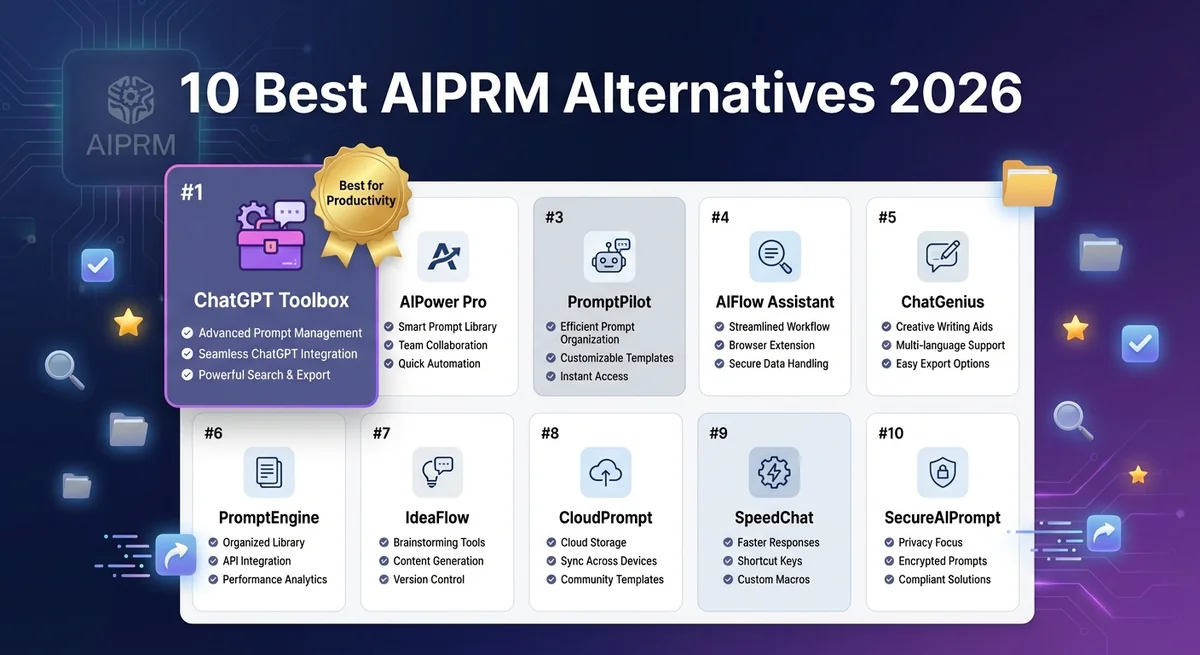
10 Best AIPRM Alternatives for ChatGPT Power Users (2026)
If you're searching for AIPRM alternatives, you're likely experiencing one of these frustrations: an overwhelming prompt library with thousands of templates, limited conversation organization features, or the realization that you need productivity tools more than pre-written prompts. The good news is that better alternatives exist for ChatGPT power users who prioritize efficiency and organization.
The fundamental question isn't "What's better than AIPRM?"—it's "Do I need prompt templates or productivity features?" AIPRM excels at providing pre-written prompt libraries for content creation and marketing. But if you have 50+ ChatGPT conversations and struggle to find past discussions, you need a different solution entirely. This guide explores the 10 best AIPRM alternatives, starting with the most comprehensive productivity-focused tools and ending with DIY approaches.
Why People Look for AIPRM Alternatives
Before diving into alternatives, let's understand why users seek AIPRM replacements. According to analysis of user reviews and Reddit discussions, the main pain points include:
- Overwhelming prompt library: With 1000+ prompts, finding the right template becomes as time-consuming as writing your own
- Limited organization features: AIPRM focuses on prompts, not conversation management. No advanced search, folders, or bulk operations
- Paid tiers required: Best prompts and features locked behind premium subscriptions
- Wrong tool for wrong problem: Users discover they need conversation organization more than prompt templates once they accumulate 100+ chats
- Feature mismatch: Power users need search, export, folders, and bulk actions—features AIPRM doesn't prioritize
The reality is that most ChatGPT power users need organization and productivity tools first, prompt templates second. After you've had 50-100 conversations, the bottleneck isn't prompting—it's finding that perfect conversation from last month or organizing projects into folders.
1. ChatGPT Toolbox – Best for Productivity & Organization
Best for: Power users with 50+ conversations who need comprehensive organization, advanced search, folders, bulk operations, and export features.
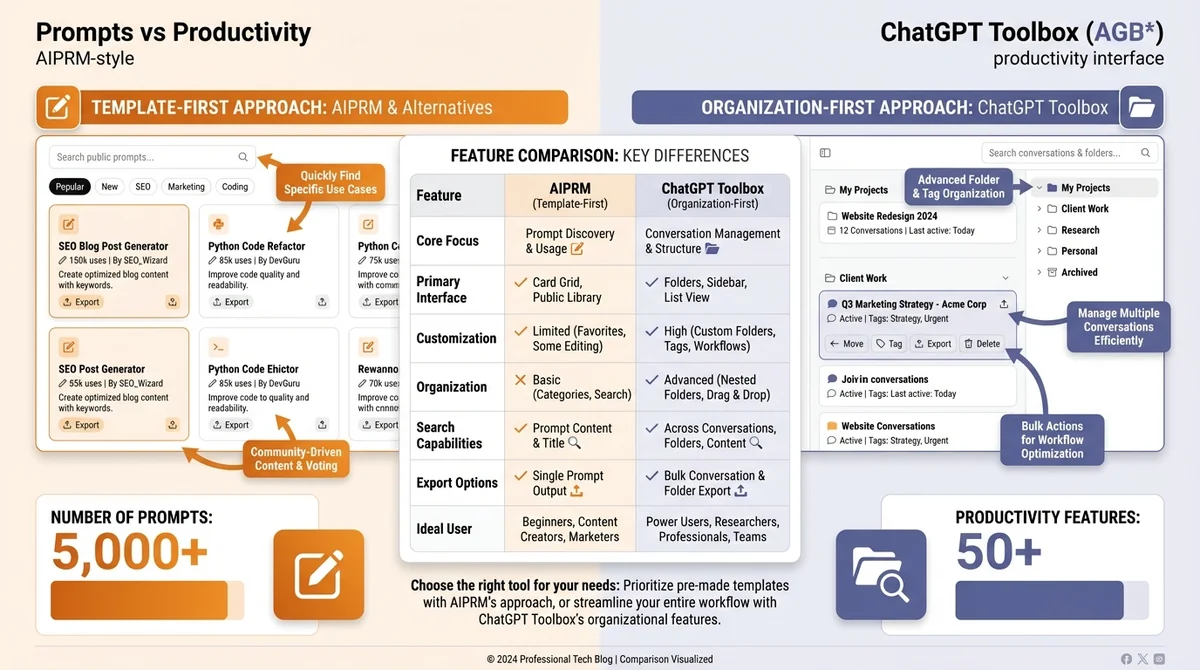
ChatGPT Toolbox is the leading AIPRM alternative for users who prioritize productivity over prompts. While AIPRM focuses on template libraries, ChatGPT Toolbox solves the actual problems power users face: organizing hundreds of conversations, finding specific chats instantly, and managing chat history efficiently.
Key Features
- Advanced Search: Find any conversation instantly with keyword search, date filters, and exact phrase matching. No more endless scrolling through chronological lists
- Folders & Subfolders: Create unlimited folders organized by project, client, topic, or any taxonomy. Drag-and-drop conversations between folders
- Bulk Operations: Select multiple conversations to delete, archive, or move in seconds. Essential when managing 100+ chats
- Export Formats: Export conversations in TXT, JSON, or Markdown for backup, documentation, or sharing
- Pinning: Pin critical conversations to the top of your sidebar for instant access
- Custom Themes: Personalize ChatGPT interface with custom colors and dark mode options
- Media Gallery: View all images generated in conversations in one organized gallery
- Prompt Library: Save and manage custom prompts (similar to AIPRM but tailored to your needs)
Pricing
- Free: Basic search, folders, export, and prompt library
- Pro ($4.99/month): Unlimited folders, advanced search filters, bulk operations, sync across devices
Pros & Cons
| Pros | Cons |
|---|---|
| Comprehensive productivity features | Not focused on pre-written prompt templates |
| Essential for managing 50+ conversations | Requires Chrome/Edge browser |
| Free tier includes core features | Learning curve for advanced features |
| Regular updates and new features | — |
| Compatible with other extensions (including AIPRM) | — |
Why It's #1
ChatGPT Toolbox ranks first because it solves the problems most power users actually face. AIPRM's prompt library helps with writing tasks, but conversation organization becomes critical once you accumulate conversations. ChatGPT Toolbox provides folders, advanced search, bulk operations, and export—features essential for anyone using ChatGPT daily for work, research, or development.
Real-world scenario: You're working on three client projects simultaneously, each with 20-30 conversations. With ChatGPT Toolbox, create folders for each client, search conversation history instantly, and export completed project chats for documentation. With AIPRM, you'd still be scrolling through a chronological sidebar trying to find last week's conversation.
2. Native ChatGPT Custom Instructions – Free Built-in Alternative
Best for: Users who primarily need persistent instructions across conversations, not pre-written prompts.
ChatGPT's native Custom Instructions feature is the best free AIPRM alternative for users who want to set default behavior without extensions. Custom Instructions allow you to define persistent prompts that apply to every conversation automatically.
Key Features
- Set persistent instructions for tone, style, format, and preferences
- Apply instructions to all conversations automatically
- Free with ChatGPT Plus and Free accounts
- No extension required—works natively in ChatGPT
How to Use Custom Instructions
- Click your profile picture in ChatGPT
- Select "Custom instructions"
- Enter two sections:
- What would you like ChatGPT to know about you? (Your background, preferences, context)
- How would you like ChatGPT to respond? (Tone, format, style guidelines)
- Enable "Enable for new chats"
Pros & Cons
| Pros | Cons |
|---|---|
| Completely free | No prompt library or templates |
| No extension needed | Only one set of instructions at a time |
| Works across all devices | No organization or search features |
| Simple and reliable | Limited to 1500 characters total |
Example Custom Instructions
What would you like ChatGPT to know about you? I'm a software developer specializing in JavaScript and React. I work on web applications and value concise, practical code examples over theory. How would you like ChatGPT to respond? - Provide code examples for every explanation - Use modern ES6+ syntax - Include error handling in examples - Keep explanations under 200 words - Always show TypeScript types when relevantWhen to choose this: Custom Instructions work best if you need consistent behavior across conversations but don't need prompt templates or organization features. For most users, combine Custom Instructions (for consistent behavior) + ChatGPT Toolbox (for organization).
3. PromptPerfect – AI-Powered Prompt Optimization
Best for: Users who want to improve their own prompts rather than use pre-written templates.
PromptPerfect takes a different approach from AIPRM: instead of providing templates, it optimizes your prompts using AI. You write a prompt, PromptPerfect analyzes and improves it for clarity, specificity, and effectiveness.
Key Features
- AI optimization: Rewrites your prompts for better results
- Multi-model support: Optimizes for ChatGPT, Claude, Gemini, DALL-E, and more
- Prompt history: Save and track optimized prompts
- Batch optimization: Optimize multiple prompts simultaneously
- API access: Integrate prompt optimization into workflows
Pricing
- Free: 10 optimizations per month
- Pro ($9.99/month): Unlimited optimizations, batch processing, API access
Pros & Cons
| Pros | Cons |
|---|---|
| Teaches better prompting skills | Not a prompt library |
| Works across multiple AI models | Requires manual prompt writing first |
| Improves your existing prompts | No conversation organization features |
| API for automation | Monthly cost for heavy users |
When to choose this: PromptPerfect is ideal if you prefer learning to write better prompts rather than relying on templates. It's educational and helps you develop prompting skills, unlike AIPRM which provides ready-made solutions.
4. Superpower ChatGPT – Another Extension with Features
Best for: Users wanting a middle ground between AIPRM's prompts and ChatGPT Toolbox's organization.
Superpower ChatGPT is another Chrome extension offering productivity features plus some prompt management. It's less comprehensive than ChatGPT Toolbox but provides more organization tools than AIPRM.
Key Features
- Basic search and folder organization
- Prompt templates library (smaller than AIPRM)
- Chat export in multiple formats
- Custom themes and interface customization
- Sync across devices (premium)
Pricing
- Free: Basic features with limitations
- Premium ($15/month): Full features, unlimited sync
Pros & Cons
| Pros | Cons |
|---|---|
| Combines prompts and organization | More expensive than alternatives |
| Regular updates | Smaller feature set than ChatGPT Toolbox |
| Active community | Free tier very limited |
When to choose this: Consider Superpower ChatGPT if you want both prompt templates and organization, though ChatGPT Toolbox provides better organization features at a lower price point.
5. ChatGPT Plus Folder Feature – Native Organization (Limited)
Best for: ChatGPT Plus users wanting basic organization without extensions.
ChatGPT Plus includes a native "Projects" feature that provides basic folder organization. While limited compared to extension options, it's built-in and requires no additional software.
Key Features
- Create folders (called "Projects") to organize conversations
- Add custom instructions per project
- Upload files to project context
- Free with ChatGPT Plus subscription
Limitations
- No subfolders or nested organization
- No advanced search within folders
- No bulk operations (move/delete multiple chats)
- Limited to ChatGPT Plus ($20/month)
- Cannot organize existing conversations retroactively (only new ones)
Pros & Cons
| Pros | Cons |
|---|---|
| Built-in, no extensions needed | Very basic compared to ChatGPT Toolbox |
| Works across devices | Requires ChatGPT Plus ($20/month) |
| Includes file uploads per project | No search, no bulk operations |
When to choose this: ChatGPT Plus Projects work if you need very basic organization and already pay for Plus. For serious organization needs, ChatGPT Toolbox provides far more features at a fraction of the Plus cost.
6. Notion AI – For Documentation Workflows
Best for: Users who live in Notion and want AI integrated into documentation workflows.
Notion AI isn't a ChatGPT extension, but it provides an alternative workflow for users who document everything in Notion. Instead of using ChatGPT + AIPRM for prompts, you can use Notion AI directly within your documentation.
Key Features
- AI writing assistance within Notion pages
- Summarization and content generation
- Database and table integration
- Template system for repeated tasks
Pricing
- Notion AI Add-on: $10/month (requires Notion subscription)
Pros & Cons
| Pros | Cons |
|---|---|
| Integrated into existing workflow | Not ChatGPT-specific |
| Excellent for documentation | Additional subscription required |
| Database integration | Less powerful than ChatGPT for complex tasks |
When to choose this: Notion AI works if you already use Notion heavily and want AI embedded in your workspace. Not a direct AIPRM replacement but a different workflow approach.
7. Markdown Export + Git – Developer Workflow
Best for: Developers who want version control for ChatGPT conversations.
For technical users, a powerful AIPRM alternative involves exporting conversations to Markdown and managing them with Git. This DIY approach provides ultimate control and version history.
How It Works
- Use ChatGPT Toolbox to export conversations as Markdown
- Save exports to a Git repository
- Organize in folders by project/topic
- Use Git for version control, search, and collaboration
- Search across all conversations with grep or IDE search
Pros & Cons
| Pros | Cons |
|---|---|
| Complete control and ownership | Manual workflow, not automated |
| Version control with Git | Technical setup required |
| Searchable with powerful tools | No real-time sync with ChatGPT |
| Free (except export tool) | Not for non-technical users |
When to choose this: This approach works for developers who value version control and offline access. Requires technical comfort with Git and command-line tools.
8. Custom GPTs – For Reusable Prompts (ChatGPT Plus)
Best for: Creating specialized AI assistants for repeated tasks.
Custom GPTs (available to ChatGPT Plus users) let you create specialized versions of ChatGPT with pre-loaded instructions, knowledge, and capabilities. This replaces AIPRM's prompt library with personalized AI assistants.
Key Features
- Create custom ChatGPT versions with specific instructions
- Upload knowledge files (PDFs, documents)
- Configure actions and integrations
- Share custom GPTs publicly or privately
Example Use Cases
- Code Reviewer GPT: Pre-loaded with your coding standards and best practices
- Content Editor GPT: Configured with your brand voice and style guidelines
- Research Assistant GPT: Trained on your field's terminology and methodologies
Pros & Cons
| Pros | Cons |
|---|---|
| Highly customizable | Requires ChatGPT Plus ($20/month) |
| No prompt rewriting needed | Limited to Plus/Enterprise users |
| Can upload knowledge files | Setup time for each GPT |
| Shareable with teams | No conversation organization |
When to choose this: Custom GPTs work perfectly if you have 3-5 repeated workflows and ChatGPT Plus. Combine with ChatGPT Toolbox for organization of conversations created with custom GPTs.
9. Copy-Paste from Prompt Libraries – Free Manual Option
Best for: Users who only occasionally need prompt templates and don't want to pay for extensions.
The simplest AIPRM alternative is using free prompt libraries online and manually copy-pasting prompts as needed. Websites like PromptBase, Awesome ChatGPT Prompts (GitHub), and FlowGPT offer thousands of free prompts.
Popular Free Prompt Libraries
- Awesome ChatGPT Prompts (GitHub): 100+ curated prompts for various tasks
- FlowGPT: Community-driven prompt sharing platform
- PromptBase: Marketplace with free and paid prompts
- Reddit r/ChatGPT: Community-shared prompts and techniques
Pros & Cons
| Pros | Cons |
|---|---|
| Completely free | Manual copy-paste required |
| No extensions needed | No organization or management |
| Access to thousands of prompts | Time-consuming to find good prompts |
| Works on any device | No customization or saving |
When to choose this: This approach works if you only need prompts occasionally and don't mind manual copying. Save favorite prompts in a document for quick access.
10. Building Your Own Prompt Library – DIY Approach
Best for: Users who want complete control and learn better through creating their own prompts.
The ultimate AIPRM alternative is building your own prompt library from scratch. This approach provides maximum customization and teaches effective prompting through practice.
How to Build Your Prompt Library
- Document effective prompts: Save prompts that produce great results in a document, spreadsheet, or note-taking app
- Categorize by use case: Organize by task type (writing, coding, analysis, research)
- Include variations: Document different versions for different contexts
- Add notes: Explain when and how to use each prompt
- Version control: Track improvements and refinements over time
Tools for Managing Your Library
- Google Docs/Sheets: Simple, accessible, searchable
- Notion: Database views, tagging, templates
- Obsidian: Markdown-based, highly customizable
- ChatGPT Toolbox: Built-in prompt library feature
Pros & Cons
| Pros | Cons |
|---|---|
| Complete customization | Requires time investment |
| Learn better prompting skills | Starts with zero prompts |
| No subscription costs | Manual organization needed |
| Tailored to your needs | No community contributions |
When to choose this: Build your own library if you're a power user committed to mastering ChatGPT. The investment pays off through deeper understanding and perfectly tailored prompts.
Comprehensive Comparison Table
Here's a side-by-side comparison of all 10 AIPRM alternatives to help you decide:
| Alternative | Best For | Pricing | Key Strength | Main Limitation |
|---|---|---|---|---|
| ChatGPT Toolbox | Productivity & organization | Free / $4.99/mo | Complete organization features | Not focused on prompts |
| Custom Instructions | Persistent behavior | Free | Native, no extensions | Only one set of instructions |
| PromptPerfect | Prompt optimization | Free / $9.99/mo | AI-powered improvement | No prompt library |
| Superpower ChatGPT | Prompts + organization | Free / $15/mo | Balanced approach | Expensive, less comprehensive |
| ChatGPT Plus Projects | Basic native organization | Included with Plus ($20/mo) | Built-in, works everywhere | Very limited features |
| Notion AI | Documentation workflows | $10/mo | Integrated workspace | Not ChatGPT-specific |
| Markdown + Git | Developer workflow | Free | Version control | Technical setup required |
| Custom GPTs | Reusable specialized assistants | Included with Plus ($20/mo) | Highly customizable | Requires ChatGPT Plus |
| Free Prompt Libraries | Occasional prompt needs | Free | No cost, no extensions | Manual copy-paste |
| DIY Prompt Library | Complete control | Free | Perfect customization | Time investment |
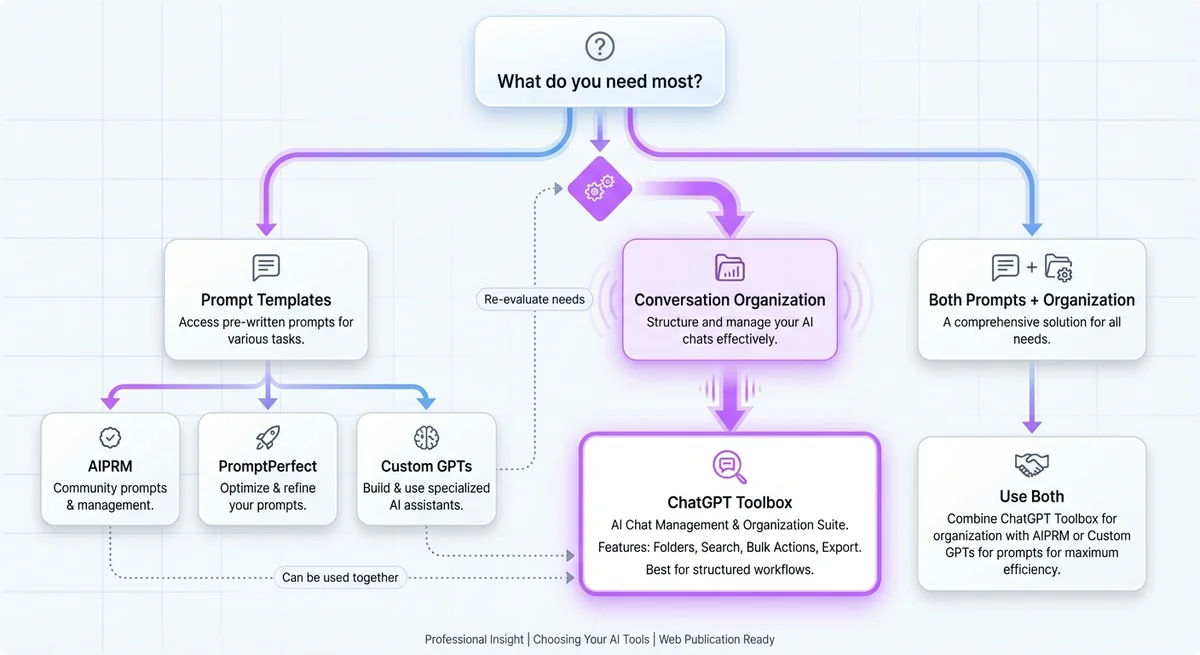
Decision Flowchart: Which Alternative Should You Choose?
Follow this decision tree to find your ideal AIPRM alternative:
Start: What's your primary need?
Path 1: Conversation Organization
- If you have 50+ conversations: → ChatGPT Toolbox (productivity features essential)
- If you need basic organization + already have Plus: → ChatGPT Plus Projects
- If you're a developer wanting version control: → Markdown + Git workflow
Path 2: Prompt Templates/Assistance
- If you want to improve your own prompts: → PromptPerfect (learn better prompting)
- If you need persistent instructions: → Native Custom Instructions (free)
- If you want specialized assistants: → Custom GPTs (requires Plus)
- If you need occasional templates: → Free prompt libraries (manual)
Path 3: Both Prompts AND Organization
- Best combination: ChatGPT Toolbox (organization) + Custom Instructions (behavior) + Custom GPTs (specialized tasks)
- Alternative: Superpower ChatGPT (less comprehensive but includes both)
Path 4: Documentation Workflow Integration
- If you live in Notion: → Notion AI (integrated workspace)
- If you want to learn and build: → DIY Prompt Library (complete control)
Real-World Use Cases: Which Alternative for Your Situation?
Scenario 1: Freelance Developer with 100+ Coding Conversations
Need: Organization, search, export for client documentation
Best alternative: ChatGPT Toolbox Pro + Markdown + Git workflow
Why: Organize conversations by client and project with folders, search for specific code solutions instantly, export as Markdown for documentation, and version control in Git for backup.
Scenario 2: Content Creator Needing Writing Assistance
Need: Writing prompts, consistent brand voice
Best alternative: Custom Instructions + Custom GPT for content editing
Why: Set brand voice and style in Custom Instructions, create a specialized "Content Editor GPT" with your guidelines, no need for complex organization since content is typically exported immediately.
Scenario 3: Researcher with 200+ Conversations Across Multiple Projects
Need: Advanced organization, powerful search, export for papers
Best alternative: ChatGPT Toolbox Pro + Custom Instructions
Why: Create folders by research project and topic, use advanced search with date filters to find specific conversations, export conversations as references for papers, set Custom Instructions for research methodology.
Scenario 4: Casual User Needing Occasional Prompts
Need: Simple prompt assistance, no organization needed
Best alternative: Free prompt libraries + Native Custom Instructions
Why: Copy prompts from GitHub/FlowGPT when needed, save favorites in a document, set Custom Instructions for general preferences, completely free solution.
Scenario 5: Team Lead Managing Multiple ChatGPT Projects
Need: Organization, collaboration, consistent workflows
Best alternative: ChatGPT Toolbox Pro + Custom GPTs + ChatGPT Team
Why: Organize team conversations with folders, create shared Custom GPTs for team workflows, sync across devices with Pro plan, export conversations for team documentation.
Can You Use Multiple Alternatives Together?
Absolutely. In fact, the best approach for power users often involves combining alternatives:
Recommended Combination Stack
- ChatGPT Toolbox (Free or Pro): For organization, search, folders, export
- Native Custom Instructions: For consistent behavior across all conversations
- Custom GPTs (if you have Plus): For 3-5 specialized repeated workflows
- Free prompt library: Occasionally reference for inspiration
Why this stack works: ChatGPT Toolbox solves organization (the actual bottleneck for power users), Custom Instructions handle consistent behavior, Custom GPTs create specialized assistants for repeated tasks, and free libraries provide occasional inspiration. Total cost: $4.99/month for ChatGPT Toolbox Pro, or free if you use the free tier.
Compatibility Note
ChatGPT Toolbox is fully compatible with other extensions including AIPRM, Superpower ChatGPT, and others. You can run multiple extensions simultaneously without conflicts. Many users actually keep AIPRM installed for prompt templates while using ChatGPT Toolbox for organization.
Migration Guide: Moving from AIPRM to Alternatives
If you're currently using AIPRM and want to switch, here's how to migrate smoothly:
Step 1: Identify What You Actually Use from AIPRM
- If you only use 5-10 favorite prompts: Save them as Custom Instructions or Custom GPTs
- If you use many different prompts: Consider whether you need templates or better organization
- If you rarely use AIPRM features: You may not need a replacement at all
Step 2: Choose Your Alternative(s)
Based on the decision flowchart above, select the alternative(s) that match your needs. For most power users, this will be ChatGPT Toolbox for organization + Custom Instructions for behavior.
Step 3: Set Up Your New System
For ChatGPT Toolbox:
- Install ChatGPT Toolbox from Chrome Web Store
- Create folder structure (Projects, Clients, Personal, Archive)
- Move existing conversations into folders (use bulk selection)
- Set up search keywords for frequently accessed topics
- Export important conversations as backup
For Custom Instructions:
- Open ChatGPT → Profile → Custom Instructions
- Enter your context and preferences (what ChatGPT should know about you)
- Define response format and style (how ChatGPT should respond)
- Enable for new chats
For Custom GPTs:
- Take your 3-5 most-used AIPRM prompts
- Create a Custom GPT for each (ChatGPT sidebar → Explore GPTs → Create)
- Configure instructions, capabilities, and knowledge
- Test and refine each GPT
Step 4: Transition Period
Keep AIPRM installed for 1-2 weeks while you adapt to new tools. Once you're comfortable with your new workflow, uninstall AIPRM. Many users find they never use AIPRM again once they experience proper conversation organization.
FAQ
What is the best free alternative to AIPRM?
ChatGPT's native Custom Instructions feature is the best free alternative to AIPRM. It allows you to set persistent instructions that apply to every conversation. For comprehensive productivity features like search, folders, and bulk actions, ChatGPT Toolbox offers a free tier with essential organization tools that go beyond AIPRM's prompt-focused approach.
Can I use AIPRM and ChatGPT Toolbox together?
Yes, AIPRM and ChatGPT Toolbox are fully compatible and complement each other well. AIPRM focuses on prompt templates and writing assistance, while ChatGPT Toolbox provides productivity features like advanced search, folders, bulk operations, and export. Many power users run both extensions simultaneously to get comprehensive ChatGPT enhancement.
Why do people look for AIPRM alternatives?
Users seek AIPRM alternatives for several reasons: overwhelming prompt library (1000s of prompts make finding the right one difficult), limited organization features (no advanced search or folder management), paid tiers required for best prompts, focus only on prompts rather than conversation management, and the realization that they need productivity tools more than template libraries once they have 50+ conversations.
Is ChatGPT Toolbox better than AIPRM for power users?
ChatGPT Toolbox and AIPRM serve different purposes. AIPRM excels at providing pre-written prompt templates for content creation and marketing tasks. ChatGPT Toolbox excels at conversation management, advanced search, folders, bulk operations, and export features. Power users typically benefit more from ChatGPT Toolbox because conversation organization becomes critical once you accumulate 100+ chats, while prompts can be written or saved manually.
Do I need AIPRM prompts or productivity tools?
Most users need productivity tools more than prompt templates. If you're new to ChatGPT and learning effective prompting, AIPRM's template library can accelerate your learning. However, once you have 50+ conversations, organization becomes the bottleneck, not prompts. ChatGPT Toolbox solves this with folders, search, bulk actions, and export features. The best approach: Start with native ChatGPT, add productivity tools when you hit 20-30 conversations, and consider AIPRM only if you need specific industry prompt templates.
What replaces AIPRM's prompt templates?
Several alternatives replace AIPRM prompt templates: ChatGPT's native Custom Instructions for persistent prompts, Custom GPTs for reusable specialized assistants, PromptPerfect for AI-powered prompt optimization, free prompt libraries copied manually, or building your own prompt library by saving your best prompts in a document or using ChatGPT Toolbox's export feature to archive conversations with effective prompts.
Can I migrate from AIPRM to ChatGPT Toolbox?
Yes, migration is straightforward because ChatGPT Toolbox and AIPRM address different needs. If you've been using AIPRM prompts, save your favorite prompts as Custom Instructions or Custom GPTs before switching. Then install ChatGPT Toolbox to add organization features. You can also keep both extensions installed together since they're compatible and serve complementary purposes.
Are there open-source AIPRM alternatives?
For prompt management specifically, there are no major open-source AIPRM alternatives. However, you can build a DIY prompt library using markdown files and Git for version control, which many developers prefer. For productivity features, some open-source ChatGPT extensions exist, but ChatGPT Toolbox provides the most comprehensive feature set with professional support and regular updates.
Conclusion: The Best AIPRM Alternative for You
The truth is, there's no single "best" AIPRM alternative—it depends entirely on what you actually need. If you've been using AIPRM for prompt templates, ask yourself: Do I need more prompts, or do I need better organization?
For the majority of ChatGPT power users, the answer is organization. Once you accumulate 50-100 conversations, the bottleneck isn't prompting—it's finding that perfect conversation from last month, organizing by project, or exporting for documentation. That's why ChatGPT Toolbox ranks #1 on this list: it solves the problems most power users actually face.
However, if you genuinely need prompt templates, combine multiple alternatives: Custom Instructions for persistent behavior, Custom GPTs for specialized tasks, and free prompt libraries for occasional inspiration. And remember: ChatGPT Toolbox and AIPRM are fully compatible. You can use both simultaneously if you need both prompts and productivity features.
Start with ChatGPT Toolbox's free tier, set up Custom Instructions, and see if that covers 90% of your needs. For most power users, this combination provides everything AIPRM offers and more—without the overwhelming prompt library.
Try ChatGPT Toolbox Free Today →
Ready to organize your ChatGPT workspace? Install ChatGPT Toolbox and experience what proper conversation management feels like. Your future self (searching for that important conversation from 3 months ago) will thank you.
