
 Add to Chrome
 Add to Edge
 Adi Leviim
How to Delete Chats in ChatGPT: Bulk Delete & Delete Multiple Chats Using ChatGPT Toolbox
Managing your ChatGPT conversations can become challenging as your chat history grows. If you're looking for an efficient way to delete chats in ChatGPT – including methods to delete multiple chats and perform a bulk delete in ChatGPT – you're in the right place. This guide walks you through how to clean up your chat history quickly using ChatGPT Toolbox.
Say goodbye to deleting chats one by one. With ChatGPT Toolbox, you can remove many conversations with just a few clicks. Read on to discover the process and benefits of bulk deletion.

Why Bulk Delete in ChatGPT is Essential
As a daily ChatGPT user, you may notice your chat history growing rapidly. Bulk deletion is an effective way to:
- Clear Up Clutter: A large number of conversations can slow you down and make it difficult to find what’s important. Deleting multiple chats at once keeps your workspace tidy.
- Stay Organized: A clean chat history lets you focus on current projects and important discussions without the distraction of outdated conversations.
- Save Time: Instead of deleting chats one by one, using a bulk delete feature allows you to remove many chats with a single click.
- Improve Performance: Reducing the volume of stored chats can enhance the overall speed and responsiveness of ChatGPT.
How to Delete Chats in ChatGPT: Bulk Delete & Delete Multiple Chats with ChatGPT Toolbox
Follow these simple steps to efficiently delete chats in ChatGPT:
- Install ChatGPT Toolbox:
First, ensure that you have the ChatGPT Toolbox extension installed. Visit the Chrome Web Store and add the extension to your browser. - Open Your Chat History:
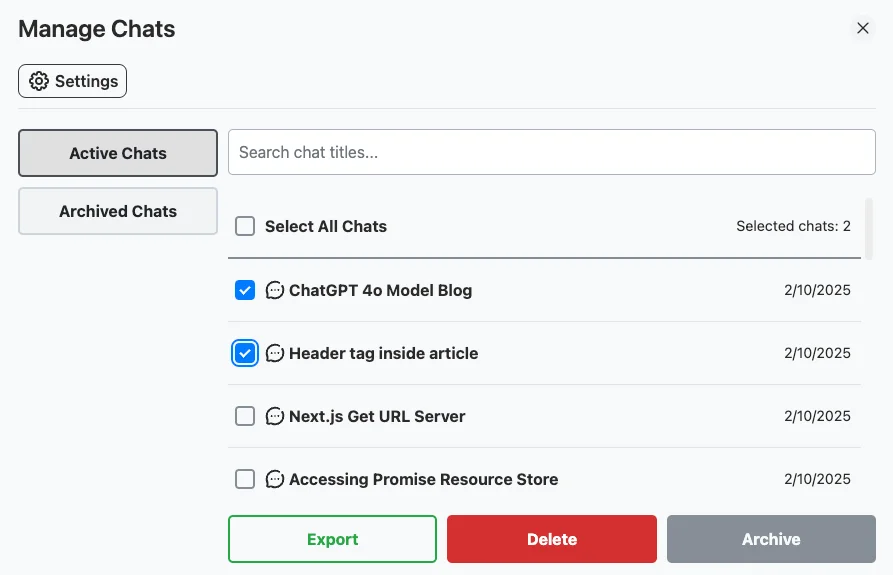
Once installed, open ChatGPT by visiting ChatGPT in your browser. In the sidebar, click on the "Manage Chats" button to access your chat history. - Select Chats for Deletion:
In the "Manage Chats" popup, scroll through your conversations and use the checkboxes to select the chats you wish to delete. This is your chance to delete multiple chats at once. - Bulk Delete Chats:
After selecting the desired chats, click the "Delete" button. A confirmation prompt will appear to ensure you want to proceed with the deletion. Confirm your choice, and the selected chats will be removed.
Benefits of Bulk Delete in ChatGPT with ChatGPT Toolbox
Using ChatGPT Toolbox to manage your chats offers several advantages:
- Efficiency: Quickly delete multiple chats with just a few clicks.
- Ease of Use: The intuitive interface makes it simple for users at all levels.
- Improved Organization: A streamlined chat history helps you focus on what matters.
- Better Performance: Reducing the number of stored chats can improve system responsiveness.
Extra Tips for Managing Your ChatGPT Chats
In addition to bulk deletion, consider these tips for effective chat management:
- Review Regularly: Periodically review your chat history to remove outdated conversations.
- Use Folders: Organize chats into folders to easily find important discussions.
- Archive Instead of Delete: For chats you may need later, consider archiving them instead of permanent deletion.
Video Tutorial: How to Bulk Delete Chats in ChatGPT
Watch the video below to learn how to delete chats in ChatGPT in bulk using ChatGPT Toolbox.
FAQ Section
- Is bulk deleting chats safe?
Yes, bulk deleting is safe when you carefully review your selections before confirming deletion. - Can I recover deleted chats?
No, deleted chats cannot be recovered. If you're unsure, consider archiving instead. - How often should I bulk delete chats?
The frequency depends on your usage. Consider bulk deleting when your chat history becomes cluttered.
