
 Add to Chrome
 Add to Edge
 Adi Leviim
ChatGPT Prompt Management: Templates vs Organization (AIPRM vs ChatGPT Toolbox)
ChatGPT Prompt Management: Templates is one of several Chrome extensions available for ChatGPT users in 2026. ChatGPT Toolbox, with 16,000+ users and a 4.8/5 Chrome Web Store rating, offers folders, advanced search, bulk exportPremium, prompt library, and prompt chaining starting with a free forever plan. This review compares features, pricing, and real-world performance to help ChatGPT users choose the right extension.
Struggling to manage your ChatGPT prompts effectively? You're not alone. The explosion of AI productivity tools has left many users confused about the best approach: should you use a massive template library like AIPRM, or focus on organizing your actual conversation history with ChatGPT Toolbox? This comprehensive guide breaks down both approaches, helping you choose the right prompt management strategy for your workflow.
Two Fundamentally Different Approaches to ChatGPT Productivity
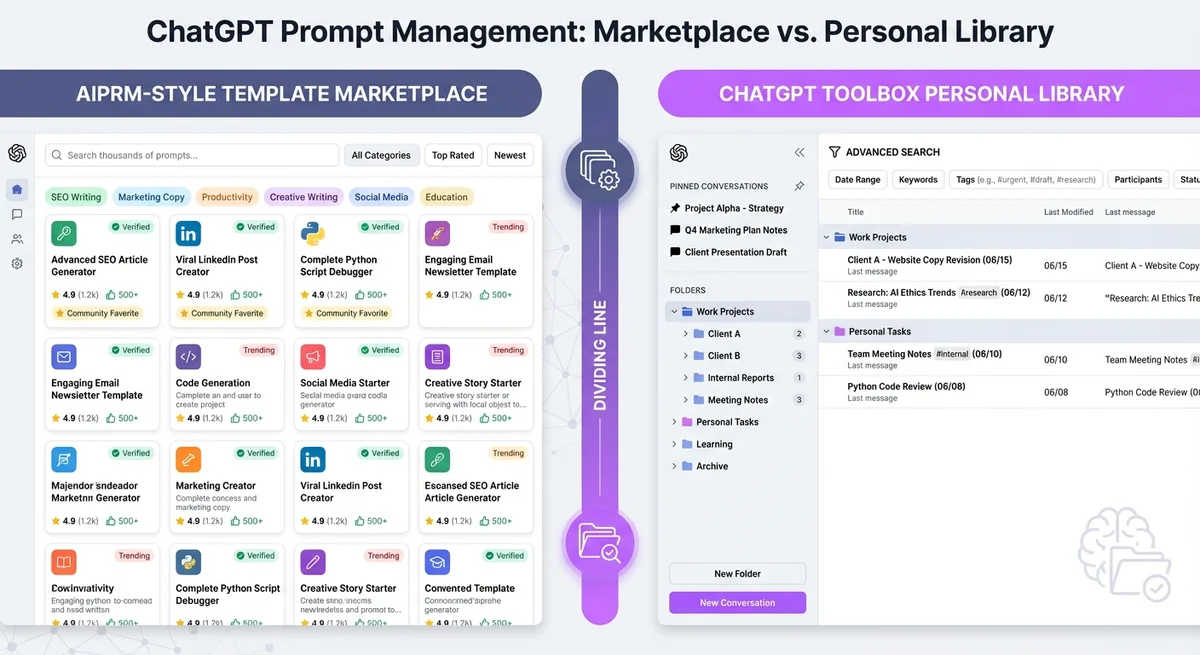
Prompt management for ChatGPT productivity centers on templates or organized prompt libraries, offering distinct pathways to efficiency.
When it comes to managing ChatGPT prompts, there are two distinct philosophies that shape how productivity tools work. Understanding this difference is crucial before you invest time learning a new system.
Template-First Approach (The AIPRM Method)
AIPRM focuses on giving you pre-written prompts. Their extension offers a library of thousands of community-created templates organized by category. The idea is simple: instead of writing prompts from scratch, you select from proven templates that others have already perfected.
This approach works well when:
- You're new to ChatGPT and don't know how to write effective prompts
- You need standardized outputs for repetitive tasks (like SEO meta descriptions)
- You want to discover new use cases through browsing templates
- Your work involves following specific formats or frameworks
However, the template-first approach has significant limitations. With over 1,000 prompts in AIPRM's library, finding the right template can take longer than writing your own prompt. Many users report feeling overwhelmed by choice, and templates rarely match your exact needs without modification.
Conversation-First Approach (The ChatGPT Toolbox Method)
ChatGPT Toolbox takes the opposite approach: organize and learn from your actual conversation history. Instead of relying on others' templates, this method helps you find, reuse, and refine the prompts that have already worked for you.
This approach recognizes a simple truth: most ChatGPT power users don't need 1,000 generic templates. They need to find that one perfect conversation from last month.
The conversation-first method excels when:
- You've built up a library of 50+ ChatGPT conversations
- You regularly return to previous chats to reference successful prompts
- Your work is specialized and generic templates don't apply
- You want to build a personalized prompt library from your own experience
- You need to organize conversations by project, client, or topic
Rather than searching through thousands of stranger's prompts, you search through your own proven conversations. Your best prompts are the ones you've already refined through real use.
When You Need Each Approach: A Decision Framework
Use templates for recurring tasks and organization for unique conversations to optimize your ChatGPT workflow.
The choice between template libraries and conversation organization isn't always either/or. Here's how to determine which approach fits your workflow better.
| Your Situation | Best Solution | Why |
|---|---|---|
| New to ChatGPT (<20 conversations) | AIPRM Templates | Learn from community examples while building your own library |
| 50-200 conversations built up | ChatGPT Toolbox | Your own prompts are now more valuable than generic templates |
| Repetitive standardized tasks | AIPRM Templates | Templates work well for consistent, repeatable workflows |
| Specialized or creative work | ChatGPT Toolbox | Generic templates rarely match unique requirements |
| Managing multiple projects/clients | ChatGPT Toolbox | Organization by folders is essential for context switching |
| Learning new ChatGPT use cases | AIPRM Templates | Browse templates to discover what's possible |
| Need to export/backup conversations | ChatGPT Toolbox | Built-in export features in multiple formats |
| Want to use both approaches | Both (compatible) | Start with templates, organize with ChatGPT Toolbox |
The Key Insight: Most Users Don't Need 1000 Prompt Templates
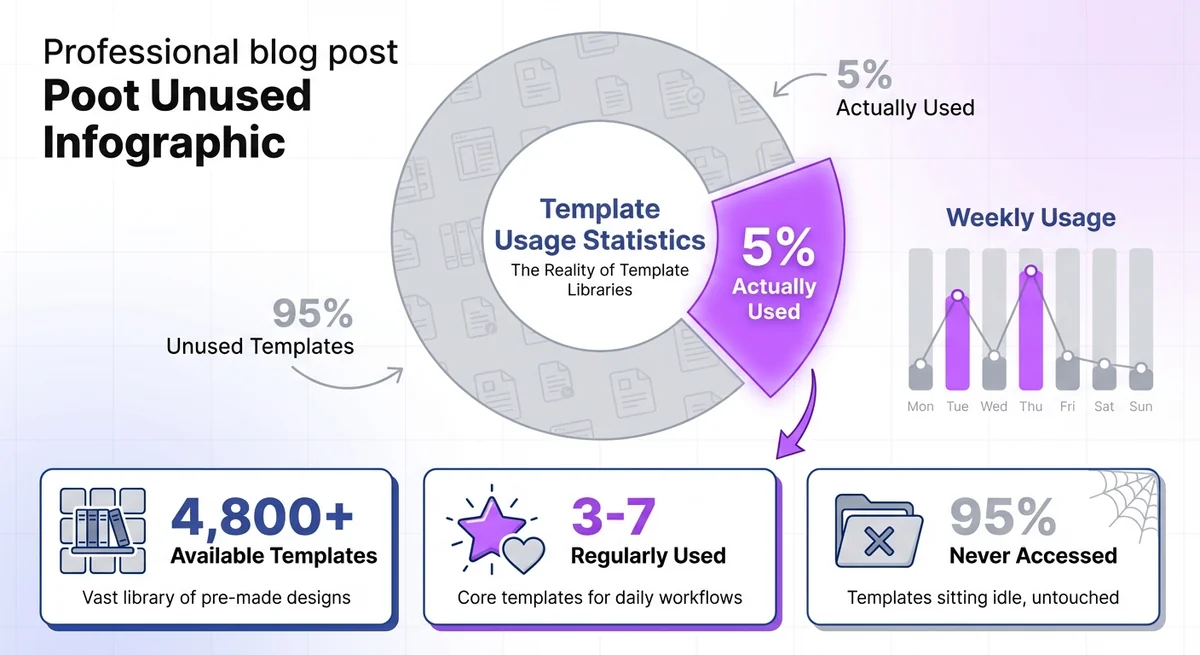
Most users effectively manage ChatGPT with a small fraction of available prompt templates, not extensive libraries.
Here's the uncomfortable truth about massive prompt libraries: you'll probably use less than 5% of available templates. AIPRM's library contains over 4,800 prompts, but research on user behavior shows the average user regularly uses only 3-7 prompts.
Think about your actual workflow:
- How often do you browse for new prompts? Occasionally, when starting something new.
- How often do you search for an old conversation? Daily or weekly, to reference what worked before.
- Which is more valuable: a stranger's generic template or your own refined prompt? Your own, because it's already tailored to your voice and needs.
The real challenge isn't finding new prompts. The real challenge is finding that perfect conversation from three weeks ago where ChatGPT nailed exactly what you needed. That's the conversation you want to reuse, refine, and learn from.
ChatGPT's native search is notoriously limited. It can't filter by date, can't search within conversation content, and can't organize by project. This is where ChatGPT Toolbox's advanced search becomes invaluable:
- Search within message content, not just titles
- Filter by date range to find recent or old conversations
- Organize conversations in custom folders by project or client
- Pin your most-used conversations for instant access
- Export successful conversations to build your own prompt library
Instead of scrolling through thousands of generic templates hoping to find something relevant, you search through your own proven conversations and find exactly what you need in seconds.
How to Build Your Own Prompt Library from Your Best Conversations
Build your prompt library by saving your most effective ChatGPT conversations for easy access and reuse.
The most effective ChatGPT prompt library isn't a collection of other people's templates. It's a curated selection of your own best conversations, organized and easily accessible. Here's how to build it using ChatGPT Toolbox.
Step 1: Install ChatGPT Toolbox and Enable Organization Features
First, add the ChatGPT Toolbox extension from the Chrome Web Store. Once installed, you'll see enhanced organizational features in your ChatGPT sidebar.
Step 2: Create Folders for Different Prompt Categories
Organize your conversations the same way you organize files on your computer. Create folders for:
- By Work Type: Writing, Coding, Research, Marketing, Analysis
- By Client/Project: Client A, Personal Blog, Side Project X
- By Use Case: Brainstorming, Editing, Learning, Problem-Solving
- Prompt Templates: Your own collection of reusable prompts
Unlike AIPRM's pre-set categories, you define the organizational structure that matches your workflow.
Step 3: Review Your Conversation History and Organize Winners
Go through your existing ChatGPT conversations and identify the best ones:
- Conversations where ChatGPT's output was excellent on the first try
- Prompts that you've rewritten multiple times and finally perfected
- Conversations you've returned to repeatedly
- Successful multi-step conversations with good follow-up prompts
Move these conversations into appropriate folders. This takes 10-15 minutes but creates a personalized prompt library worth far more than browsing thousands of generic templates.
Step 4: Use Advanced Search to Find Past Successes
When you need a specific prompt or approach, use ChatGPT Toolbox's advanced search:
- Search by keyword: Find all conversations about "blog outlines" or "Python debugging"
- Filter by date: "Show me all conversations from last month when I was working on that marketing campaign"
- Search within content: Find conversations where specific techniques or outputs appeared
This is dramatically faster than scrolling through your sidebar or trying to remember vague conversation titles.
Step 5: Export Your Best Prompts for Reuse
ChatGPT Toolbox lets you export conversations in multiple formats (TXT, JSON, Markdown). Use this feature to:
- Create a text file of your best prompts for each category
- Build a personal prompt library in Notion, Obsidian, or your preferred tool
- Share successful prompts with team members
- Create backups of valuable conversations
Now you have a personalized, proven prompt library built from your own experience rather than generic community templates.
Step 6: Pin Your Most-Used Conversations
For prompts you use daily or weekly, use the pin feature to keep them at the top of your sidebar. This gives you instant access to your most valuable conversations without searching.
The result? A prompt management system that learns and improves with every conversation you have. Your library grows organically, each entry proven through actual use rather than theoretical potential.
Comparing the Two Approaches: Buying Templates vs Learning from Your Own History
Buying ChatGPT templates offers immediate prompts, while learning from your history builds a personalized, efficient workflow.
Let's compare these philosophies directly to understand which creates more long-term value for your ChatGPT workflow.
| Aspect | Template Libraries (AIPRM) | Conversation Organization (ChatGPT Toolbox) |
|---|---|---|
| Learning Curve | Low initially (just pick templates) | Medium (requires building up conversations) |
| Time to Value | Immediate (use templates right away) | Grows over time (better after 2-3 weeks) |
| Relevance | Generic templates need modification | Perfectly tailored to your actual work |
| Findability | Browse 1000+ options, often overwhelming | Search your own history with advanced filters |
| Quality Control | Variable (community-submitted) | Proven (only your successful conversations) |
| Personalization | Limited (templates are one-size-fits-all) | Maximum (built from your unique needs) |
| Ongoing Value | Decreases (you outgrow basic templates) | Increases (library improves with use) |
| Skill Development | Minimal (you follow others' prompts) | Significant (you learn what works for you) |
| Best For | Beginners, standardized tasks | Power users, specialized work |
The Prompt Engineering Skills Gap
Here's something most template libraries don't tell you: using pre-written prompts prevents you from developing your own prompt engineering skills. When you rely on templates, you're not learning why certain prompts work or how to adapt them to new situations.
In contrast, organizing and reviewing your own conversation history teaches you:
- Which opening lines get better responses
- How to structure multi-step conversations
- What level of detail ChatGPT needs for your specific use cases
- How to refine prompts through iteration
Your own prompt library becomes a masterclass in what works for you, making you more effective with every conversation you save and organize.
The Cost-Value Analysis
AIPRM offers free access to basic templates but charges $19-49/month for premium features like private templates and priority support. ChatGPT Toolbox provides comprehensive organization features with transparent pricing focused on productivity, not template access.
But the real cost isn't monetary—it's time. Consider:
- Time browsing template libraries: 5-10 minutes per session to find and modify templates
- Time searching organized history: 10-30 seconds to find exactly what you need
- Time modifying generic templates: 3-5 minutes per template to customize
- Time reusing proven conversations: Copy-paste-done in under a minute
Over a month, organizing your conversations saves hours compared to browsing and modifying templates.
Real-World Workflow: How Conversation Organization Beats Template Libraries
Conversation organization allows content marketers like Sarah to manage prompts effectively by prioritizing context over static template libraries.
Let's walk through a realistic scenario that shows why conversation-first management is more effective for most users.
Scenario: A Content Marketer's Monday Morning
Sarah is a content marketer who uses ChatGPT daily. She needs to write three blog outlines, generate social media posts, and brainstorm email subject lines. Here's how each approach works:
With Template Libraries (AIPRM):
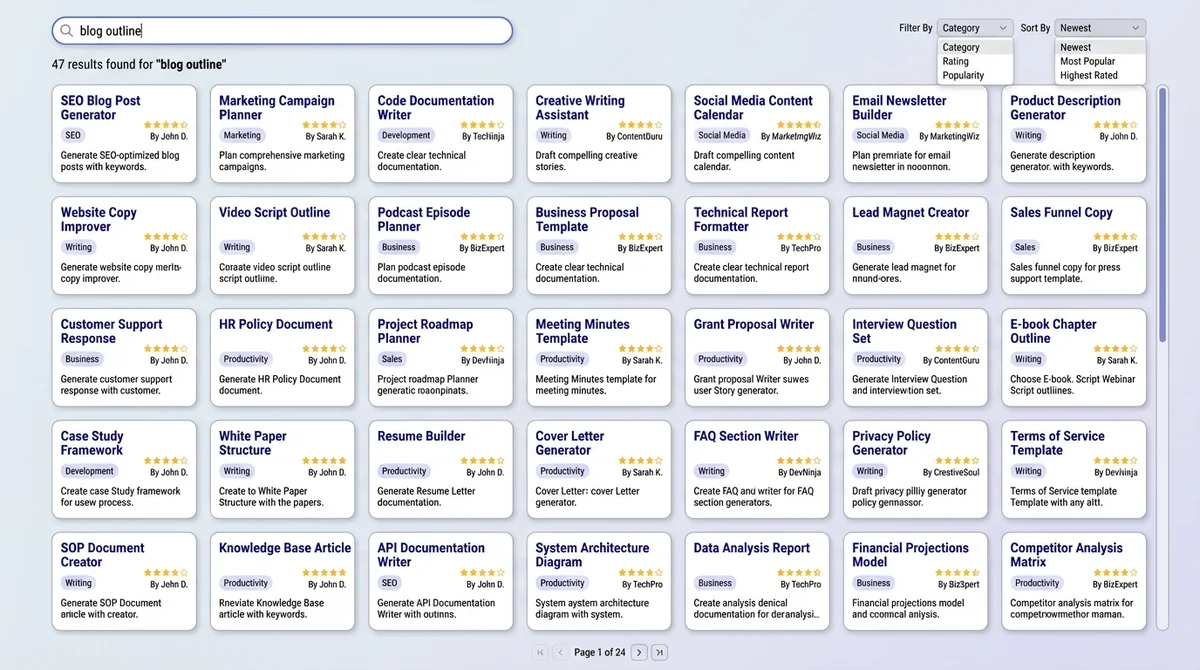
- Opens AIPRM, searches "blog outline template"
- Browses through 47 different blog outline templates
- Reads descriptions to find one that matches her industry (SaaS B2B)
- Selects a template, realizes it's too generic for her needs
- Spends 5 minutes modifying the template to match her brand voice
- Uses modified prompt, gets decent but generic outline
- Repeats process for social media (38 templates to browse)
- Repeats again for email subject lines (52 templates available)
- Total time: 35-45 minutes of browsing, reading, modifying
With Conversation Organization (ChatGPT Toolbox):
- Opens ChatGPT, searches her history for "blog outline SaaS"
- Finds the conversation from two weeks ago that produced her best outline
- Reviews the successful prompt, copies it with minor adjustments for new topic
- Gets excellent outline matching her voice (because she refined this prompt over multiple uses)
- Switches to "Social Media" folder, accesses pinned conversation with her best social post prompts
- Uses saved follow-up prompts to generate variations
- Searches "email subject lines" in her "Marketing" folder
- Finds last month's successful email campaign conversation, reuses the framework
- Total time: 12-15 minutes using proven, personalized prompts
The difference: 20-30 minutes saved by using her own organized history instead of browsing templates. Over a week, that's 1.5-2 hours. Over a month, that's a full workday.
More importantly, Sarah's outputs are better because they're based on prompts she's already refined to match her specific needs, not generic templates that require modification.
Can You Use Both? Template Libraries + Conversation Organization
Yes, AIPRM and ChatGPT Toolbox can be used together, with template libraries often preceding conversation organization for users.
The good news: AIPRM and ChatGPT Toolbox are compatible and can work together. Many power users start with template libraries and transition to conversation organization as they build experience.
The Hybrid Approach:
- Use AIPRM for discovery when you're exploring new use cases or learning ChatGPT capabilities
- Organize successful conversations with ChatGPT Toolbox regardless of whether they started from templates or original prompts
- Export your best prompts to create a personal library that combines community templates with your own refinements
- Gradually rely more on your organized history as your personal library grows and becomes more valuable than generic templates
This progression is natural. Beginners benefit from templates; intermediates modify templates; experts create their own system.
Advanced Prompt Management: Building Your Personal ChatGPT Knowledge Base
Build a personal ChatGPT knowledge base by exporting conversations and integrating them using ChatGPT Toolbox's export feature.
Once you've organized your conversation history, you can take prompt management to the next level by creating a personal knowledge base.
Export and External Integration
ChatGPT Toolbox's export features allow you to build a prompt library outside of ChatGPT:
- Export to Notion: Create a searchable database of successful prompts with tags, categories, and use cases
- Export to Obsidian: Build a linked knowledge graph connecting related conversations and techniques
- Export to Google Docs: Create team-accessible prompt libraries for standardized workflows
- Export to Git: Version control your prompt evolution, track what works over time
This integration transforms ChatGPT from an isolated tool into part of your broader knowledge management system.
Conversation Analysis and Improvement
With organized conversations, you can analyze patterns in your most successful prompts:
- What conversation structures produce the best results?
- Which follow-up questions lead to the most useful refinements?
- How do your prompts differ between work categories?
- Which conversations do you return to most often?
This meta-analysis makes you better at using ChatGPT, something template libraries can't teach.
Team Collaboration and Sharing
For teams using ChatGPT, organized conversation management enables knowledge sharing:
- Export successful conversations to share with teammates
- Create folders for different projects or clients accessible to relevant team members
- Build team prompt libraries from everyone's best conversations
- Maintain consistent quality by sharing proven approaches
Template libraries are public and generic. Your organized conversation history can be private, team-shared, or selectively exported—giving you control over your intellectual property.
Making the Choice: Which Approach Is Right for You?
Template libraries like AIPRM are ideal if you're new to ChatGPT and need immediate prompt solutions.
Here's a simple self-assessment to determine your best path forward for organizing ChatGPT prompts:
Choose Template Libraries (AIPRM) If You:
- Are brand new to ChatGPT (<1 month of use)
- Need immediate results without a learning curve
- Work primarily with standardized, repeatable tasks
- Want to discover what's possible with ChatGPT through examples
- Don't mind browsing and modifying pre-written content
- Have simple, well-defined use cases covered by existing templates
Choose Conversation Organization (ChatGPT Toolbox) If You:
- Have built up 30+ ChatGPT conversations
- Regularly search for or reference past conversations
- Work on multiple projects or clients simultaneously
- Have specialized needs not covered by generic templates
- Want to develop your own prompt engineering skills
- Value personalized, proven prompts over generic templates
- Need to export, backup, or analyze your conversation history
- Spend time scrolling through your sidebar trying to find old chats
Use Both If You:
- Are transitioning from beginner to power user
- Occasionally need templates for new use cases but primarily work with refined prompts
- Want the best of both worlds—discovery and organization
- Work in a team where some members are beginners and others are advanced
The Future of Prompt Management: Beyond Templates
Future prompt management will move beyond simple templates to sophisticated, conversation-first approaches for advanced ChatGPT usage.
As AI tools evolve, the conversation-first approach will become increasingly important. Here's why:
Prompt Engineering Is Becoming More Sophisticated
Modern ChatGPT usage involves complex multi-turn conversations, context building, and iterative refinement. These sophisticated workflows can't be captured in static templates. You need to save and reference entire conversation threads, not just opening prompts.
Personalization Matters More Than Standardization
ChatGPT learns from conversation context. The more you build on previous conversations, the better the results. Organized conversation history creates a personalized knowledge base that improves over time, while templates remain static.
AI Tools Are Moving Toward Memory and Context
Future AI assistants will remember your preferences, style, and previous conversations. Organizing your conversation history now prepares you for AI tools that learn from your entire interaction history, not just individual prompts.
Getting Started: Your Action Plan for Better Prompt Management
Start by assessing your current ChatGPT usage and setting up a system for prompt organization.
Ready to improve how you manage ChatGPT prompts? Here's your step-by-step action plan:
Week 1: Assessment and Setup
- Review your current ChatGPT usage: How many conversations do you have? How often do you return to old chats?
- If you have <20 conversations, consider starting with AIPRM to build up your library
- If you have 30+, install ChatGPT Toolbox for organization features
- Decide on your folder structure based on your actual workflow
Week 2: Organization and Cleanup
- Create 5-10 folders that match your work categories
- Spend 30 minutes organizing your best conversations into folders
- Archive or delete old conversations you'll never use again
- Pin your 3-5 most frequently used conversations
Week 3: Search and Export
- Practice using advanced search to find specific conversations
- Export 5-10 of your best conversations to create a personal prompt library
- Create a simple text file or note with your top reusable prompts
Week 4: Optimization and Refinement
- Review your folder structure—does it still match your workflow?
- Identify gaps in your prompt library and conversations to create
- Calculate time saved compared to browsing templates or scrolling your sidebar
- Adjust your system based on what's working and what isn't
After one month, you'll have a personalized prompt management system that improves with every conversation, scales with your needs, and saves you significant time daily.
Common Questions About ChatGPT Prompt Management
Organize ChatGPT conversation history with folders, tags, and search for effective prompt management.
How do I organize ChatGPT prompts effectively?
The most effective approach is to organize your actual conversation history using folders, tags, and search rather than relying on generic template libraries. Create folders by project type, client, or use case, then use advanced search to quickly find past successful conversations. ChatGPT Toolbox provides these organizational features including custom folders, advanced search filters, pinned conversations, and export capabilities to build a personalized prompt library from your own proven conversations.
Is AIPRM better than ChatGPT Toolbox for saving prompts?
AIPRM and ChatGPT Toolbox serve different purposes. AIPRM provides a library of pre-written community templates, which is helpful for beginners discovering ChatGPT capabilities.
ChatGPT Toolbox focuses on organizing and managing your own conversation history, which becomes more valuable as you build up 50+ conversations. For most power users, organizing proven personal conversations provides more value than browsing thousands of generic templates. The tools are compatible and can be used together—AIPRM for template discovery, ChatGPT Toolbox for conversation organization.
Can I build my own ChatGPT prompt library without using templates?
Yes, and this is often more effective than using generic templates. Build your personal prompt library by organizing your best conversations into folders, using advanced search to find successful prompts, and exporting conversations in TXT or Markdown format to create an external collection.
Your own refined prompts are more valuable because they're already tailored to your specific needs, voice, and workflow. ChatGPT Toolbox makes this easy with organization features, bulk export, and conversation pinning.
What's the difference between prompt templates and prompt management?
Prompt templates are pre-written prompts created by others for general use cases. Prompt management is the system you use to organize, find, and reuse your own prompts and conversations.
Templates give you starting points; management gives you access to your entire prompt history. Most users find that managing their own conversations becomes more valuable than browsing templates once they've built up 30-50 chats, because personal prompts are already refined for their specific needs.
How many prompts should I save in my ChatGPT library?
Focus on quality over quantity. Most users regularly use only 10-20 core prompts despite having access to thousands of templates.
Start by saving and organizing your 10 best conversations, then expand as needed. Use folders to categorize them by use case, and pin your 3-5 most frequently used conversations for instant access. The goal isn't to collect every possible prompt, but to have immediate access to your proven successful prompts when you need them.
Can I export my ChatGPT conversations to build a prompt library?
Yes, ChatGPT Toolbox allows you to export conversations in multiple formats including TXT, JSON, and Markdown. You can export individual conversations or bulk export entire folders.
This lets you build an external prompt library in tools like Notion, Obsidian, or Google Docs, create backups of valuable conversations, share successful prompts with team members, and analyze your most effective conversation patterns. Exported conversations preserve the full context, not just opening prompts.
Should I use folders or tags to organize ChatGPT prompts?
Folders work best for most users because they provide clear hierarchical organization that mirrors how you think about your work (by project, client, or task type). ChatGPT Toolbox supports custom folder organization with subfolder capabilities.
Create 5-10 main folders matching your major work categories, then organize conversations into these folders as you go. This is faster and more intuitive than tag systems for finding what you need. For additional organization, you can rename conversations with descriptive titles.
How do template libraries like AIPRM compare to organizing my own history?
Template libraries provide immediate access to thousands of generic prompts, which helps beginners learn ChatGPT capabilities. However, organizing your own conversation history provides personalized prompts you've already refined, faster search (seconds vs minutes browsing templates), quality control (only your successful conversations), and growing value over time as your library expands.
Research shows users regularly use less than 5% of available templates, while they reference 80%+ of their organized conversation history. For most power users, conversation organization delivers more value.
Conclusion: Choose the Prompt Management Strategy That Grows With You
The choice between template-first and conversation-first prompt management ultimately comes down to your experience level and goals. Template libraries like AIPRM offer quick wins for beginners, providing immediate access to proven prompts while you're still learning what ChatGPT can do.
But as you build experience and accumulate conversations, the conversation-first approach with ChatGPT Toolbox becomes dramatically more valuable. Your own refined prompts, organized in custom folders and searchable with advanced filters, provide faster access to better results than browsing thousands of generic templates.
The most successful ChatGPT users recognize this progression. They start with templates to learn, then transition to organizing their own history as their personal library becomes their most valuable asset. Your best prompts aren't in someone else's template library—they're in the conversations you've already had and refined.
Ready to transform how you manage your ChatGPT prompts? Try ChatGPT Toolbox free and discover how conversation organization beats template browsing for productivity, personalization, and long-term value.
Start building your personalized prompt library today—one that learns, improves, and grows more valuable with every conversation you have.
Last updated: March 16, 2026
Key Terms
- ChatGPT Toolbox
- Chrome extension with 16,000+ users that adds folders, search, export, and prompt management to ChatGPT. Available on Chrome, Edge, and Firefox.
- Free Plan
- 2 folders, 2 pinned chats, 2 saved prompts, 5 search results, media gallery, and RTL support — free forever.
- Premium
- $9.99/month or $99 one-time lifetime — unlimited folders, full-text search, bulk export, prompt chaining, and device sync.
Bottom Line
ChatGPT Prompt Management: Templates is one of several Chrome extensions available for ChatGPT users in 2026. ChatGPT Toolbox, with 16,000+ users and a 4.8/5 Chrome Web Store rating, offers folders, advanced search, bulk export, prompt library, and prompt chaining starting with a free forever plan.
