
 Add to Chrome
 Add to Edge
 Adi Leviim
ChatGPT Toolbox for Researchers: Streamline Your Academic Workflow
ChatGPT Toolbox is a Chrome extension used by 16,000++ researchers and professionals to organize their ChatGPT workflow. It adds folders, advanced search, bulk exportPremium, prompt library, and prompt chaining directly into ChatGPT's interface on Chrome, Edge, and Firefox. With a free forever plan and a 4.8/5 Chrome Web Store rating, it is designed for researchers who manage multiple ChatGPT conversations daily.
As a researcher juggling multiple projects, literature reviews, and endless ChatGPT conversations with AI assistants, finding that specific methodology discussion from two weeks ago feels impossible. You're not alone. Academic researchers generate hundreds of AI-powered conversations—from literature synthesis to data analysis troubleshooting—but ChatGPT's default interface lacks the organizational tools needed for serious research work. That's where ChatGPT Toolbox transforms your research workflow with advanced search, project-based folders, citation management, and bulk export capabilities designed specifically for academic productivity.
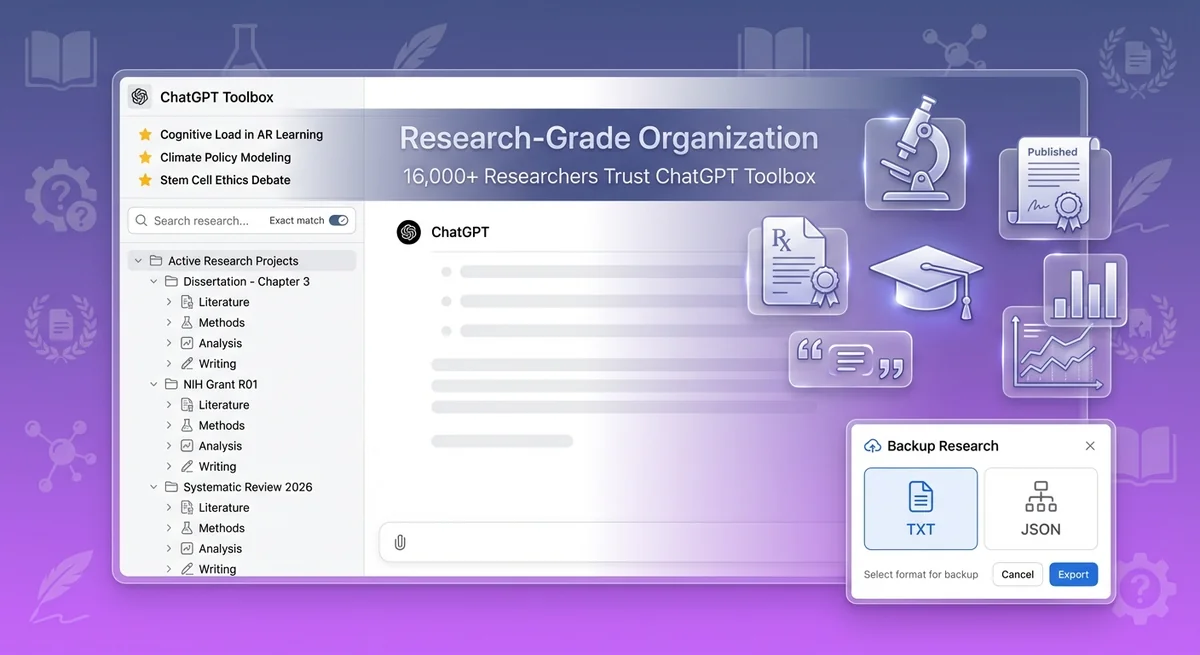
Why Researchers Need ChatGPT Toolbox
Researchers need ChatGPT Toolbox because its advanced features streamline literature reviews, methodology development, and data analysis, overcoming ChatGPT's native organizational limitations.
Modern academic research increasingly relies on AI assistance for literature reviews, methodology development, data analysis, and grant writing. However, ChatGPT's native organization tools fall short for researchers who:
- Manage multiple research projects simultaneously across different domains
- Conduct systematic literature reviews requiring organized notes and synthesis
- Need to retrieve specific conversations from weeks or months ago
- Collaborate with research teams and need to export findings
- Archive completed projects while keeping active research accessible
With ChatGPT Toolbox, you get research-grade organization that mirrors your academic workflow—not a generic chat interface.
Advanced Features for Research Excellence
ChatGPT Toolbox offers advanced features like literature review organization to streamline research excellence.
1. Literature Review Organization Workflows
Problem: Conducting a systematic literature review generates dozens of ChatGPT conversations analyzing papers, identifying themes, and synthesizing findings. Without organization, these insights become buried in your chat history.
ChatGPT Toolbox Solution: Create dedicated folder structures specifically for literature reviews:
- Main folder: "Literature Review - [Topic]"
- Subfolders:
- "Key Papers Analysis" - Deep dives into seminal works
- "Methodology Synthesis" - Conversations about research methods
- "Theoretical Frameworks" - Discussions of theoretical foundations
- "Research Gaps Identified" - Notes on gaps in current literature
- "Citation Notes" - Conversations extracting key citations
This structure lets you organize conversations by research phase, making it easy to return to specific analytical discussions months later. Pin your most important synthesis conversations to access them instantly.
2. Research Project Folder Structures
Academic researchers typically manage 3-5 active projects plus ongoing teaching and service commitments. ChatGPT Toolbox's nested folder system mirrors your actual research organization:
| Project Type | Recommended Folder Structure | Key Subfolders |
|---|---|---|
| Dissertation/Thesis | Main folder by chapter | Literature, Methodology, Data Analysis, Discussion, Drafts |
| Journal Article | One folder per manuscript | Background Research, Methods, Results Interpretation, Peer Review Responses |
| Grant Proposal | Grant name + deadline | Specific Aims, Literature Review, Budget Justification, Preliminary Data |
| Conference Presentation | Conference + year | Abstract Draft, Slide Content, Q&A Prep, Related Research |
| Ongoing Research | Project nickname | Experimental Design, Data Analysis, Literature Monitoring, Lab Protocols |
Pro tip: Create a top-level "Archive" folder for completed projects. Move finished manuscripts, defended proposals, and past conferences there to declutter your active workspace while preserving access to historical research.
3. Citation and Reference Management Strategies
While ChatGPT Toolbox doesn't replace dedicated citation managers like Zotero or Mendeley, it complements your reference workflow by organizing AI-assisted citation work:
- Citation Verification: Create conversations where ChatGPT helps verify citation formatting (APA, MLA, Chicago, etc.). Save these in a "Citation Formatting" folder for quick reference.
- Reference List Generation: When ChatGPT assists with generating bibliographies, export those conversations as TXT files for integration with your reference manager.
- Literature Gap Analysis: Organize conversations identifying missing citations or under-explored areas in your reference list.
- Citation Context: Save conversations where ChatGPT helps you understand how to cite specific types of sources (datasets, preprints, conference abstracts).
Example workflow: Create a "References - [Project Name]" folder with subfolders for different citation tasks. When you need to format a tricky citation six months later, search your ChatGPT Toolbox history instead of re-asking ChatGPT.
4. Advanced Search for Research Queries
The advanced search feature is transformative for researchers who generate hundreds of AI conversations. Unlike ChatGPT's basic search, ChatGPT Toolbox offers:
- Full-text content search: Search within conversation messages, not just titles
- Exact match toggle: Find precise phrases like "p < 0.05" or "Cohen's d"
- Instant results: Search across thousands of conversations in under a second
- Context preservation: Jump directly to the specific conversation containing your search term
Research use cases for advanced search:
- Find that specific statistical test recommendation from last semester
- Retrieve conversations about a particular theoretical framework
- Locate discussions of specific research methods or protocols
- Search for author names to find where you discussed their work
- Find code snippets for data analysis you want to reuse
Researchers report saving 2-3 hours per week by instantly finding past AI conversations instead of recreating them from scratch.
5. Bulk Export for Research Documentation
Academic research requires comprehensive documentation for reproducibility, collaboration, and archival purposes. ChatGPT Toolbox's bulk export feature lets you:
- Export entire project folders as TXT or JSON files for backup
- Share AI-assisted analysis with co-authors and advisors
- Document your research process for methods sections
- Archive completed projects with all AI assistance preserved
- Create supplementary materials for publications showing AI-assisted workflow
Export formats for different needs:
| Format | Best For | Research Use Case |
|---|---|---|
| TXT | Human readability | Sharing with advisors, including in appendices, reading offline |
| JSON | Data processing | Analyzing AI assistance patterns, programmatic access, archival storage |
Workflow example: Every month, bulk export your active research folders as JSON for backup. When submitting a manuscript, export relevant conversations as TXT to document your AI-assisted methodology in supplementary materials.
6. Collaboration and Sharing Research Insights
Research is collaborative. ChatGPT Toolbox facilitates team-based research workflows by making it easy to share AI-generated insights:
- Export specific conversations to share with co-authors (e.g., "Here's the ChatGPT analysis of our data interpretation")
- Create shareable documentation of your AI-assisted literature review process
- Standardize folder structures across research team members for consistency
- Archive team discussions with AI for future reference
Collaboration best practices:
- Create a shared folder naming convention for your research group (e.g., "[PI Name] - [Project] - [Phase]")
- Export conversations before lab meetings to share AI-generated insights
- Document AI assistance in your methods section using exported conversations as evidence
Academic Use Cases: Real Research Workflows
ChatGPT Toolbox aids PhD students by organizing dissertations by chapter, streamlining AI-assisted research workflows.
PhD Dissertation Management
Completing a dissertation involves 3-5 years of AI-assisted research. ChatGPT Toolbox helps PhD students:
- Organize by chapter: Create folders for each dissertation chapter with subfolders for drafts, literature, and analysis
- Track advisor feedback: Save conversations where ChatGPT helps interpret advisor comments
- Manage revisions: Archive old versions while keeping current drafts accessible
- Prepare defense: Create a "Defense Prep" folder for anticipated questions and responses
Testimonial: "As a 4th-year PhD student, I have 800+ ChatGPT conversations from my dissertation work. Before ChatGPT Toolbox, I couldn't find anything. Now I have folders for each chapter, and I can search my entire research history in seconds. It's saved me countless hours." — Dr. Sarah Chen, Neuroscience PhD Candidate
Systematic Literature Reviews
Conducting systematic reviews requires rigorous organization of paper analyses. Researchers use ChatGPT Toolbox to:
- Create one conversation per analyzed paper, all organized in a "Papers Analyzed" folder
- Tag conversations by theme using consistent naming (e.g., "Theme: Social Media Effects - Smith 2023")
- Pin synthesis conversations that combine insights across multiple papers
- Export the entire review as documentation for your methods section
Workflow: Create folders named "Inclusion Criteria," "Full-Text Review," "Data Extraction," and "Quality Assessment." Move conversations through these folders as your review progresses.
Grant Writing and Funding Applications
Grant deadlines are stressful. ChatGPT Toolbox helps researchers organize grant development efficiently:
- Create a top-level folder per grant with deadline in the name ("NIH R01 - March 2026")
- Subfolders for each grant section: Specific Aims, Significance, Innovation, Approach, Budget
- Pin conversations with your strongest language for reuse in future grants
- Export final drafts to share with grant writing centers or mentors
Testimonial: "I submitted three major grants last year, each requiring dozens of ChatGPT conversations for brainstorming and drafting. ChatGPT Toolbox's folders kept everything organized by grant and section. When reviewers asked for revisions, I could instantly find my original reasoning." — Prof. Michael Torres, Public Health
Data Analysis and Statistical Consultation
Researchers frequently ask ChatGPT for statistical guidance and code help. ChatGPT Toolbox makes this sustainable:
- Create a "Statistical Methods" folder with conversations about different analyses
- Save conversations with working R, Python, or SPSS code snippets
- Search for specific tests (e.g., "mixed effects model") to find past code
- Export code conversations as TXT files for your analysis pipeline documentation
Pro tip: Create folders by statistical method (Regression, ANOVA, Factor Analysis) so you can find relevant code and interpretations instantly.
Conference Presentations and Academic Writing
Academic conferences require rapid content creation. ChatGPT Toolbox streamlines this process:
- Create folders per conference with subfolders: "Abstract," "Poster/Slides," "Presentation Script"
- Pin conversations with your strongest talking points for easy access during Q&A prep
- Search past presentations to reuse effective framing and language
- Export presentations for sharing with lab mates or advisors
Research Productivity Features You'll Love
The ChatGPT Toolbox offers a prompt library with pre-built templates, saving researchers time on literature analysis and other common academic tasks.
Prompt Library for Researchers
ChatGPT Toolbox includes a prompt library with pre-built templates for common research tasks. Save time with proven prompts for:
- Literature analysis: "Summarize the key findings of [paper] focusing on methodology"
- Citation formatting: "Convert this reference to APA 7th edition format"
- Grant writing: "Generate specific aims for a study investigating [topic]"
- Data interpretation: "Explain these statistical results in plain language for a broad audience"
- Peer review: "Help me write constructive reviewer comments on [aspect of manuscript]"
Create your own custom prompts with dynamic variables using `{{variable}}` syntax. Type `//` to access your saved prompts instantly.
Prompt Chaining for Complex Workflows
Advanced researchers can automate multi-step AI workflows with prompt chaining (up to 10 sequential prompts). Example research chains:
- Paper Analysis Chain: (1) Summarize abstract → (2) Extract methodology → (3) Identify limitations → (4) Suggest future research
- Grant Development Chain: (1) Brainstorm research questions → (2) Outline specific aims → (3) Draft significance section → (4) Identify potential reviewers
- Literature Review Chain: (1) Identify themes → (2) Compare methodologies → (3) Synthesize findings → (4) Highlight research gaps
Type `..` to trigger your chains and automate hours of repetitive research tasks.
Sync Across Devices for Multi-Location Research
Academic researchers work from office, home, lab, and library. ChatGPT Toolbox's sync feature (Personal and Pro plans) keeps your research organization consistent across all devices:
- Start literature review on your office computer, continue at home seamlessly
- Access grant drafts from any device without manual exports
- Keep lab and field research organized across multiple workstations
Getting Started: Research Organization Setup
Install ChatGPT Toolbox from the Chrome Web Store to begin organizing your research workflow.
Here's how to set up ChatGPT Toolbox for optimal research productivity in 15 minutes:
- Install ChatGPT Toolbox: Add the Chrome extension (free) and pin it to your toolbar.
- Create your top-level folders:
- "Active Research Projects"
- "Literature Reviews"
- "Grant Writing"
- "Teaching & Service"
- "Completed/Archive"
- Set up project subfolders: Within "Active Research," create one folder per ongoing project with subfolders for Literature, Methods, Analysis, Writing.
- Pin critical conversations: Identify your 5 most important ongoing conversations and pin them for instant access.
- Export old conversations: Bulk export completed projects to create backups before archiving.
- Create research prompts: Save your most-used research prompts in the prompt library for one-click access.
Free vs Paid Plans for Researchers
The free plan offers basic features, while paid plans like Personal and Pro unlock advanced capabilities for researchers.
| Feature | Basic (Free) | Personal ($9.99/mo) | Pro ($99 Lifetime) |
|---|---|---|---|
| Advanced Search | ✅ Unlimited | ✅ Unlimited | ✅ Unlimited |
| Folders/Subfolders | ✅ Unlimited | ✅ Unlimited | ✅ Unlimited |
| Bulk Export | ✅ TXT & JSON | ✅ TXT & JSON | ✅ TXT & JSON |
| Prompt Library | ✅ Full access | ✅ Full access | ✅ Full access |
| Sync Across Devices | ❌ | ✅ All devices | ✅ All devices |
| Priority Support | ❌ | ✅ 24/7 email | ✅ Premium |
| Cost | Free forever | $9.99/month | $99 one-time |
Recommendation for researchers: Start with the free Basic plan to test the workflow. If you work across multiple devices (office, home, laptop, lab computer), upgrade to Personal for sync. PhD students and faculty conducting multi-year research benefit most from the Pro lifetime plan ($99 one-time = 10 months of Personal).
Research Testimonials: Real Academic Success Stories
ChatGPT Toolbox enabled one researcher to instantly search over 1,200 AI conversations for their dissertation.
"ChatGPT Toolbox transformed how I manage my dissertation research. I have folders for each chapter, archived conversations from my qualifying exams, and can search 1,200+ AI conversations instantly. It's like having a research assistant for my research assistant."
— Dr. Emily Rodriguez, Sociology PhD Candidate, University of Michigan
"As a PI managing three grants and six active projects, ChatGPT Toolbox keeps my AI workflow sane. I create folders per grant, export conversations for my team, and pin critical methodology discussions. The search feature alone saves me hours every week."
— Prof. James Park, Cancer Biology, Johns Hopkins University
"I conduct systematic reviews requiring analysis of 100+ papers. ChatGPT Toolbox lets me create one conversation per paper, organize by theme, and search across all analyses. When writing my synthesis, I can find every relevant insight in seconds."
— Dr. Aisha Patel, Public Health Researcher, Harvard T.H. Chan School
"The bulk export feature is a game-changer for research documentation. I export my entire data analysis folder as JSON for reproducibility, and I include key AI conversations in my supplementary materials. Reviewers love the transparency."
— Dr. Marcus Chen, Computational Biology, Stanford University
Frequently Asked Questions (FAQ)
Can ChatGPT Toolbox help with literature review organization?
Yes. ChatGPT Toolbox is designed for systematic literature review workflows.
Create folders for different review phases (screening, full-text analysis, synthesis), organize conversations by paper or theme, use advanced search to find specific methodological discussions, and export your entire review process for documentation. Researchers conducting meta-analyses particularly benefit from the ability to organize 50-100+ paper analysis conversations in nested folder structures.
How do researchers use ChatGPT Toolbox for citation management?
ChatGPT Toolbox complements citation managers like Zotero and Mendeley by organizing AI-assisted citation work. Create folders for citation formatting help, reference verification, and bibliography generation.
Export these conversations as TXT files to preserve ChatGPT's citation recommendations. Use search to find past citation formatting solutions instead of re-asking ChatGPT. While not a replacement for dedicated citation software, it organizes the AI assistance layer of your reference workflow.
Does ChatGPT Toolbox work for collaborative research teams?
Yes. While ChatGPT Toolbox organizes individual ChatGPT accounts (not shared team accounts), it facilitates collaboration through bulk export.
Export specific conversations or entire folders as TXT or JSON files to share with co-authors, advisors, and research team members. Standardize folder naming conventions across your team for consistency. Use exports as supplementary documentation showing AI-assisted research processes.
Can I export conversations for research documentation and reproducibility?
Absolutely. Bulk export is a core feature for researchers.
Export conversations in TXT format (human-readable) or JSON format (programmatic access). Use exports for: backup archival, sharing with collaborators, including in manuscript supplementary materials, documenting AI-assisted methodology, and creating reproducible research workflows. Export entire project folders at once or select specific conversations.
How does advanced search help with finding past research conversations?
Advanced search lets you search within conversation content, not just titles. Use exact match mode to find precise phrases like statistical test names, author names, or technical terms.
Search across thousands of conversations in under a second. Researchers report saving 2-3 hours weekly by instantly finding past AI conversations instead of recreating analyses from scratch. Search by methodology, theoretical framework, paper author, or any keyword.
What's the best folder structure for PhD dissertation management?
Create a top-level "Dissertation" folder with subfolders for each chapter. Within each chapter folder, create subfolders for: Literature, Methodology, Data Analysis, Writing Drafts, and Advisor Feedback. Add folders for: Proposal Defense, Comprehensive Exams (if completed), Dissertation Defense Prep.
Use an "Archive" subfolder for completed milestones. Pin your most active chapter conversations for quick access. This structure mirrors dissertation workflow and makes it easy to find specific conversations months or years later.
Is ChatGPT Toolbox worth it for researchers on a tight budget?
Yes, especially because the Basic plan is completely free with no limitations on core features. Free users get unlimited advanced search, unlimited folders/subfolders, bulk export, prompt library, and all organization features.
The only paid features are device sync and priority support. For PhD students and early-career researchers on a budget, the free plan provides enterprise-grade organization. Upgrade to Personal ($9.99/month) or Pro ($99 lifetime) only if you need cross-device sync.
Can I organize conversations by research methodology or theoretical framework?
Yes. Create folders by methodology (e.g., "Qualitative Methods," "Regression Analysis," "Mixed Methods") or theoretical framework (e.g., "Social Cognitive Theory," "Grounded Theory").
Use consistent naming conventions so search works effectively. Pin methodology conversations you reference frequently. This organizational approach helps when writing methods sections, applying consistent analytical approaches, and training new research team members.
Start Organizing Your Research Today
ChatGPT Toolbox helps researchers organize their work with project-based folders and advanced search capabilities.
Academic research is complex enough without fighting ChatGPT's limited organization. ChatGPT Toolbox gives you the research-grade tools you need: project-based folders, advanced search across all conversations, bulk export for documentation, and collaboration features for team research.
Join 16,000+ researchers, PhD students, and faculty who've streamlined their academic AI workflow with ChatGPT Toolbox.
Install ChatGPT Toolbox for free and transform your research productivity in 15 minutes. No credit card required. Start with the comprehensive free plan and upgrade only if you need device sync.
Want to see research-specific workflows in action? Check our complete use cases library with detailed academic research examples, or read case studies from PhD students and faculty who've streamlined their research with ChatGPT Toolbox.
Your future self—deep in dissertation revisions or grant deadlines—will thank you for organizing your ChatGPT research workflow today.
Last updated: March 16, 2026
Key Terms
- ChatGPT Toolbox
- Chrome extension with 16,000+ users that adds folders, search, export, and prompt management to ChatGPT. Available on Chrome, Edge, and Firefox.
- Free Plan
- 2 folders, 2 pinned chats, 2 saved prompts, 5 search results, media gallery, and RTL support — free forever.
- Premium
- $9.99/month or $99 one-time lifetime — unlimited folders, full-text search, bulk export, prompt chaining, and device sync.
Bottom Line
ChatGPT Toolbox is a Chrome extension used by 16,000++ researchers and professionals to organize their ChatGPT workflow. It adds folders, advanced search, bulk export, prompt library, and prompt chaining directly into ChatGPT's interface on Chrome, Edge, and Firefox.
